
What a pleasure to have support within minutes. Brillant, accurate answer, and solved the question. Thanks to the Formidable Team. Eric


Last updated on August 12, 2026 by Ryan Cordoni
How to Create a Touchless Kiosk for Mobile Forms
Time to go contactless! Here's how to create a touchless kiosk for mobile forms. Keep your customers safe & save time with touchless forms.
 Approximate read-time: 5 minutes
These days, everyone is keen to stay safe. One way to make your customers safer? Set up a touchless kiosk so customers can give you data from their own devices.
It sounds complicated, but it doesn't take much to get your business into contactless kiosk mode. Here's what you need for today's quick tutorial:
Approximate read-time: 5 minutes
These days, everyone is keen to stay safe. One way to make your customers safer? Set up a touchless kiosk so customers can give you data from their own devices.
It sounds complicated, but it doesn't take much to get your business into contactless kiosk mode. Here's what you need for today's quick tutorial:
- WordPress site
- Form builder for WordPress
- A QR code
- Access to wifi-internet
- Curbside restaurant take-out orders
- Gym sign-in or sign-up
- Security check-ins for the workplace and beyond
- Online application forms of any kind
- Event admission (or anything that requires tickets or check-in)
- Medical in-take forms & questionnaires at clinics and hospitals
- Temperature check logging and COVID-19 screening
- Any form that requires an electronic signature
- Airline boarding passes and flight check-in at airports
Upgrade your WordPress site with powerful, flexible forms.
Why build contact-free forms?
When you consider the above list, collecting data with mobile devices seems like a huge opportunity! Even when public health is less of a concern, a touch-free kiosk is a very valuable thing. If you've already decided to go digital and use paperless forms, contactless forms for your customer-facing storefront are the next logical step. Want to save big on hand sanitizer? Stick around! This technology works just like a mobile app. As long as your customers have an iPhone or an Android smartphone, you're set. To fill out your form, they need only scan a QR code. Once scanned, the QR code takes users directly to your form. It really is that easy!From Idea to Reality in Minutes. Build Powerful Forms, Dashboards, Apps and More.
Formidable Forms makes advanced site building simple. Launch forms, directories, dashboards, and custom WordPress apps faster than ever before.
Building a touchless kiosk for mobile forms
For the sake of brevity, let's assume you already have a WordPress website. Here are the steps we'll follow today:- Set up your kiosk
- Create your WordPress form
- Get a QR code
- Publish your form
1. Set up your kiosk
Thanks to modern technology and websites like Amazon, it's easy to set up a touchless kiosk for your mobile forms. There are a ton of low-cost options available. When shopping for one, consider these features:
- Can they hold your device? (An iPad or a mobile phone would be best)
- Are they mountable? (to the wall, to the ground, to a table)
- Do they lock your device in place? (so that your device won't be stolen)
- Does the kiosk stand allow for charging? (so your device won't run out of battery)
2. Create your WordPress form
If you thought the first two steps were easy, wait till you see this one! To create a form in WordPress, you just need to download one plugin. We recommend Formidable Forms - of course! It's our very own plugin, it makes sense that we'd suggest it. You can use our free plugin if you're feeling sheepish. Just keep in mind you won't be able to use all the features as you would with our premium plans. A version of this will still work with our free plugin though, so give it a try! Going premium will give you access to all the following key features (perfect for touchless kiosks):
- Electronic signatures
- Full-page form previews
- Automatic data collection and storage
- Searchable database built-into WordPress admin
- Plus, a vast array of form building features
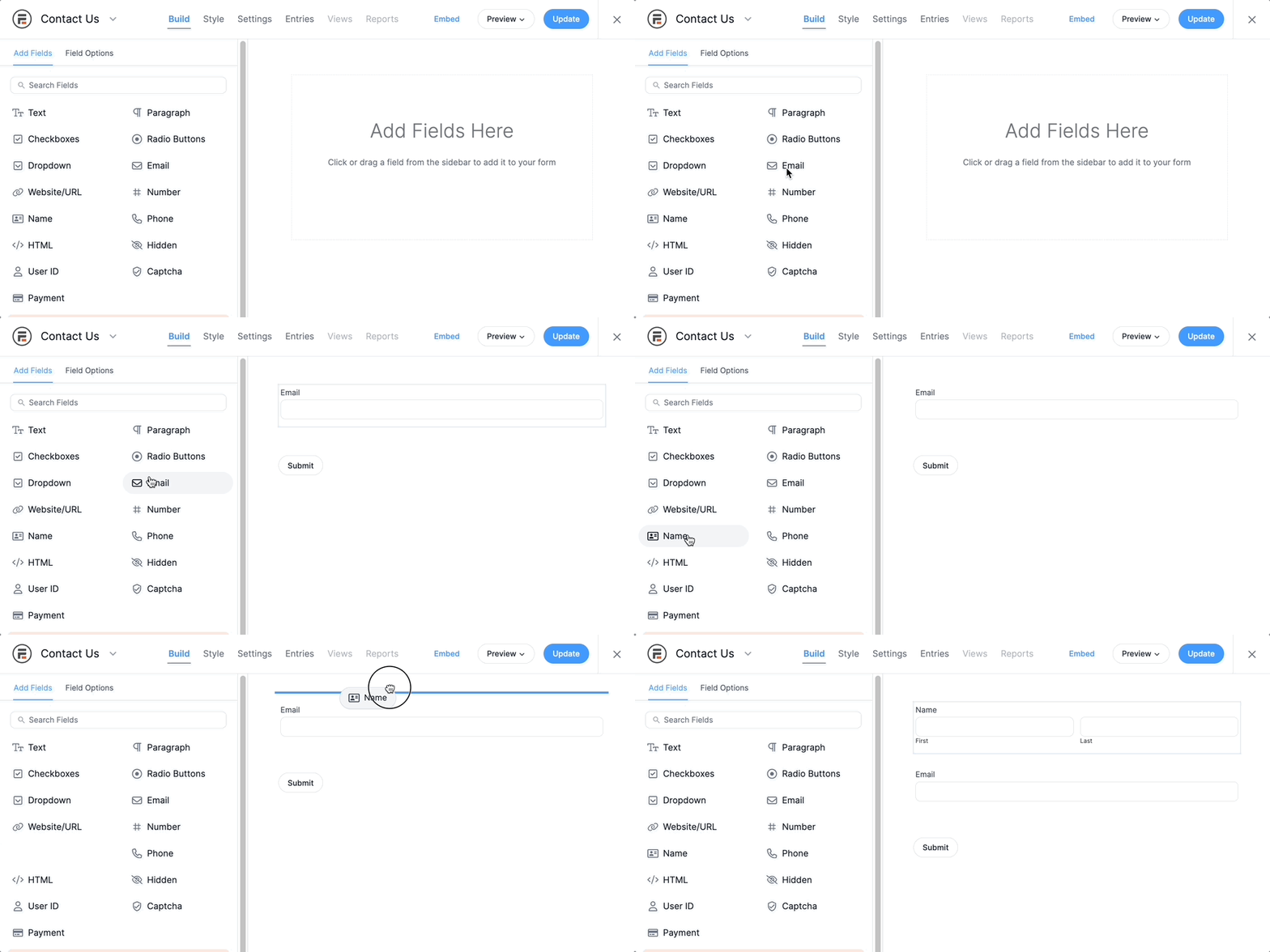 Need help with your Forms? Check it out: How to Create a Form in WordPress
Electronic signatures plug a lot more
One of those form fields may be an Electronic Signature Field. Here's a quick look at how our own Formidable Signatures work... ...they are just as simple as they should be! Sign your name from any touch-ready device (pretty much all mobile phones these days). Users can also type their name as text. Here's a demo - sign here please:3. Get a QR code
A QR code functions just like a web link. Scan the code with your mobile device, and it will take the user to a website URL. QR codes look complicated, but they are really easy to create. Check out our QR code generator tutorial to get started. The only consideration is whether or not the QR code has limits. Sometimes QR codes can only be accessed a limited number of times. This might make collecting multiple submissions more challenging.
Remember the form we just made? Copy the preview URL and make it the target link for your QR code. Anybody who scans your QR code with their phone will be taken to your form!.
The only consideration is whether or not the QR code has limits. Sometimes QR codes can only be accessed a limited number of times. This might make collecting multiple submissions more challenging.
Remember the form we just made? Copy the preview URL and make it the target link for your QR code. Anybody who scans your QR code with their phone will be taken to your form!.
4. Publish your form
This is a bit different than how we'd normally do this, but it's also the secret to making our touchless kiosk form a winner! First, create a blank post or page in WordPress. Then, add your QR code to the page. Feel free to include any on-screen instructions within this page as well. Just keep it simple and make sure your QR code stands out and that it is scannable. Next, publish the post or page. Finally, navigate to the page on your kiosk iPad and place it into your kiosk stand. Test that everything is working one more time and voila! You are done.Wrapping up
I know what you are thinking: this is really achievable. Now that you know how easy it is to set up contactless forms, what are you waiting for? Good luck!Read more about Formidable Forms
 Formidable Forms 7.0: Built for Bigger, Busier Forms
 How to Add a Timer to Your WordPress Quiz
 Sell Products on Your WordPress Site for Free (No WooCommerce Needed)
Try Formidable Forms risk-free today. Give it a spin for 14-days and if you don't love it, we'll give you all your money back. Check out our premium versions to get started.
This article may contain affiliate links. Once in a while, we earn commissions from those links. But we only recommend products we like, with or without commissions.

