
What a pleasure to have support within minutes. Brillant, accurate answer, and solved the question. Thanks to the Formidable Team. Eric


Last updated on October 14, 2026 by Emma Wells
Formidable Forms 7.0: Built for Bigger, Busier Forms
Spam filters catch customers by mistake, old entries pile up, and long forms get slow. Formidable Forms 7.0 fixes all three, and Formidable Forms Lite now connects to AI assistants through MCP. Here's what's new, and what license it requires.
Approximate read time: 8 minutes
Upgrade your WordPress site with powerful, flexible forms.
MCP is now built into Formidable Forms Lite
Tell your AI assistant “build me a contact form with a phone field that emails me,” and it builds it on your WordPress site. That connection works through MCP, a standard way for AI assistants like Claude to connect to apps.
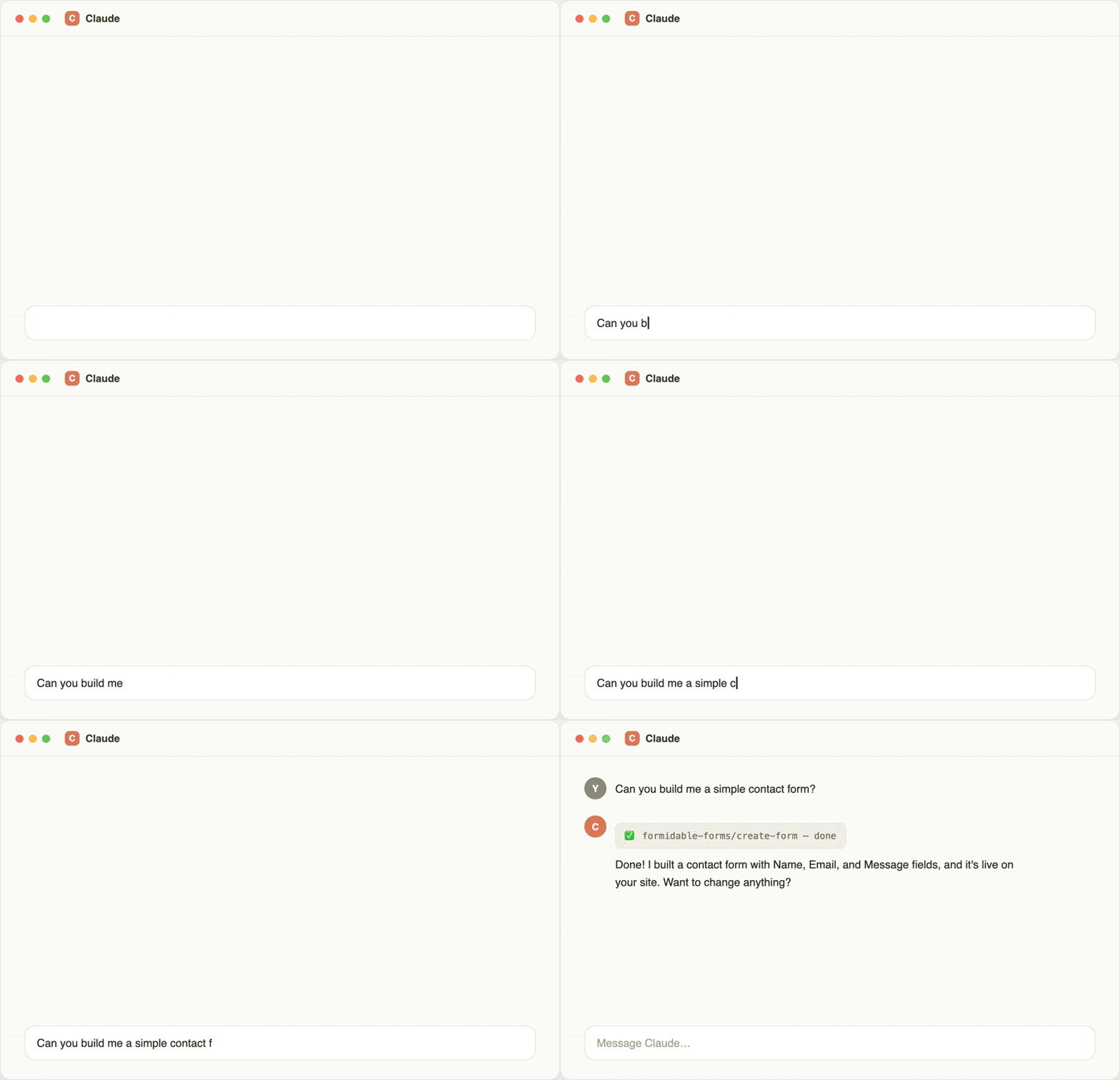
Until now, connecting Formidable to an AI assistant through MCP meant installing the Formidable API Add-on, which required a Business license or higher.
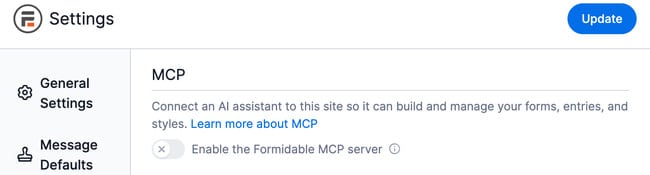
In 7.0, it's built into Formidable's AI form builder and works on Formidable Forms Lite. It works on every paid license, with no extra add-on to install or buy.
You don’t need to update WordPress itself either: Formidable Forms 7.0 runs on WordPress 6.3 or higher.
If you've already set up Formidable's MCP connection, nothing changes for you.
7.0 also adds two new things an AI assistant can do through MCP: process payment refunds and cancel subscriptions. These join the existing form, entry, style, and application management.
If you still have the API Add-on installed, it keeps working alongside the built-in MCP connection.
One thing to keep in mind: MCP only works with what's already active on your site. It can build a form using any field type or add-on you have installed, but it can't turn on a Stripe action if Stripe isn't connected, and it can't use a feature your license doesn't include.
The MCP global settings screen has also been reworked to make the first connection easier to follow, with clearer steps and fewer places to get stuck.
MCP works on Lite and every paid license.
See what MCP can build.
From Idea to Reality in Minutes. Build Powerful Forms, Dashboards, Apps and More.
Formidable Forms makes advanced site building simple. Launch forms, directories, dashboards, and custom WordPress apps faster than ever before.
Spam entries: review them before they disappear
Spam filtering has always had the same tradeoff: block too little and spam piles up in your entries, block too much and a customer's submission disappears with no record it ever happened. Formidable 7.0 changes the second half of that problem.
Submissions Formidable flags as spam get saved as spam entries, with the reason they were flagged attached, so you can review them, restore them, or confirm they're spam without digging through server logs or asking the customer to resubmit.
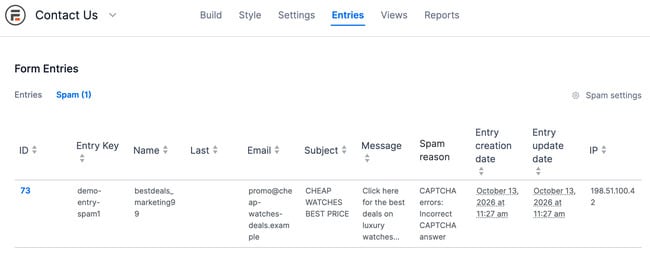
Mark entries as spam or not spam by hand. When you restore a spam entry, you choose whether to re-run its original actions, like email notifications and webhooks, or skip them. You can also set spam entries to delete automatically after a retention period you pick.
Spam never shows up in your regular entries list, lookups, or reports, and it doesn't trigger form actions like emails. That way it won't throw off a count or send a notification before you've reviewed it.
Reviewing and marking spam entries works on Lite and every paid license. Automatic spam deletion needs a paid license.
Big forms, built for speed
Long forms are now much faster to build and edit. Opening field settings, dragging fields, and scrolling a long form all feel quicker, and your forms look exactly the same to visitors.
We tested on a form with more than 1,100 fields and compared 7.0 with the previous release. Here’s what changed:
- The form builder loads all of those fields in 79 percent less time with long form loading turned on
- Lookup fields respond up to 109 times faster when pulling from more than 50,000 entries
- A calculation that uses a large number of shortcodes updates up to 2.5 times faster
The form builder speedup works on Lite and every paid license. Lookup fields and calculations require a paid license, so those gains apply there.
GDPR: old entries delete themselves on your schedule
Formidable's GDPR (General Data Protection Regulation) settings now include automatic entry deletion. Say you only need to keep job applications for 90 days. Set that number once, and any entry older than 90 days gets deleted on its own from then on.
Automatic deletion is off until you turn it on, so updating to 7.0 won’t delete any of your entries.
Deletion also clears out related Repeater field entries, file uploads, and linked posts that came from that entry. You can disable automatic deletion for any form at any time if your retention needs change.
Automatic entry deletion requires a paid license.
Flexible submission limits
Before 7.0, a form could only limit each person to one entry total. Now you choose how the limit works.
Running a giveaway that should only accept 500 entries total? Set a limit of 500 for the whole form. Running a daily poll where someone can vote once a day? Set a limit of one entry per day instead.
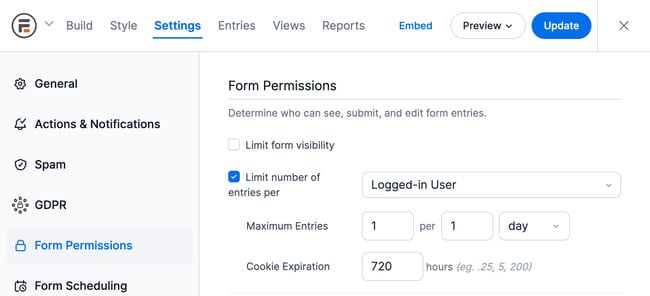
You also choose how Formidable tells people apart: by their account, email address, IP address, or a browser cookie. Use an account or email for anything that needs to survive cleared cookies. Use a cookie or IP address for a quick, anonymous poll where you don't want to require a login.
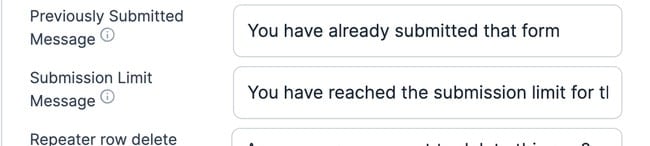
There's also a new Submission Limit Message setting. This is the message someone sees if they try to submit after hitting the limit, and you can now write a different one for each kind of limit, like a total cap or a one-per-day limit. A "come back tomorrow" message makes sense for a daily poll, but it confuses someone who just missed out on a giveaway that's closed for good.
Submission limits require a paid license.
Payments: a different price for each option
Selling event tickets at different prices used to mean building a separate form for each one. Now a single registration form can handle all of them.
Add a payment action for each ticket type, like $15 for students, $30 for general admission, and $60 for VIP, and Formidable charges the right amount based on what someone picks. It works with both Stripe Lite and PayPal Commerce.
This feature requires a paid license.
More accessible forms, with clearer validation
Validation errors now include a clickable summary at the top of the form that takes people straight to the field that needs fixing. Name and Address fields now say which part is missing, like the street or the last name.
Range sliders now work with a keyboard and announce their value to screen readers as it changes. We also improved keyboard navigation across the admin screens.
The clickable error summary and clearer Name and Address errors work on Lite and every paid license. Range slider support requires a paid license.
Images in Dynamic and Lookup field choices
Dynamic and Lookup radio and checkbox fields can now show an image next to each option, as well as a text label. You can also pull that image from a file upload field on the entry each option comes from, like showing a product photo next to its name.
This works the same whether the choices come from another form's entries or a fixed list you set up by hand, and the images update correctly when conditional logic changes the field's options.
Dynamic and Lookup fields require any paid license, since they aren't included in Lite.
Conditional logic and builder improvements
Conditional logic now reads individual parts of Name and Address fields, like a first name or a city, to show or hide fields and to trigger form actions. Calculations also run correctly inside Repeater fields affected by conditional logic. Default values now stay in place when someone returns to a page that conditional logic skipped.
New in the builder:
- Select multiple fields inside a section at once
- Add a custom placeholder to the Other option on radio and checkbox fields
- Rename a CSS class you've added to a style, without deleting and recreating it
- Assign a form to an application directly from the forms list
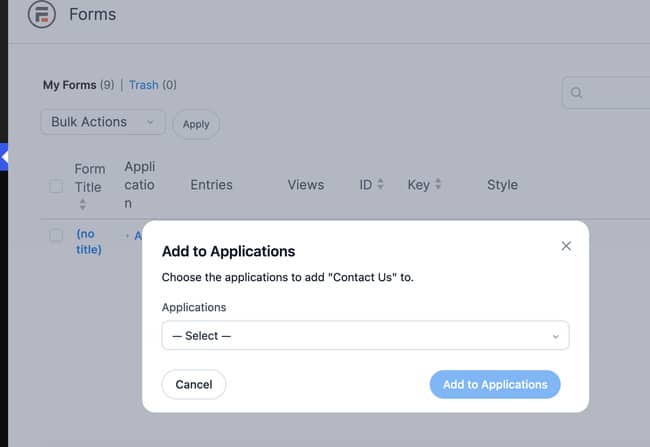
Conditional logic requires any paid license, and assigning a form to an application needs a Business license or higher.
Which license do you need?
7.0 updates the plugin itself, so there's nothing extra to install.
MCP, spam review, and the form builder speedup work on Lite and every paid license. Most other new features need a paid license.
If you want to see MCP in action first, check out our MCP setup guide.
Update Formidable Forms today from Plugins → Installed Plugins in your WordPress dashboard.
Do I need the API Add-on for MCP in Formidable 7.0?
No. Starting with 7.0, MCP works on every license, including the free version of Formidable Forms. The Formidable API Add-on is no longer required to connect an AI assistant. If you already have the add-on installed from before, it continues to work alongside MCP.
Can MCP use add-ons or licenses I don't have?
No. MCP works with whatever is already active on your site. It can build with any field type, add-on, or integration you've already set up, but it can't turn on a payment gateway you haven't connected or use a feature your license doesn't include. If something needs an upgrade, MCP returns an error, and your AI assistant will usually explain what's missing.
What happens to spam submissions now?
Formidable 7.0 saves flagged submissions as spam entries, with the reason they were flagged attached. You can review, restore, or confirm each one by hand, and, with a paid license, set spam entries to delete automatically after a retention period you choose. Spam entries are excluded from your regular entries list, lookups, reports, and form actions until you act on them.
Will automatic entry deletion remove my existing entries?
Only if you turn it on and set a retention period. Automatic deletion is an opt-in GDPR setting per form. It isn't enabled by default, and you can disable it at any time if your retention needs change.
Does updating to 7.0 change my existing forms?
No. Existing forms, fields, and settings carry over as they were. The one exception is the datepicker: if a form explicitly used jQuery UI's datepicker, that's preserved. Otherwise, including forms that relied on the old default, it now uses Flatpickr.
What license do I need for Formidable 7.0's new features?
MCP, spam review, and the form builder speedup work on Lite as well as every paid license. Most other new features need a paid license.
This article may contain affiliate links. Once in a while, we earn commissions from those links. But we only recommend products we like, with or without commissions.