
What a pleasure to have support within minutes. Brillant, accurate answer, and solved the question. Thanks to the Formidable Team. Eric


Last updated on September 27, 2026 by Emma Wells
Sell Products on Your WordPress Site for Free (No WooCommerce Needed)
Want to take payments on your WordPress site without installing WooCommerce or paying a monthly fee? Pricing Fields have always been a Pro feature, and now they're in Formidable Forms Lite for free. In this post, we'll show you how to set up pricing fields in Formidable Forms Lite and start taking payments in under three minutes.

Approximate read time: 4 minutes
Upgrade your WordPress site with powerful, flexible forms.
The problem with selling on WordPress (until now)
WordPress is great for content, but it's not know for making it easy to sell a single product.
WooCommerce is the go-to recommendation, but WooCommerce is built for complete stores. If you're selling a coaching package or a handmade candle kit, you don't need inventory management and shipping zones. You just need a way to take money.
So people go looking for lighter alternatives. Most of them charge a monthly fee. You're paying $15 a month just to keep the payment form alive on your site, whether you sold anything that month or not. That's a real cost when you're moving a $40 item a few times a month.
The rest of the options involve workarounds. A text field pretending to be a price, manually telling customers what they owe, and hoping the math adds up. None of it is clean, and none of it shows customers a real total before they hand over their card number.
That's the gap Formidable Forms can fill with it's free pricing fields.

From Idea to Reality in Minutes. Build Powerful Forms, Dashboards, Apps and More.
Formidable Forms makes advanced site building simple. Launch forms, directories, dashboards, and custom WordPress apps faster than ever before.
What's new: sell products directly from any WordPress page
Pricing Fields used to be a Pro-only feature. They're now included in Formidable Forms Lite, free to install and use. Here's what you get:
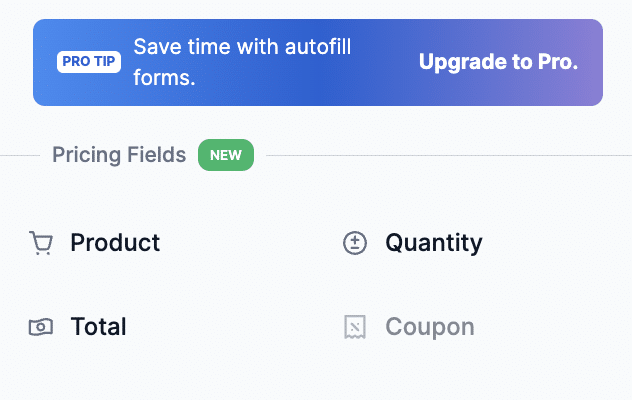
Product field. Add a Product field and choose how it displays. Set it to Single Product for one item at a fixed price, shown in read-only format. Switch to dropdown, radio buttons, or checkboxes if you're selling multiple things. Each option shows its price and customers pick what they want.
Quantity selector. The Quantity field multiplies the product price automatically. Order 3, pay for 3. Set a minimum and maximum range if you need to.
Live total. The Total field calculates everything in real time. Customers see the exact amount before they hit submit. No surprises at checkout.
Stripe connection. Connect your Stripe account in Formidable's payment settings. That's the whole setup.
Pay-when-you-sell pricing. No monthly cost. You pay a 3% transaction fee plus Stripe's standard fee when you make a sale. If you sell nothing, you pay nothing. Upgrade to a paid plan and that 3% fee goes away completely.
More on Pro. Already on a paid plan? You get all of the above plus product images and coupon codes, so customers can see what they're buying and you can run discounts without any extra plugins.

How it actually works
Here's how to go from zero to a working product page.
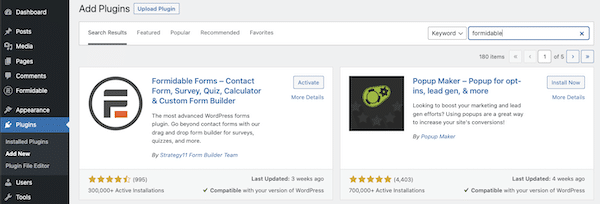
Step 1: Install Formidable Forms Lite
Download Formidable Forms Lite from the WordPress plugin directory and activate it. It's free, with no account required to get started.
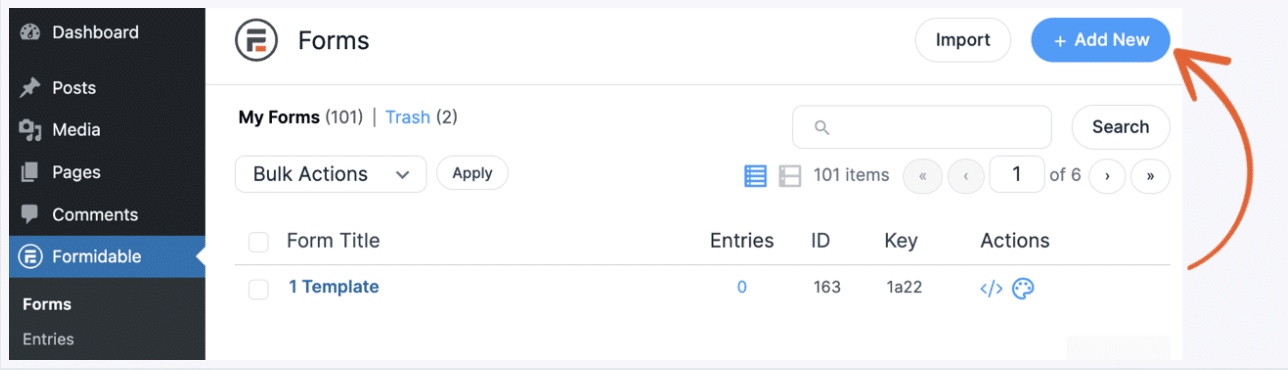
Step 2: Create a new form
In your WordPress dashboard, go to Formidable → New Form and create a blank form. Call it "Order Form" or whatever won't confuse you at 11pm six months from now.
Step 3: Add your pricing fields
Open the form builder and look for the Pricing Fields section in the field list. Drag in three fields:
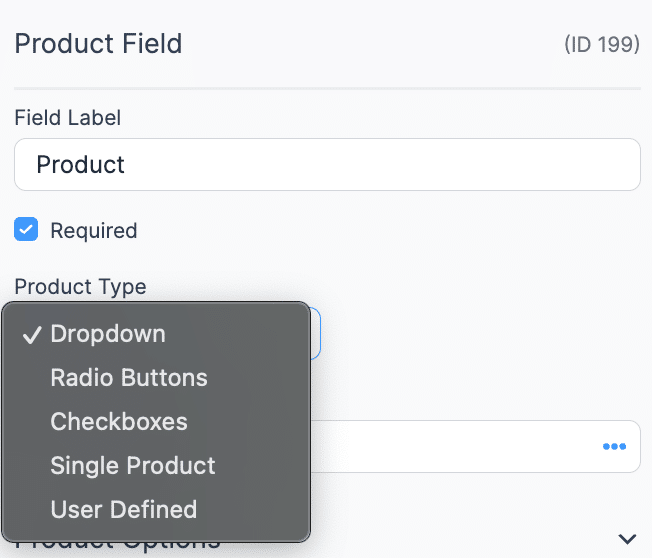
Product. Set it to "Single Product" for one item at a fixed price. Switch to dropdown , checkboxes, or radio buttons if you're selling multiple things and want customers to choose.
Quantity. Links to your Product field and handles the multiplication. Set a minimum and maximum if inventory is a real concern.
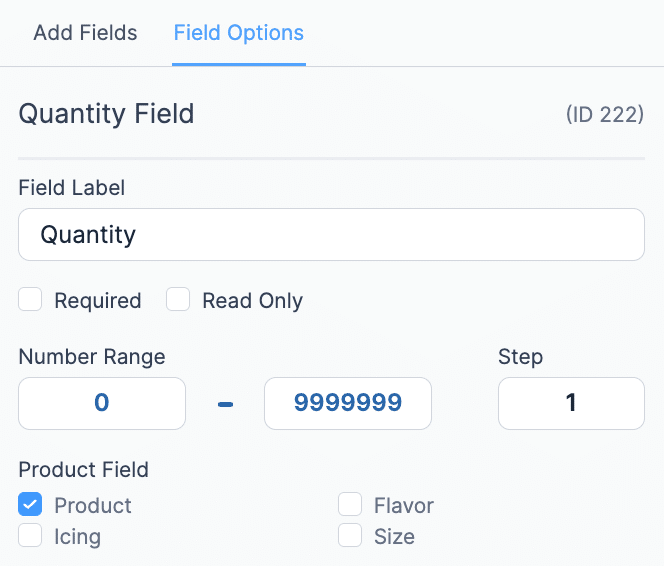
Total. Drag it below Product and Quantity. It calculates everything automatically. You don't have to do anything else to it.
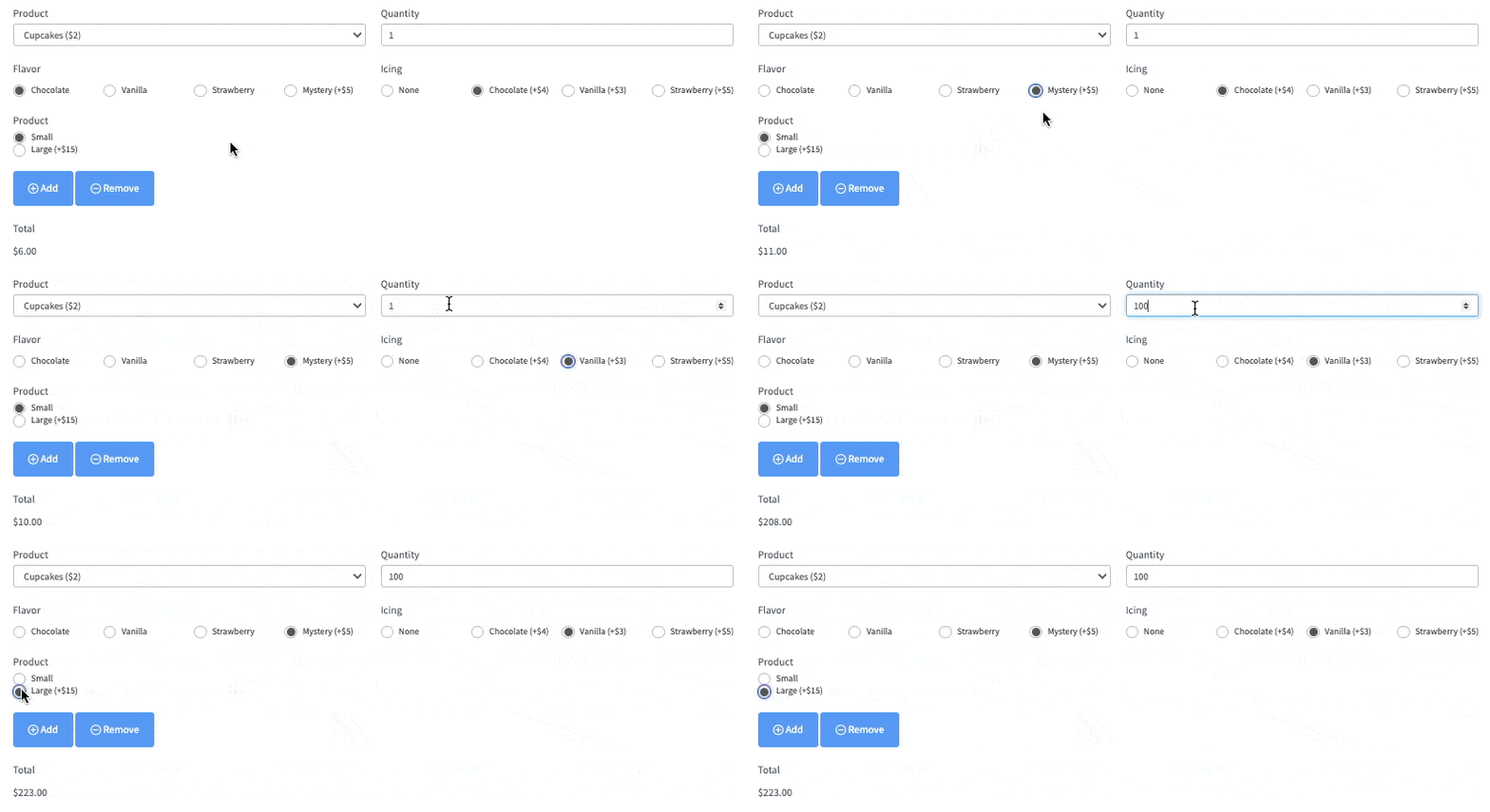
Three fields. A few minutes of setup.
Step 4: Connect Stripe
Go to Formidable → Payments and connect your Stripe account. Add a payment action to the form and Stripe handles the transaction when customers submit.
Step 5: Add the form to a page
Embed your form using the Formidable shortcode or block. Publish the page. Your site takes real payments now.
What happens after someone pays
Formidable handles the confirmation side too.
The Total field value can be shown in confirmation messages, follow-up emails, and order summary views, formatted with your currency symbol and two decimal places with no extra setup needed. Add the Total field shortcode to your email template and it pulls in the exact amount the customer paid.
If you're using a dropdown or radio Product field, the confirmation shows which product they selected alongside the total. It reads like an order receipt without building anything custom.
Real-world use cases
Pricing Fields work anywhere you need to collect a specific payment from a WordPress page without spinning up a full store.
Handmade or physical goods. You make custom candles, leather goods, or print-on-demand items. Add a product, a quantity selector, and a total. Customers order from your site and you skip the WooCommerce setup entirely.
Digital products. Selling a Lightroom preset pack, a PDF guide, or a business template? A simple form handles the payment. Pair it with an email notification to send the download link automatically.
Coaching or service bookings. Selling a 60-minute strategy call for $150? One Product field, one form, and clients pay when they book. No third-party scheduling tool required if all you need is the payment.
Event tickets. Running a workshop or virtual class? Sell tickets directly from a page. Set the price, let people pick how many they need, and collect payment.
School or club fees. Activity fees, field trips, class supplies. Set up the form, share the link, and stop chasing checks.
Pre-orders. Taking orders before your next market or pop-up? A product form handles deposits or full payments before you show up.
Freelancer invoicing. Send clients a link to a payment form with the project amount already set. They pay. You get paid.
Any time WooCommerce feels like bringing a forklift to move a couch, Formidable Forms can handle it.
Transparent pricing, no surprises
The plugin is free. You pay nothing to install it, build forms, or connect Stripe.
When you make a sale, Formidable charges a 3% transaction fee on top of Stripe's standard 2.9% + $0.30 per transaction. If you sell nothing that month, you pay nothing.
Compare that to payment plugins that bill you $15 or $20 a month whether your form sees a single submission or not. With Formidable Forms Lite, there's no baseline cost.
Want to get rid of the 3% fee entirely? Upgrade to any Basic, Plus, Business, or Elite license and it's gone. You'll also unlock PayPal, coupon codes, product images, and more advanced payment features.
Get started with Pricing Fields in Lite
Formidable Forms Lite is free to install from the WordPress plugin directory. Pricing Fields are included, with no upgrade required!
Connect Stripe, drag in your pricing fields, and you're accepting payments. Most people are up and running in under three minutes.
Ready to start? Install Formidable Forms Lite free from the WordPress plugin directory.
This article may contain affiliate links. Once in a while, we earn commissions from those links. But we only recommend products we like, with or without commissions.

