
What a pleasure to have support within minutes. Brillant, accurate answer, and solved the question. Thanks to the Formidable Team. Eric


Last updated on August 12, 2026 by Formidable Team
How To Build a Web App with WordPress
Learn how to build a web app with WordPress in 2025! This simple guide shows you how to create a great web app quickly and without coding stress.

Approximate read time: 6.5 minutes
If you want to build a web app with WordPress, you might have some questions...
- Can you actually make a web app with WordPress?
- Is it easy?
- Is WordPress really powerful enough to handle a web app?
TL;DR - Yes to all of the above!
In this post, we'll explore the above questions and then show you how to build web apps using WordPress in five simple steps. Let's get started!
Upgrade your WordPress site with powerful, flexible forms.
What is a web app?
At its core, a web app is simply an app built on top of a mini website. They're also known as Progressive Web Apps (PWA).
Users use the site like any other app (typically on mobile devices). And based on how they use it, different things happen in the web app.

Here's a simple example: a restaurant web app. This app allows restaurant owners to add their listings and adjust the information customers need. The app also helps customers interact with them by rating, leaving comments, or booking reservations.
It'd take a lot more work to get something to put on the iOS and Android mobile app stores. But, as far as the user experience, they'd barely even know they're on a website!
From Idea to Reality in Minutes. Build Powerful Forms, Dashboards, Apps and More.
Formidable Forms makes advanced site building simple. Launch forms, directories, dashboards, and custom WordPress apps faster than ever before.
Why use WordPress to build a web app
Many people may think WordPress isn't ideal for a web app because of its history as a Content Management System (CMS).
Most would use PHP libraries, external APIs, development frameworks, and many hours of code. But that doesn't sound ideal to many, and we imagine you're one of them.
And that's where WordPress comes in. Using WordPress, you can speed things up and get a few extra benefits, like:
- Quick custom development: WordPress already has features (custom post types, user management, content management, etc.) that save you time when you start.
- Saves money: WordPress is free and open-source, with a library of WordPress themes, web page templates, and plugins to save on development costs.
- Ease of use: Technical and non-technical users can create a WordPress web app and add extra features.
- Flexible: WordPress started as a blogging platform, but with its extra plugins and features, it has become a complete development tool.
So, using WordPress for your web app is a great idea, depending on your needs and goals. And there's one WordPress plugin that can make developing a web app even easier.

How to create a web application with WordPress
Formidable Forms is the best WordPress form plugin because of how you can use its form data.
With Formidable Views, you get a low-code WordPress application builder. It's a feature-rich tool that you can use for different projects, including web applications.
Your forms used to sit and collect data, but now they can create dynamic and interactive web applications.
You don't need to know much code to do it. The app builder lets you create apps without PHP knowledge, whether a personalized dashboard for a members-only area or graphs and charts to show donation amounts in real-time.
And if you want to save even more time, you can use one of Formidable's premade WordPress web application templates.
The best part? It's only five steps to build a WordPress web app:

Step 1: Download and install Formidable Forms Pro
Installing and activating Formidable Forms Pro is the first step if you haven't already done so.

Since you plan to create an app with Formidable Views, you must also add the Visual Views plugin. You can do this by going to Formidable → Add-Ons:
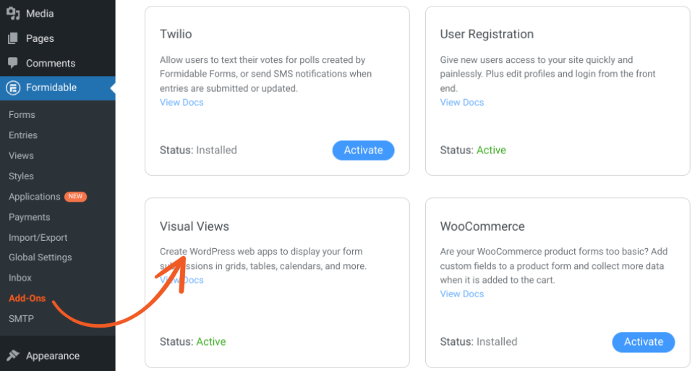
Select the Activate button for the Visual Views plugin if it's inactive.
Step 2: Make a custom empty app
Next up is creating the WordPress custom application itself.
First, go to Formidable → Applications. You can choose one of Formidable's app templates or click the Add New button to start from scratch.
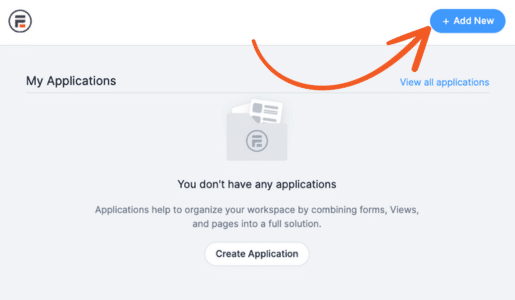
Next, name your app, then click on Create empty application to create an application without any forms or views:
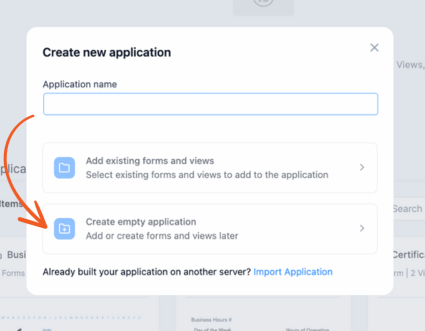
Note that you can also create an application using forms and views. To do that, you would select Add existing forms and views.
On the next screen, select the Add Item button at the top. Now, you can begin building your application.
Step 3: Create the form for your application
To start, you need a form to collect data.
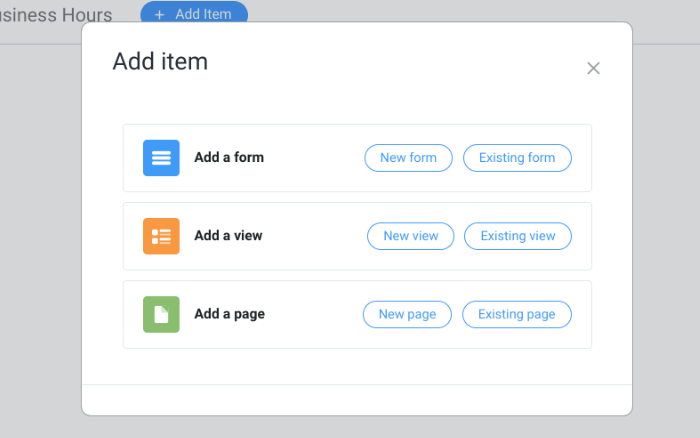
So, under the Add Item dashboard, click the New Form button.
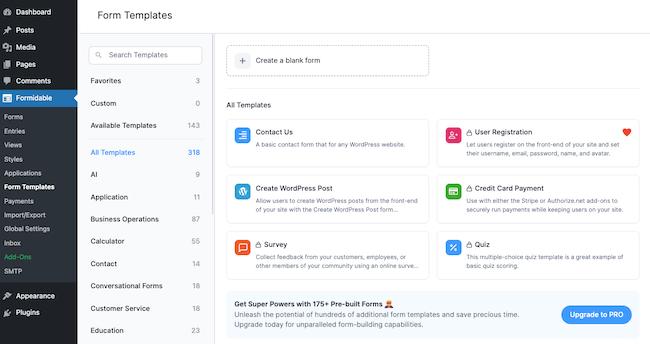
You'll be brought to Formidable's drag and drop form builder, where you can choose to Create a blank form or use a pre-made form template to save time.
Next, drag and drop the form fields to the form canvas.
For our example, we're creating a sports schedule web app where people can view the upcoming schedule of their favorite sports team, the Formidable Formers.
Since we're the only ones using this form to enter game data, we'll add the following:
- Date field to choose the game day
- Dropdown for the opponent
- File Upload field for the opponent's logo
- Radio field for home/away
- Text field to enter the game time
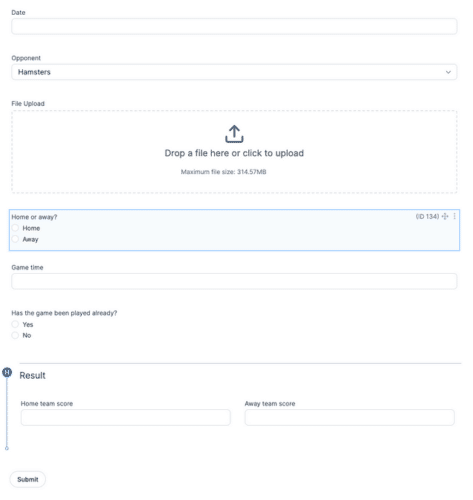
We also added another Radio field asking if the game has been played. If it has, we used conditional logic to show Section field where we put two Number fields for the home and away team scores. That way, we can keep the schedule up-to-date.
Last, click Save to save your form progress and give it a name.
Step 4: Build your view
First, go to Formidable → Views and click the Add New button.
Next, choose your View type depending on your needs. For ours, I'll choose the Grid view type. Then, give your view a name, choose your form in the Use Entries from Form dropdown, and your application from the Insert view into application dropdown.
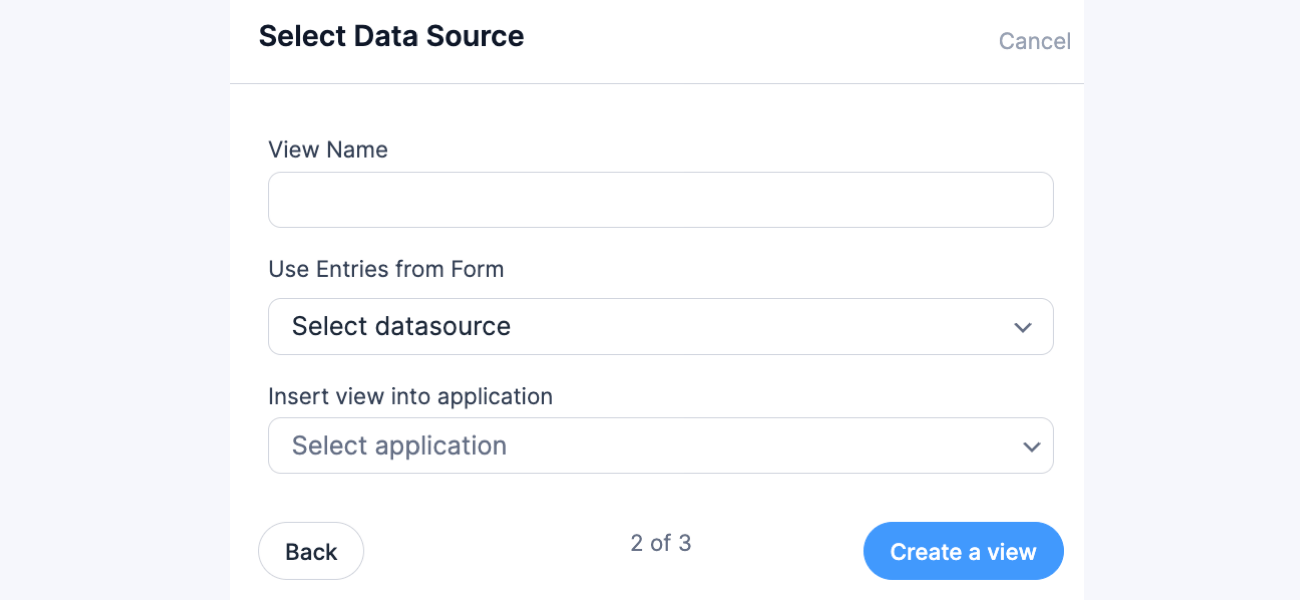
Once you click Create a view, the plugin takes you to the view builder to start building.
First, you can click Layout Builder to start creating your layout.
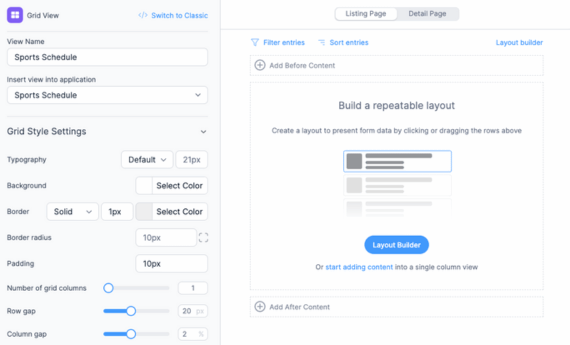
Feel free to customize your layout to match your needs, where you can add the form data to show dynamically in the view.
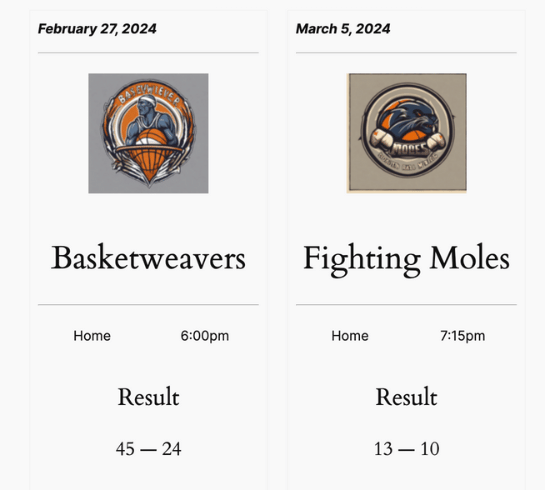
For example, we created a few sample entries to display the data, which looks something like this:

So, feel free to play around with your design so your view looks how you want.
Step 5: Create a page for your view
Last, you must create a page for your modern web app on your WordPress website so people can see it!
Go to Formidable → Applications and choose your application from the options. Then, click Add Item, and under Add a Page, click New Page.
Give the page a name, then add a new WordPress block and search for the Formidable Views block. Choose your view, and it will appear on the page.

Last, update the page, and the web app is ready! For example, here's how our sports schedule for the Formidable Formers ended up!
Ready to create a web app with WordPress?
We're sure you're excited to start working on your custom applications and all the ideas you have in mind for your WordPress site. Formidable Forms is the tool you need to get it done quickly.
With Formidable's WordPress Application Builder, you can easily build various web apps, including testimonials, directories, recipes, and more.
Check out our complete guide with 30+ examples to see what's possible.
So, if you're ready to start building, grab Formidable Forms Pro today!
And follow us on Facebook, Twitter, LinkedIn and YouTube for more WordPress tips and tricks!
Read more about web apps!
 How To Add AI to Your Website [Fast + Easy]
 6 Best WordPress Classifieds Plugins
This article may contain affiliate links. Once in a while, we earn commissions from those links. But we only recommend products we like, with or without commissions.

