
What a pleasure to have support within minutes. Brillant, accurate answer, and solved the question. Thanks to the Formidable Team. Eric


Last updated on August 19, 2026 by Kyle Cash
How To Add WordPress Payment Gateways without WooCommerce
Want to add WordPress payment gateways without WooCommerce? This guide shows you how to integrate payment gateways in WordPress without WooCommerce.

Approximate read time: 3.5 minutes
Need an easy way to accept payments in WordPress?
Well, payment gateways are the perfect solution. But finding a way to add one to a WordPress website that isn’t WooCommerce is tough. After all, WooCommerce isn’t the only payment gateway out there.
There are several different options to choose from, and we've gathered them in this list. From alternative methods to an all-in-one solution, there's a method here for everyone.
So, let's dive into it.
Upgrade your WordPress site with powerful, flexible forms.
Why wouldn’t you use WooCommerce?
WooCommerce is a huge platform and is extremely popular among online stores.
And when you search Google for WordPress payment options, it’s a repeated option. But that doesn’t mean it’s for everyone and is without drawbacks.
For example, here are some top complaints about WooCommerce:
- Poor theme selection
- Slow performance
- Add-ons are expensive
- Plugins are out of date
If you’ve experienced any of these, then it’s understandable why you’d want to try something different.
The tricky part is finding an alternative.
Luckily, we’ve got a few different ways for you here.
From Idea to Reality in Minutes. Build Powerful Forms, Dashboards, Apps and More.
Formidable Forms makes advanced site building simple. Launch forms, directories, dashboards, and custom WordPress apps faster than ever before.
How to add payment gateways in WordPress without WooCommerce
1. Use Stripe Payments
Stripe is one of the most popular payment processors in the world.
From security to ease of use, accepting various payment methods is easy. And that’s even more true when you combine Stripe’s power with Formidable Forms.
After all, without a form, you can’t accept payment! Formidable makes it easy to build your Stripe payment form, integrate it with Stripe, and start accepting payments.
It makes it even faster when using Link by Stripe.
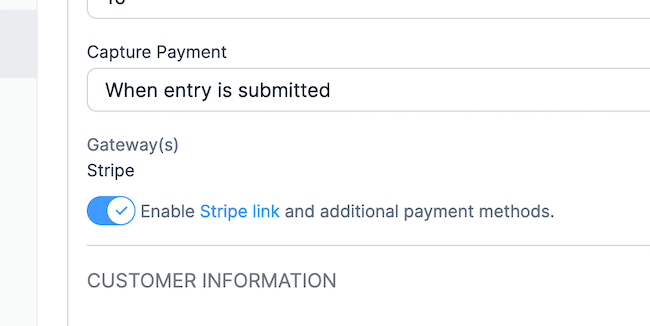
Link by Stripe allows users to choose their preferred Stripe payment method, from credit card payments to ACH. All it takes is to connect a Stripe account to the WordPress dashboard. Formidable's user-friendly interface and drag and drop form builder help with the rest.
Any eCommerce website or a website selling digital products can benefit from using Formidable's payment features.
2. Accept payments with PayPal
What about the most popular payment gateway, PayPal?
Whether you want to accept payments from other PayPal accounts, debit, or credit cards — it’s easy in WordPress.
With a simple form builder (like Formidable), you can easily add a PayPal button or form for your products or services. Simply install and activate the plugin, and you’re ready to build an excellent order form.
There is no need for a WooCommerce store on your WordPress site. Instead, send customers to the PayPal checkout page for easy payment processing.
With PayPal, you get plenty of payment options to handle.
Can’t decide between PayPal or Stripe?: Stripe vs. Paypal for Nonprofits in WordPress
3. Use Authorize.net
Another option is to use Authorize.net, which is lesser-known but still a great option.
You can easily accept credit and debit cards on your online store without the WooCommerce plugin.
All you need is a simple form plugin and an email address for Authorize.net. Then, you’ll be accepting payments in no time.
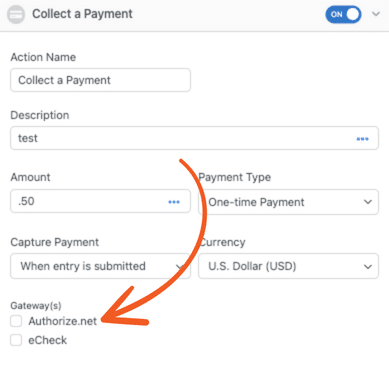
So, if you’re looking for a WordPress payment gateway without WooCommerce, Authorize.net is a solid option.
4. Use Formidable Forms and get them all

As we mentioned in several sections, a subscription to Formidable Forms gives you access to all of these options.
And what’s better than having more options? We can’t think of anything!

If you try Stripe and feel it’s not for you, give PayPal a go. Or, if you decide PayPal or Stripe is for you, try out Authorize.net.
Whatever you choose, your forms with Formidable only need a few setting changes. Whether you have a Buy Now button or a simple payment form, a few changes are necessary.
That way, you don’t disrupt your business and ensure you still get paid.
Plus, you get all these fantastic features:
- 150+ form templates. Save yourself time and let Formidable do the hard work for you.
- Calculators. Give your customers live calculations of their shopping cart totals.
- Forms to PDF. Convert customer orders to PDFs and email them for their records.
- Google Sheets. Keep track of all your orders and expenses easily.
- Zapier integration. Add 5000+ MORE apps to your website to expand its functionality.
To list all the features would take an entire blog post, so we recommend checking out Formidable’s feature page.
But, with this list, it’s hard to go wrong.
Ready to integrate payment gateways to your WordPress site?
WooCommerce isn’t essential for your online store.
And this post showed you how you can easily bypass WooCommerce and give your customers the experience you want.
So, what are you waiting for? Get started with one of these options today!
And, if you want more about adding payment gateways to your WordPress site, we recommend checking out our guide on adding payment gateways!
Last, follow us on Twitter, Facebook, and YouTube for more WordPress payment tips & tricks!
Read more about Stripe!
 Sell Products on Your WordPress Site for Free (No WooCommerce Needed)
 Introducing Virtual Fields: Keep Sensitive Data Off the Page
 Why Recurring Payments Fail in WordPress After Month 3
This article may contain affiliate links. Once in a while, we earn commissions from those links. But we only recommend products we like, with or without commissions.

