
What a pleasure to have support within minutes. Brillant, accurate answer, and solved the question. Thanks to the Formidable Team. Eric


Last updated on September 21, 2026 by Emma Wells
The Simple Way to Sell Digital Downloads & Make Money!
Want to open an online store but have no clue how to sell digital downloads on your WordPress site? Check out this simple tutorial and start making money online now!
In recent years, more people have been online than ever before in human history. At the same time, millions of Americans faced unemployment, with about 6.8 million still jobless as of mid-2025. While employment rates have gradually improved, our digital habits have remained largely unchanged.
The huge online market and an influx of people who need income create a favorable environment for online businesses to thrive. This includes the growing market of WordPress eCommerce.
However, a lot of people who want to capitalize on the opportunity by selling digital products lack the time and skills to get the job done. Even worse, most people don't even know where to start when it comes to the purchase process or delivery. But we have a solution.
Using a simple drag-and-drop form builder, you can create a digital downloads store on WordPress, no coding necessary!
And since one-time Stripe, PayPal, and Square payments are included in the free Formidable Forms Lite plugin, you can start selling without spending a dime. A 3% Formidable fee applies on Lite, Basic, and Plus plans, and it goes away on Business and Elite.
Imagine what you could do with the extra weeks of time and money saved from using a plugin instead of hiring a developer or doing it yourself!
Upgrade your WordPress site with powerful, flexible forms.
Why create a digital downloads store?
Digital downloads stores, compared to stores that sell physical products, are a better choice in this global climate for many reasons:

- Easy and affordable to build.
- No supply chain issues. You're in complete control.
- No need to find a storage space for your products.
- Immediate delivery of products.
- Zero material or assembly costs.
Awesome, right? And we're not the only ones who understand the benefits of a digital downloads store. Tons of businesses and individuals are catching on.
A new McKinsey Global survey shows that the share of digital products in company portfolios has accelerated by seven years. Digital products are indeed the way to go. You can even offer free digital downloads in exchange for subscriber information or to draw potential customers onto your website.
From Idea to Reality in Minutes. Build Powerful Forms, Dashboards, Apps and More.
Formidable Forms makes advanced site building simple. Launch forms, directories, dashboards, and custom WordPress apps faster than ever before.
What can I sell on a digital downloads eCommerce website?
Wondering what types of digital products you can sell on your post or page? While the digital possibilities are endless, you may be asking questions like:
- How can I sell digital tickets to a concert?
- How do I sell a digital ebook on WordPress?
- Can educators sell online courses and resources on their websites?
- Can my company offer exclusive group access or bundle deals through digital downloads?
- How do I sell my services online?
- How can I sell pdf files online with PayPal integration?
- How can I require email to download a product?
The simple answer to these questions is that they're all possible and easy with Formidable Forms' drag-and-drop form builder plugin.
And though we won't go over the specifics to all of these, with a simple online store, you can sell just about anything you can dream up through a WordPress site.
But before we move on, what are some digital downloads ideas?
| Ebooks | Audiobooks |
| Sheet Music | Music/Audio files |
| Ring Tones | Tickets |
| Art | FTPs |
| Cryptocurrency | Videos |
| Digital Content | Education Courses |
| Printables | Bundle Deals |
| Access to Online groups | Digital Services (blogs/editing) |
| Life Coaching | Tutoring |
| Interviews | PDFs |
But I bet that leaves you begging the question:
How do I add digital downloads in WordPress?
For the next part of this article, we will show you how to sell digital products on your WordPress site.
We will build our WordPress digital downloads form from scratch for our example. This will teach you how to:
- Sell a list of products
- Send digital file download links to customers when they purchase files
- And accept payments.
Also, for this example, we will be using the super simple Formidable Forms plugin. No coding skills necessary!
But first, why Formidable?

Because it's better than a single digital downloads plugin. Formidable's all-in-one plugin is WordPress's most versatile form builder and includes a huge library of templates, as well as the tools to create powerful, feature-rich forms from scratch. Make your store look the way you want without breaking a sweat.
So, where should you start when building a digital downloads store?
First, you'll need the following:
- The Formidable Forms plugin
- A product list with prices
- Digital files (download links)
- And a Payment gateway e.g. Stripe or PayPal
Now, let's get your store up and running and make your first big sale!
Let's go!
Step 1 - Create a form to build a store
Once the Formidable plugin is installed and activated we can create a new form for our WordPress store.
To do this, go to Formidable Forms → Add New → Blank Form.
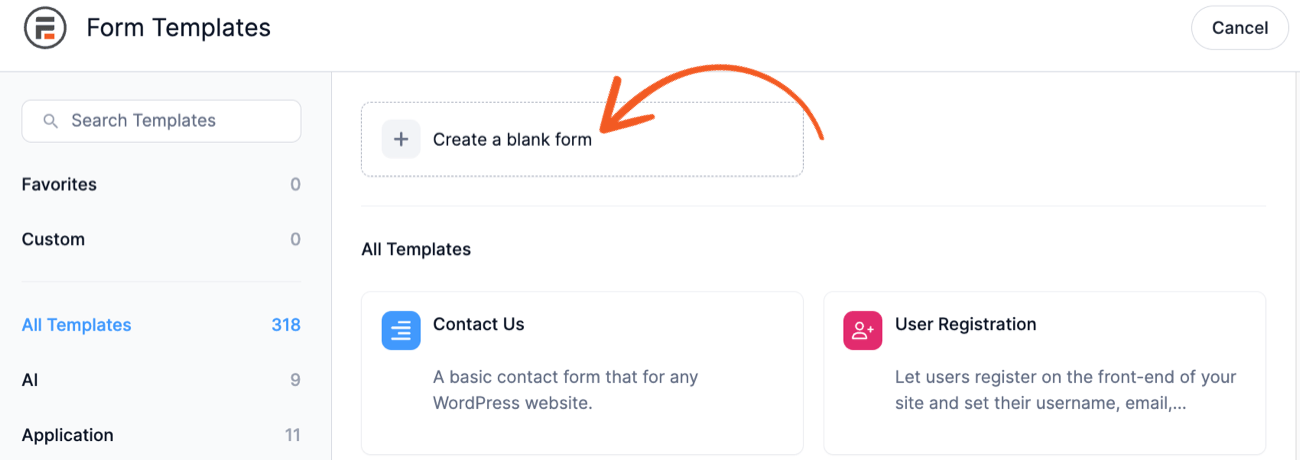
Be sure to give your form a name that will help you identify it clearly from the many other forms in your library.
Step 2 - Add products
To add products to our digital downloads store, we'll need to start by creating three main sections on our form:
- Product List
- Payment Information
- And email Information
These sections will provide us with the structure to add products to the online store and send them out to customers. This helps to create a seamless user experience.
Now, onto the online products! Your products are one of the most important elements of your digital downloads store. You can't provide digital downloads without digital goods.
With this in mind, we can now add our products to the Product List. There are 3 types of product fields you can add. Quantity, Total, and Product.
To add products, go to Product → Field Options and enter your product information and pricing.
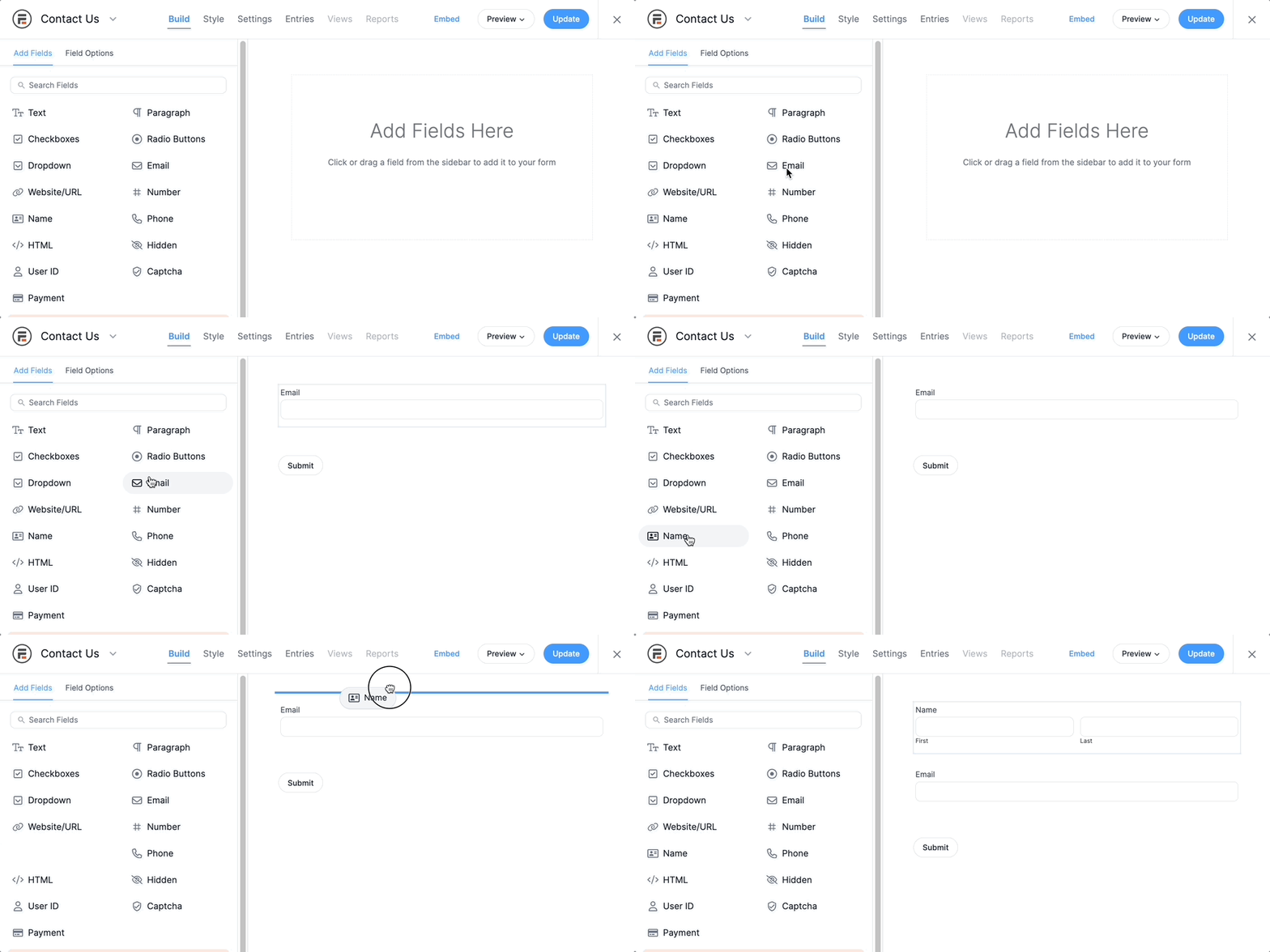
Here is what the Product field looks like. With Formidable Forms, you can display product fields using a dropdown, radio buttons, checkboxes, as a single product, or a user-defined value.

Here is an example of the Quantity field. Quantity fields allow users to easily choose how many products they want. Make sure to set the number range to put a limit on the number of products a user can select.

And the final example is of the Total field. Total fields automatically calculate all the products and quantities in the form so you don't have to worry about it.

Step 3 - Fill out payment information
As you'll recall, during Step 2 we created the Payment Information section. We can now add the following fields:
- Credit Card
- First Name
- Last Name
- Address
You may choose to adjust the Field Label for Address to Billing Address to clarify what your customers need to fill out. We also recommend making ALL fields in this section "Required".
Next, we will set up the actions and notifications that will enable your digital downloads store to receive payments.
Please be sure that you have access to your payment gateway so you will be able to receive the money from sales. Just in case you need help, you can learn how to install Stripe to find out how to do this.
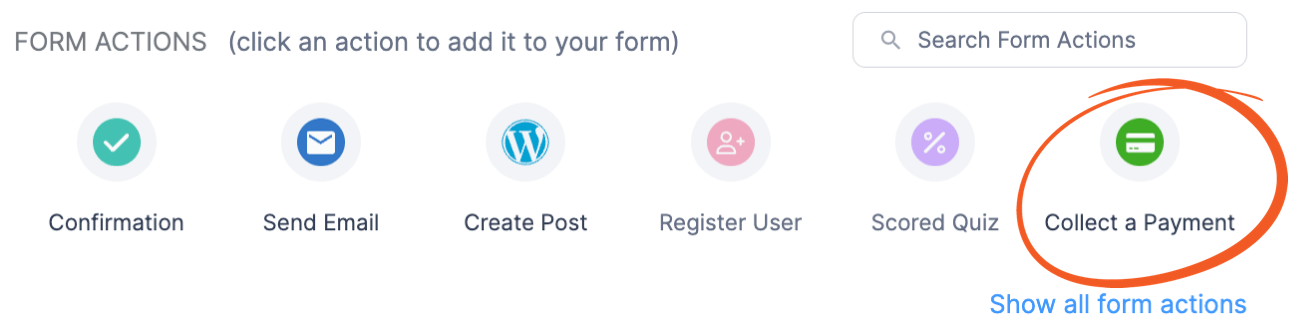
Now go to Settings → Actions & Notifications. There you will see a list of Form Actions. Add the Collect A Payment Action and fill in the required fields.
Step 4 - Set up email notifications
The Email Information section is so simple that it only requires one field: the Email field. Having said this, it's still super important!
The email address provided by the user will be where your WordPress store will send the link for the digital product(s) purchased. You'll also want to add it to your store's email list for future email marketing campaigns.
To ensure that customers receive the files they pay for, we will also use the Send Email action.
For this part of the build, you will need to ensure that you have uploaded your digital files to your Media Library on WordPress or a third-party cloud storage facility.
Make sure your uploads include the ability to generate links so your store can offer a download file after form submission. DropBox, Google Drive, or any similar application will work well here.
When you have your download links, go to Settings → Actions → Notifications and add Send Email to the list of Form Actions.
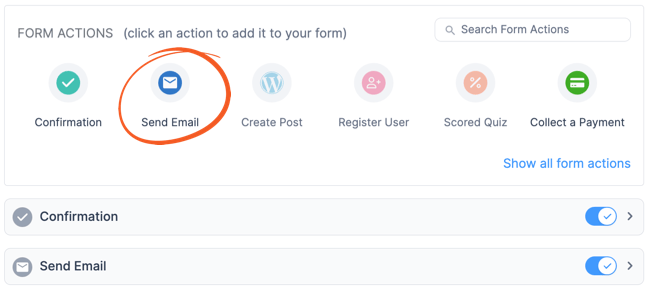
If a Send Email action is already on the list, there's no need to add another. You can edit the one already there.
We recommend using the drop-down button to reveal the editable fields and make the following edits:
- Change Action Name from Send Email to Customer Email or whatever name you would like to give the action.
- Trigger this Action when Succesful Payment
- To: [Email ID], the ID that matches the email address in your form.
- Put Email Subject
- Craft and input the message that you would like your customers to receive.
- Add attachment to the email with the file link

Step 5 - Create a "Buy Now" button
Once you've specified how a client can receive the download, you're ready to give them access! After all, you can have the coolest downloads and it won't matter without a way for the customer to actually buy the product!
So next, we'll add a button that lets the buyer make their purchase using the pre-existing "submit" button option.
To make the Submit button a more relevant call to action, convert it to a Buy Now button. You could also consider other phrases like "Get started" or "Get my freebie!" depending on what you're selling.
Conclusion
That's it! You're done!
Just as we promised, you now have a fully functional digital downloads store using only Formidable's form builder plugin and WordPress. You can now add or subtract products as you wish to give customers the easy digital downloads experience they were hoping for.
Tada! Your store requires little to no upkeep, so you can leave it up while focusing your energies on gathering more leads and driving more traffic to your WordPress website.
Ready to build your online store and start making money? Get started with Formidable today with our 14-day risk-free trial.
This article may contain affiliate links. Once in a while, we earn commissions from those links. But we only recommend products we like, with or without commissions.

