
What a pleasure to have support within minutes. Brillant, accurate answer, and solved the question. Thanks to the Formidable Team. Eric


Last updated on September 30, 2026 by Formidable Team
How to Automate a Service Business in WordPress
Want to run an online service business without hiring a developer or writing a single line of code? Richard Camara did exactly that by using Formidable Forms and Zapier to automate his entire order and fulfillment workflow from scratch. Here's how he built it, and how you can set up the same system for your own business.
Upgrade your WordPress site with powerful, flexible forms.
From hobby to business idea
Richard Camara is a medical student with a love of gaming. One evening in the spring of 2016, he was watching Twitch when an idea hit him. Even though he had spent most of his adult life studying medicine, he had a different idea: starting his first online business.
"Looking back, I had no idea what I was signing up for," Richard recalls.
The idea was simple: turn his love of video games into a profitable business
His plan was to create a service that helped players achieve in-game goals in the popular online game series Destiny. In this game, there are objectives that could take the average player weeks to accomplish. Richard's service helped players reach those same goals in just a few hours.
From Idea to Reality in Minutes. Build Powerful Forms, Dashboards, Apps and More.
Formidable Forms makes advanced site building simple. Launch forms, directories, dashboards, and custom WordPress apps faster than ever before.
Starting a website from scratch
Through a friend, Richard connected with a developer named Jon. The two began meeting each evening to work on the new website. Richard quickly came to appreciate Jon's skills as a WordPress expert. Though Jon was very skilled in HTML, CSS, and graphic design, it became clear that his weakness was PHP.
"To be fair, Jon would only dabble in PHP when absolutely necessary," Richard remarks.
As the project moved forward, Richard realized how a simple idea can quickly become a complicated one. He and Jon found they were spending a lot of time trying to simplify the website, testing numerous WordPress plugins and hoping that one of them would do the trick.
Despite the struggles, they finally finished a barebones version of the site and opened for business. "We almost jumped out of our seats with excitement when a notification for the first purchase came through," said Richard.
But that first purchase turned out to be a double-edged sword. Revenue was exciting, but it came with new responsibilities. "We had to improve the efficiency and functionality of the website." With more and more customers coming in, it became clear the back-end wasn't built to scale.
Something had to change
After fighting through customer service and management issues, Jon and Richard agreed something had to change.
They decided to step back and find a better plugin solution. "We agreed all the issues stemmed from a poorly designed back-end."
Shortly after they began their search, they discovered something they didn’t expect.. "Keep in mind that when Jon and I were originally building the website, we had already done an extensive search for plugins," Richard remembers. "At the time of the initial launch, I had been confident that Jon and I had tried every plugin possible. But I was wrong!"
How they automated everything with Formidable Forms and Zapier
"The solution we found was built around Formidable Forms and Zapier."
Richard found that Formidable Forms "allows for extremely versatile creation of forms within WordPress." But what really made a difference was WordPress form automation through integrations. Formidable Forms lets you link form submissions to built-in features and third-party apps through Zapier, all without touching a line of code.
Using Formidable Forms and Zapier, Richard and Jon built a fully automated system that:
- Collected orders via a custom checkout form
- Processed payments through PayPal
- Sent email notifications to both the customer and manager
- Logged all order data to Google Sheets
- Pushed real-time alerts to Slack
Some of these features, like email notifications, were built directly into Formidable Forms. Others were connected through Zapier in just a few clicks.

"The most beautiful thing about Formidable Forms and Zapier was that none of this required coding."
Richard said the solution was entirely built using Formidable’s drag-and-drop interface. "That made things simple and quick for Jon and me to set up and troubleshoot."
By fall of 2016, Richard and Jon had the company back on track with a streamlined, automated back-end. "We have to give credit specifically to Formidable and Zapier. Without these two tools, I would've been forced to close down my website and look elsewhere for custom development."
Richard says these tools are the main reason he was able to keep running a web business while continuing his medical studies. "As with any website, improvements can always be made. But I know the ongoing development will be made easier with the help of Formidable Forms."
How to build the same system for your business
Richard's setup isn't complicated, and it's not unique to the gaming niche. Any service business that takes orders, collects payments, and needs to keep a team in the loop can replicate it. Here's the basic approach using Formidable Forms and Zapier.
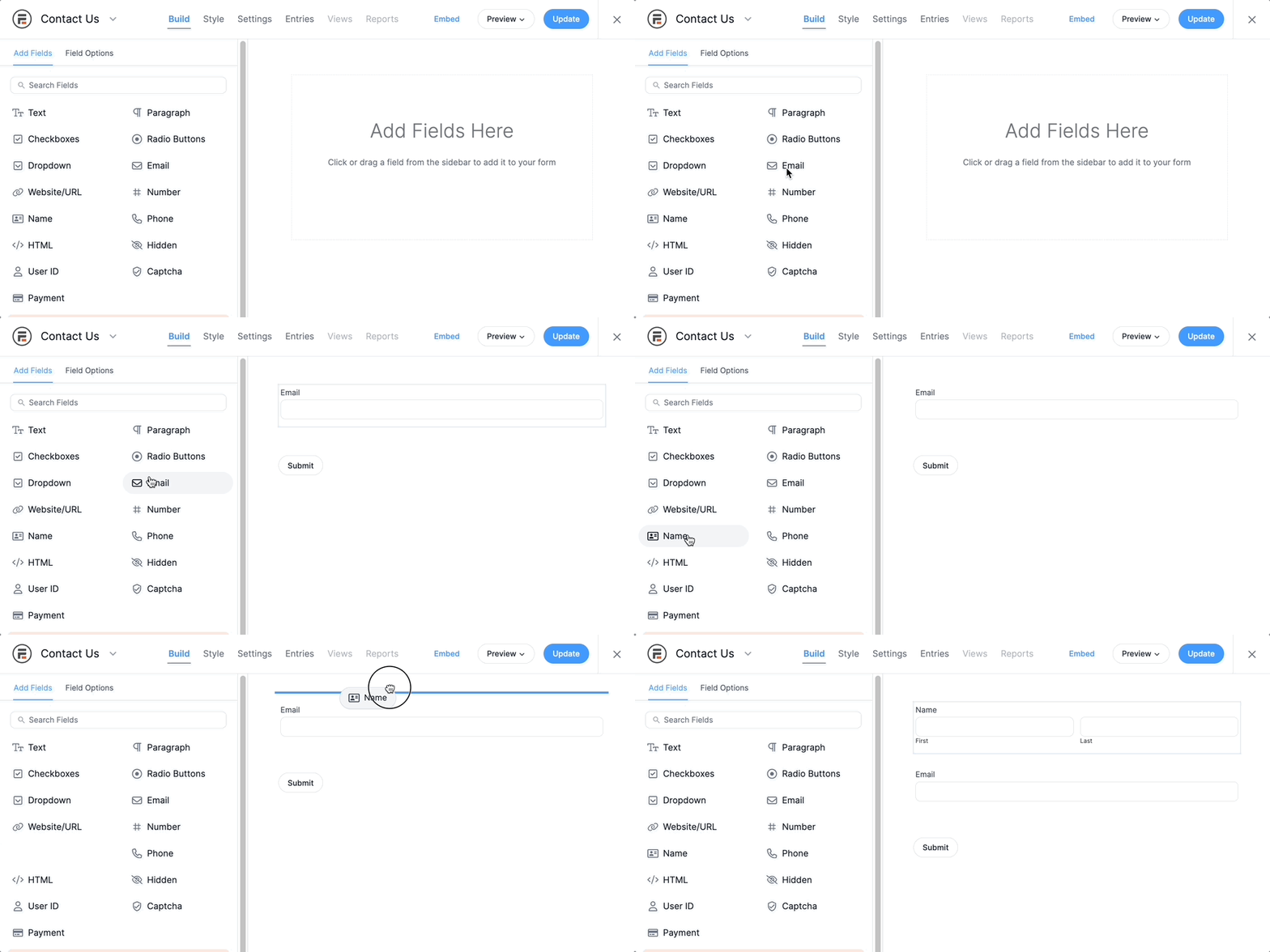
Step 1: Build your order form. Use Formidable's drag-and-drop builder to create a checkout form that collects the customer details and service options you need. No coding required.
Step 2: Connect PayPal. Add Formidable's PayPal add-on to your form so customers are sent to a PayPal payment page on submission. You can accept one-time payments or set up recurring subscriptions.
Step 3: Set up email notifications. Formidable's built-in notification system lets you automatically send a confirmation email to the customer and an alert to your team the moment a form is submitted.
Step 4: Connect Zapier. Install Formidable's Zapier add-on to complete your WordPress form automation setup and link your form submissions to any other app in your stack. Richard used Google Sheets for order tracking and Slack for team alerts. You can use whatever tools your business already runs on.
Step 5: Test and launch. Submit a test order and confirm that each connection fires correctly. Once everything works, you have a fully automated order and fulfillment workflow that runs without you.
That's the entire system. No custom development, no need for a separate, complex automation platform, and no manual data entry.
Advice for those in a similar position
After his experience, Richard wanted to share a few things he'd do differently:
- Be patient as you look for a developer. "Even though Jon was not the perfect developer, I get along with him well and this has made a huge difference. We've worked hundreds of hours together. Trusting and getting along with your developer is extremely important."
- Don't launch before all the pieces are in place. "Launching earlier might generate revenue sooner, but this early revenue will be spent fixing bugs and adding new features that are easier to resolve prior to launching."
- Take your time finding the right technology. "Prior to launching my website, I should have spent more time searching for different software options like Formidable Forms and Zapier. If I had done this, I might have found Formidable Forms and Zapier before launching my website."
As plugin developers, we couldn't agree more.
Read more Formidable case studies
 How One Freelancer Manages 30 Websites with Formidable Forms
 How Formidable Forms Saves Clio Websites Time [And Headaches]
 How Formidable Forms Powered A Life-Changing Directory
 Build a Patient Management System Like a Surgeon
 How Smart Forms Cut Our Support Load by 20%
 Case Study: Dance Studio Goes Paperless with Online Registration
 From Registered Nurse to Software Developer
Richard's story shows what's possible when the right tools handle the busywork. Formidable Forms and Zapier gave him a fully automated backend with no custom code required. Ready to build your own? Get started with Formidable Forms today.
This article may contain affiliate links. Once in a while, we earn commissions from those links. But we only recommend products we like, with or without commissions.

