
What a pleasure to have support within minutes. Brillant, accurate answer, and solved the question. Thanks to the Formidable Team. Eric


Last updated on August 12, 2026 by Formidable Team
How to Accept ACH Payments in WordPress with Stripe for Free
Accepting online payments matters, but the fees can be brutal. It's 3 percent here, 5 percent there, and suddenly a chunk of every sale is gone to card processors. If your business is based in the United States, there's a cheaper way to take money straight from a customer's bank account, and you can set up WordPress ACH payments without writing a line of code using Formidable Forms.

Approximate read time: 9 minutes
This guide explains what ACH payments are and why they're worth it, then walks through setting them up end to end with Stripe: turning on ACH, connecting it to WordPress, building the payment form, and testing it before you go live.
Upgrade your WordPress site with powerful, flexible forms.
What is an ACH payment?
ACH stands for Automated Clearing House, the network of US financial institutions that moves money directly between bank accounts without a wire transfer or a credit card. It's the same system behind direct deposit paychecks and the autopay you set for rent or streaming services. An ACH payment is sometimes called an eCheck, and it's a popular way to take both one-time charges and recurring payments.
From Idea to Reality in Minutes. Build Powerful Forms, Dashboards, Apps and More.
Formidable Forms makes advanced site building simple. Launch forms, directories, dashboards, and custom WordPress apps faster than ever before.
How accepting ACH payments helps your business
A few things make ACH worth the small setup effort:
- Lower fees. ACH costs a fraction of what credit and debit cards charge, and Stripe caps the fee on a standard ACH payment at $5. Card processors often take around 3 percent of every sale with no cap, so the savings grow as your transaction sizes climb. On a $1,000 invoice, that's $5 with ACH versus roughly $30 on a card.
- Fewer failed renewals. Bank accounts don't expire the way cards do, so subscriptions keep working long after a card would have lapsed.
- Higher trust for big invoices. Customers paying hundreds or thousands of dollars are often more comfortable with a bank transfer than typing a card number into a form.
The catch is that your business has to be based in the United States to accept ACH direct debits, and your customers need US bank accounts. If you're outside the US, you can use the same Stripe integration to accept iDEAL payments, SEPA transfers, or PayPal instead, all through Formidable Forms.
What you'll need
- A WordPress site you can install plugins on
- A Stripe merchant account, which is free to create
- Formidable Forms. The free version handles Stripe ACH payments with a 3 percent Formidable Forms fee on top of Stripe's standard rates, and a Business or Elite license removes that 3 percent fee plus unlocks subscriptions and the heavier Views and logic features.
That's it. No third-party payment plugin, no monthly gateway fee, and no developer. Ready? Here's the path: install Formidable Forms, connect Stripe, turn on ACH, build your form, and publish it.
Step 1: Install and activate Formidable Forms
From your WordPress dashboard, go to Plugins → Add New Plugin and search for "Formidable Forms."
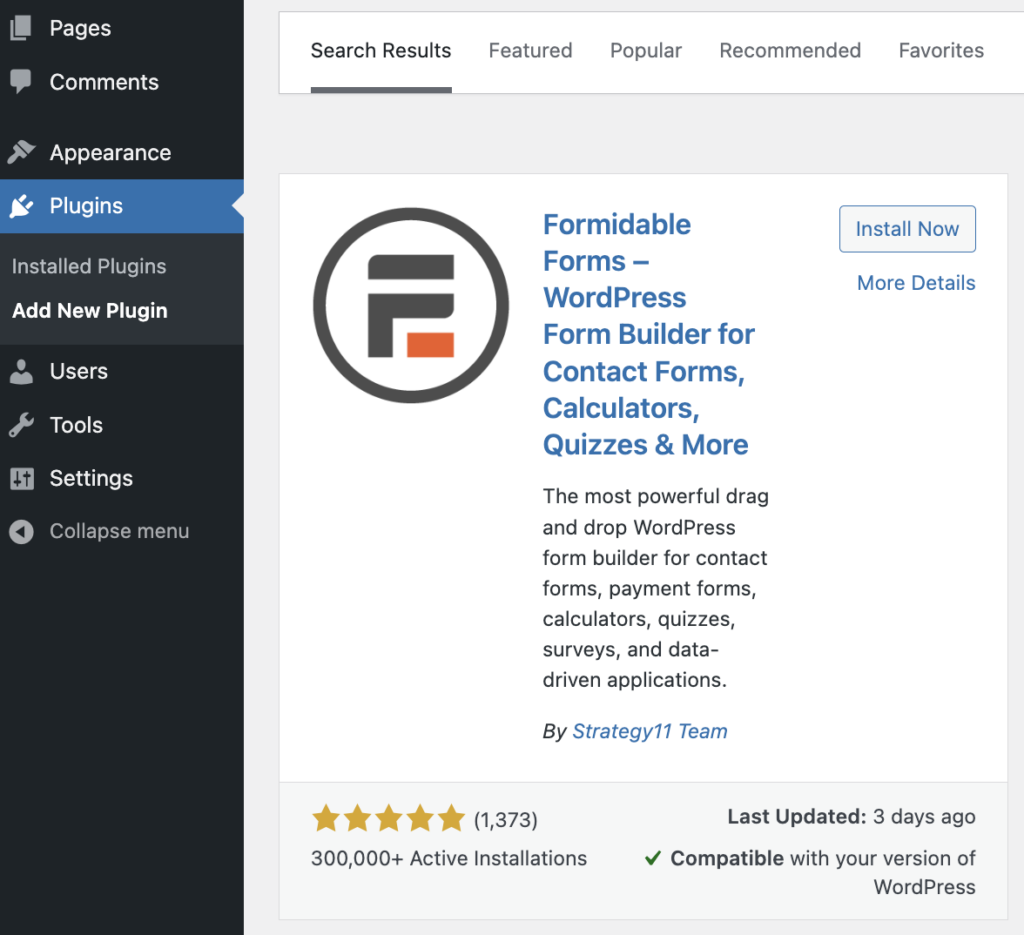
Click Install, then click Activate when the button appears. Formidable Forms runs on more than 300,000 sites with a 4.8 out of 5 rating across 1,300+ reviews, so the Stripe setup ahead is well-trodden ground.
If you want Pro features like subscriptions, repeating payments, and Formidable Views to display payment records, grab Formidable Forms Pro from your account and install it the same way. The Stripe payment form add-on unlocks one-time charges, subscriptions, and additional payment methods beyond ACH.
Step 2: Connect Stripe to your WordPress website
In your WordPress dashboard, go to Formidable → Global Settings → Stripe.
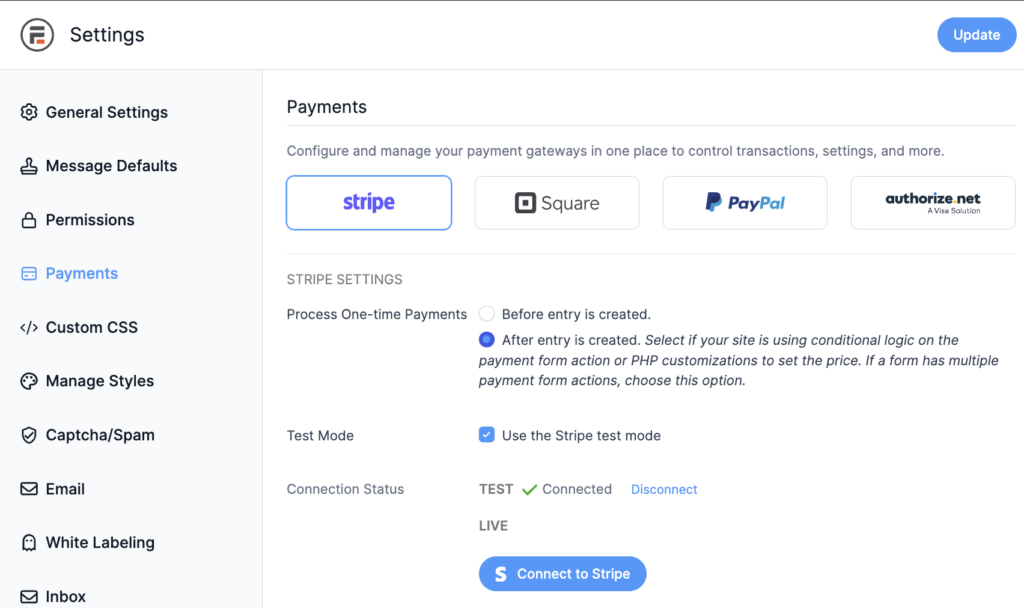
On the Stripe settings screen, choose Test Mode for now so you can run a few fake transactions before any real money moves, and switch to Live when you're ready.
Click Connect to Stripe, and the setup wizard opens.
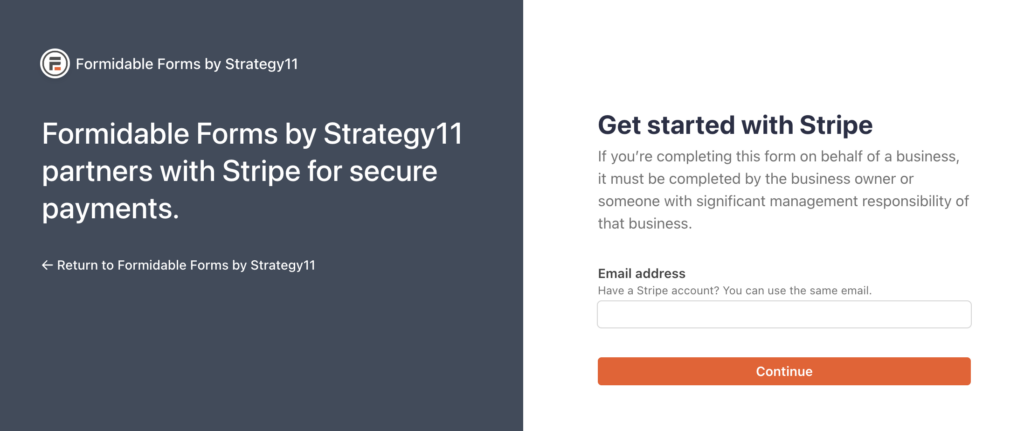
Enter your email to log in to your Stripe account or create a new one.
There are no API keys to copy and paste. When you're done, the wizard sends you back to WordPress with the connection in place, so Formidable Forms can create charges, subscriptions, and refunds through your Stripe account.
Step 3: Turn on ACH payments in Stripe
ACH is off by default in Stripe, so you'll switch it on from your Stripe dashboard before it shows up on your form.
Log in to your Stripe dashboard and go to Settings → Payment Methods. You'll see a list of all the available payment options.

If you don't see the list, you may need to select your platform, Formidable Forms, from the dropdown menu at the top.
Scroll down to the Bank Debits section.
Click Turn On next to ACH Direct Debit, and you're good to go.

Now let's head back to WordPress and build a form to connect to your payment gateway.
Step 4: Make a WordPress ACH payment form
Back in your WordPress dashboard, go to Formidable → Forms → Add New.
You have 2 starting points: choose Create a blank form for full control, or pick the Credit Card Payment template to save time, since the same payment field works for ACH too.

Give your form a name and click Create to open the drag and drop builder.
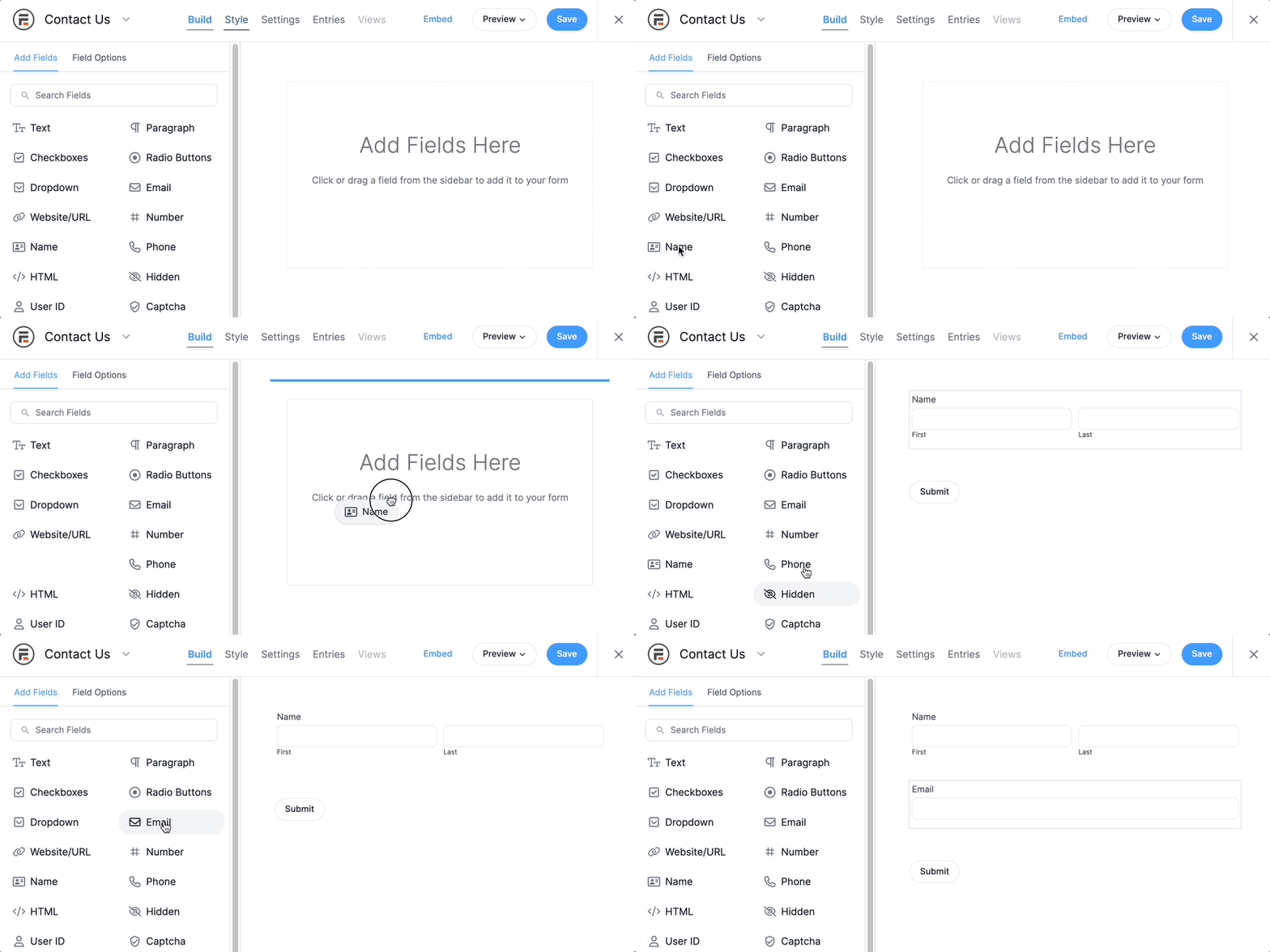
Drag the fields you need from the left panel onto your form:
- Name and Email fields, so Stripe can send receipts
- A Single Line Text field for an invoice number or order reference, if you need one
- A Number or Radio Buttons field if you're letting the customer choose an amount or a tier
- The Credit Card payment field, which doubles as the bank account field once ACH is enabled
Click any field to open its Field Options on the left, where you can change the label, add a description, set placeholder text, and mark it required.
The one field you can't skip is the Credit Card payment field. Without it, the form collects names and emails but never moves money. You don't need to build fields for the bank routing or account numbers yourself, because the Stripe gateway and payment field take care of all of that for you.

When the form looks right, click the blue Update button in the upper right to save it.
Set up the payment action
Now select the Settings tab at the top of the form editor, then open Actions and Notifications in the left menu.
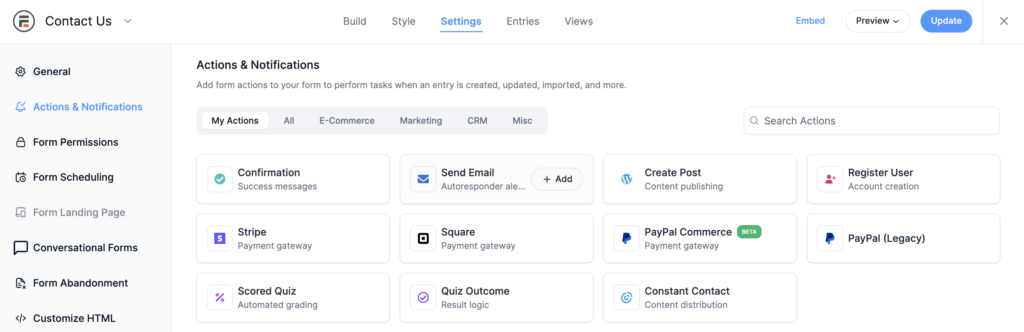
Click Collect a Payment, which is where you tell Stripe what to charge. Fill in the settings:
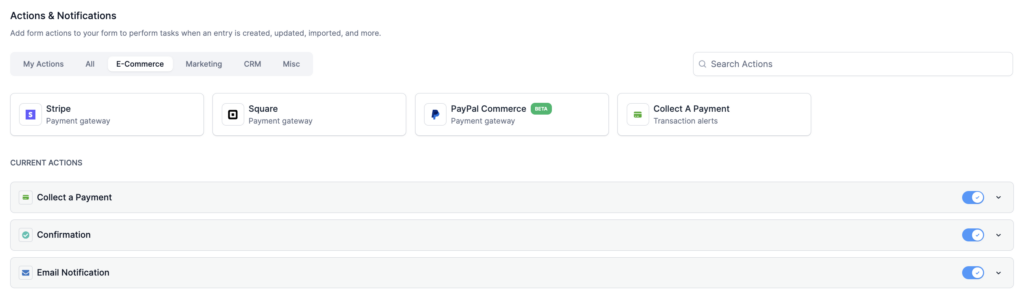
- Amount: a fixed value, or a calculation tied to a form field if customers are choosing a quantity or tier
- Currency: USD for ACH
- Payment type: one-time, subscription, or installments, since ACH works for all three. If you set up a subscription, choose the interval
- Enable Stripe Link and additional payment methods: this is the toggle that surfaces ACH as an option to the customer. If you skip it, they'll only see credit card

Once you've filled in the payment and customer details, click Update. You now have a form to accept ACH payments on your WordPress site.
Step 5: Publish and test your form
All that's left is to publish your form. Open the WordPress page or post where you want it to appear, click the + in the block editor to add a new block, and search for the Formidable Forms block.
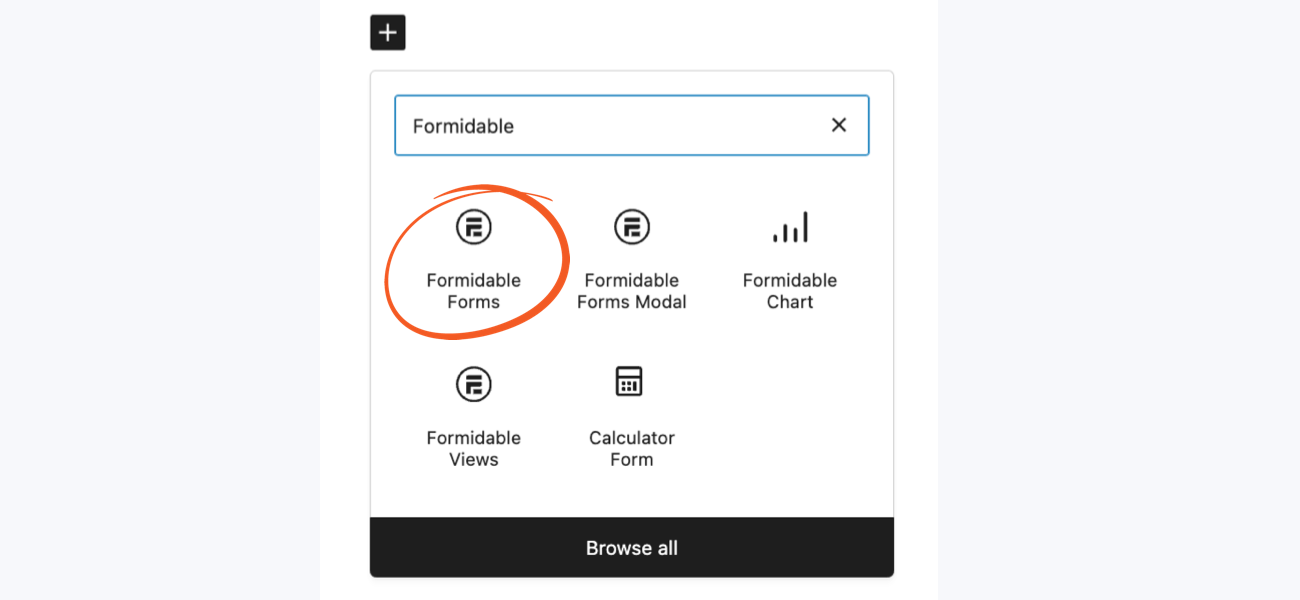
Select your ACH payment form from the dropdown menu and publish the page.
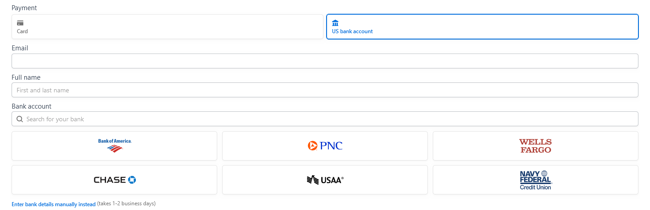
Run a few test transactions before you go live. Because you're still in test mode, no real money moves. To test debit or credit card payment flows, use 4242 4242 4242 4242 for the card number, any three digits for the CVC, any future date, and at least 50 cents for the amount.
To test ACH payments, Stripe provides test account numbers in their documentation, so see the Stripe docs for the current list and for testing bank account verification through Stripe Financial Connections.
When everything behaves the way you expect, go back to Formidable → Global Settings → Stripe and switch from test mode to live.
What happens after a customer pays
ACH isn't instant. Stripe takes between 2 and 6 business days to process a standard ACH payment, and your exact timing depends on your Stripe setup. If you need it sooner, Stripe offers faster settlement and instant bank account verification for additional fees, so check Stripe's pricing page for the current rates. There are also fees for failed and disputed payments, so visit the Stripe website for the latest figures.
For most use cases, standard ACH is fine. Send the customer a confirmation email when the form submits so they know the payment is on its way, and lean on Formidable Forms' built-in payment status updates to track when the funds actually arrive.
This delay matters less for subscriptions. ACH is especially well-suited to recurring payments because bank accounts don't expire the way cards do. The first charge clears, the account is verified, and every charge after that uses the saved verification.
Once your site's a success
Formidable Forms Lite is free and handles Stripe ACH payments without limiting how many transactions you take. Upgrading to a Business or Elite license adds two things worth knowing about:
- No Formidable Forms transaction fee. Lite, Basic, and Plus add a 3 percent Formidable Forms fee on top of Stripe's standard rates. The Business and Elite licenses remove that 3 percent entirely, which pays for itself quickly once you're processing a few hundred dollars a month.
- Recurring payment management. A paid license logs every subscription in a dashboard you can search, filter, and export, and it sends you summary emails to help you keep track.
Turn it on once, run everything through it
Now that you know how to accept ACH payments in WordPress, you can run almost anything through that one form: invoice payments, membership dues, donations, contractor retainers, and monthly subscriptions. The setup is the same regardless of what you're collecting, and the fee savings stack up the moment your transaction sizes climb past the credit card break-even point. If you're weighing other options, our roundup of the best recurring payment plugins for WordPress is worth a look.
If you haven't installed Formidable Forms yet, Formidable Forms Lite is free and includes everything you need to take your first ACH payment today.

- Does Stripe accept ACH payments?
-
Yes. Stripe supports ACH direct debits for US businesses with US-based customers, giving you a secure and efficient way to process these transactions. You turn it on in Settings → Payment Methods in your Stripe dashboard, then surface it on a WordPress form using Formidable Forms, no code required.
- How much does Stripe charge for ACH payments?
-
Stripe charges 0.8 percent for standard ACH payments, up to a maximum of $5. Faster settlement and instant bank account verification cost extra, as do failed and disputed payments, so check Stripe's pricing page for the current rates.
- How long does Stripe take to process ACH payments?
-
Stripe takes between 2 and 6 business days to process ACH payments. Your exact timing depends on your Stripe setup, including whether your merchant account is eligible for faster settlement.
- Can I accept ACH payments in WordPress for free?
-
Yes and no. You can use the free Formidable Forms plugin to accept Stripe ACH payments on your website, including the Stripe connection and the payment field, but transaction fees still apply: Stripe's standard rate, plus a 3 percent Formidable Forms fee on the free plan. There's no upfront software cost, and upgrading to a Business or Elite license removes that 3 percent.
- Can I set up recurring ACH payments?
-
Yes. In the Collect a Payment action, choose subscription and set the interval. ACH is well-suited for subscriptions because bank accounts don't expire, so the verified account stays active until the customer revokes authorization.
- What if my business isn't based in the US?
-
ACH is a US-only network. If you're outside the US, you can use the same Stripe integration to accept iDEAL payments, SEPA transfers, or PayPal instead. The setup is similar: enable the payment method in Stripe, connect it to Formidable Forms, and build the form.
This article may contain affiliate links. Once in a while, we earn commissions from those links. But we only recommend products we like, with or without commissions.

