What a pleasure to have support within minutes. Brillant, accurate answer, and solved the question. Thanks to the Formidable Team. Eric


Last updated on September 27, 2026 by Formidable Team
MailPoet vs. Mailchimp [Which is Better for You?]
This MailPoet vs. Mailchimp guide compares free plans, sending limits, automation, analytics, and pricing so you can pick the right email tool for your WordPress site.

Approximate read time: 7 minutes
Formidable Forms is our own product, and we recommend it in this article.
There are tons of WordPress email newsletter tools.
But two that always appear at the top of the rankings are Mailchimp and MailPoet. One is an email heavyweight (Mailchimp), and the other is a powerful WordPress plugin (MailPoet).
Here's how they compare.
Upgrade your WordPress site with powerful, flexible forms.
Overview of MailPoet and Mailchimp
Mailchimp and MailPoet are both email marketing solutions available for WordPress.
Both work with any WordPress site. MailPoet runs as a plugin, and Mailchimp connects to WordPress through its own plugin or embed code. Either way, you get newsletters, email builders, and campaigns ready to grow your subscriber list.

The difference between them is that Mailchimp works for any user. You sign up through their website and then have a few options to install it on your website or share it. This gives you tons of flexibility in how you grow your email list.
On the other hand, MailPoet is an email marketing plugin for WordPress only.
If you're a WordPress user, MailPoet keeps your email marketing inside WordPress. But if you're not a WordPress user, MailPoet won't be helpful.
Let's dive into the specifics to find which one works for you.
From Idea to Reality in Minutes. Build Powerful Forms, Dashboards, Apps and More.
Formidable Forms makes advanced site building simple. Launch forms, directories, dashboards, and custom WordPress apps faster than ever before.
MailPoet vs. Mailchimp: A Breakdown
Ease of use
Mailchimp and MailPoet are both drag and drop email builders.
If you can use a computer mouse, you can easily create and send email campaigns with either tool. Plus, they have some basic styling options to customize your email to your liking. And their email templates save you time in your design process.
But styling Mailchimp forms is a bit basic. There aren't many customization options, so check other form options if you prefer more control.
MailPoet's form builder gives you a few more options, but the overall look of your forms is pretty basic, and it's a similar experience to Mailchimp.


But, if we're talking ease of use as a WordPress user, it's hard to beat MailPoet.
It's a WordPress plugin, so you install and activate it. Then, enter your MailPoet details, and you're off and running. You can use the plugin with their free plan, too. So, nothing is holding you back from creating email campaigns in as little as a few minutes.

Mailchimp takes an extra step. You sign up on Mailchimp's site, generate an API key, then use that key to connect your Mailchimp account to WordPress and get full Mailchimp integration. It isn't difficult, but it takes more time than installing a plugin.
So, in terms of use, we must give this one to MailPoet.
Email options and limits
Here's how their free plans compare:
- Mailchimp offers 500 monthly emails, capped at 250 per day, and a 250-contact limit
- MailPoet gives you 5,000 monthly emails and a 500-subscriber limit
That works out to twice the subscribers and 10x the monthly emails on MailPoet's free plan.
One difference stands out: every MailPoet paid plan sends unlimited emails per month. Mailchimp caps monthly sending on every plan, Premium included.
Something to consider if you're sending out a lot of emails or have multiple sites.
Also, MailPoet allows you to choose from multiple types of email delivery services, like:
- Your host
- With a 3rd party SMTP
- MailPoet's email-sending service
While this may not matter to some, many people want more control over how their emails are sent to ensure they get delivered quickly and securely.
In that case, MailPoet gives you a few more options.
On subscriber limits, sending caps, and delivery options, MailPoet takes this round.
Automation
Email marketing automation welcomes new subscribers, builds relationships, and promotes your products without you writing each message by hand.

MailPoet includes automation on every plan, including the free Starter plan. It's basic there, and the Business plan adds targeted automation built on subscriber segments.
Mailchimp's free plan includes no automation flows. Essentials includes flows limited to 4 steps. Standard allows up to 200 flows, and Premium adds enhanced flows with predictive segmentation.
On automation features alone, Mailchimp goes deeper. MailPoet's advantage is that you get working automation without paying anything.
Email analytics
Both tools give you the core email numbers.
MailPoet reports open rates, click rates, and subscriber scores, along with unsubscribes, bounces, and machine opens. On a paid plan you also get your top-clicked links, the products sold from each email, and the revenue each email brings in once WooCommerce is connected.

Mailchimp covers the same ground and adds reporting MailPoet doesn't have:
- Delivery insights
- Industry average comparison
- Custom reports on Standard and Premium
These numbers show what's working in your newsletters and what isn't. They also point to where the rest of your business needs attention.
MailPoet has closed most of this gap with its ecommerce stats, but Mailchimp still reports more.
Pricing
Both companies price by list size, so every plan below is priced for a list of 1,000 contacts.
| Plan | Price per month | Contacts | Emails per month |
|---|---|---|---|
| MailPoet Starter (free) | $0 | Up to 500 | 5,000 |
| MailPoet Creator | $16 | 1,000 | Unlimited |
| MailPoet Business | $20 | 1,000 | Unlimited |
| MailPoet Agency | $60 | 1,000 per site, 50 sites | Unlimited |
| Mailchimp Free | $0 | Up to 250 | 500, capped at 250 per day |
| Mailchimp Essentials | $26.50 | 1,000 | 15,000 |
| Mailchimp Standard | $45 | 1,000 | 18,000 |
| Mailchimp Premium | $350 | Unlimited | 150,000 |
Prices checked November 2026 on the MailPoet and Mailchimp pricing pages.
Two notes on that table. Neither free plan holds 1,000 contacts, so they're there for reference. And Mailchimp Premium carries no contact limit, which is why its price doesn't move at this list size.
MailPoet's Creator plan is worth singling out. It includes every Business feature, including unlimited sending, segmentation, and detailed stats, but leaves out the MailPoet Sending Service. You handle delivery yourself through your host or a third-party SMTP service, which is why it costs less.
Also, beyond simply being able to send more emails to more people, many premium features are available in MailPoet's free or lower-tier plans.
For example, you get automation, WooCommerce integration, popup forms, and pre-built templates.
And that's just the free plan.
Both line-ups cover a range of needs. At 1,000 contacts, though, MailPoet's Business plan costs less than Mailchimp's cheapest paid plan and drops the sending cap entirely, so on price MailPoet comes out ahead.
Who wins in the MailPoet vs. Mailchimp battle?
Both tools handle WordPress email marketing well, but they fit different setups.

MailPoet doesn't match Mailchimp's reporting depth or its automation ceiling. It makes up for that on price and on how little setup it takes.
Choose MailPoet if:
- Your list lives on a WordPress site and you want to run it from the dashboard
- You send a high volume and want unlimited monthly sending for a low price
- You want basic automation and WooCommerce integration on the free plan
Choose Mailchimp if:
- You need multi-step automation flows and industry benchmark reporting
- You market outside WordPress too, through landing pages, SMS, or ads
- You want your list to stay independent of any single website
For WordPress-first email marketing, MailPoet is the better fit.
A powerful form builder for your email marketing efforts
Mailchimp and MailPoet both do one job well, and that job is email marketing.
Like every tool, though, they have their limitations.
One of those areas is form-building. You get basic tools to assemble something, but it's not the most advanced or attractive thing you've ever created.
If you want more control over your Mailchimp or MailPoet forms, a dedicated form builder helps.
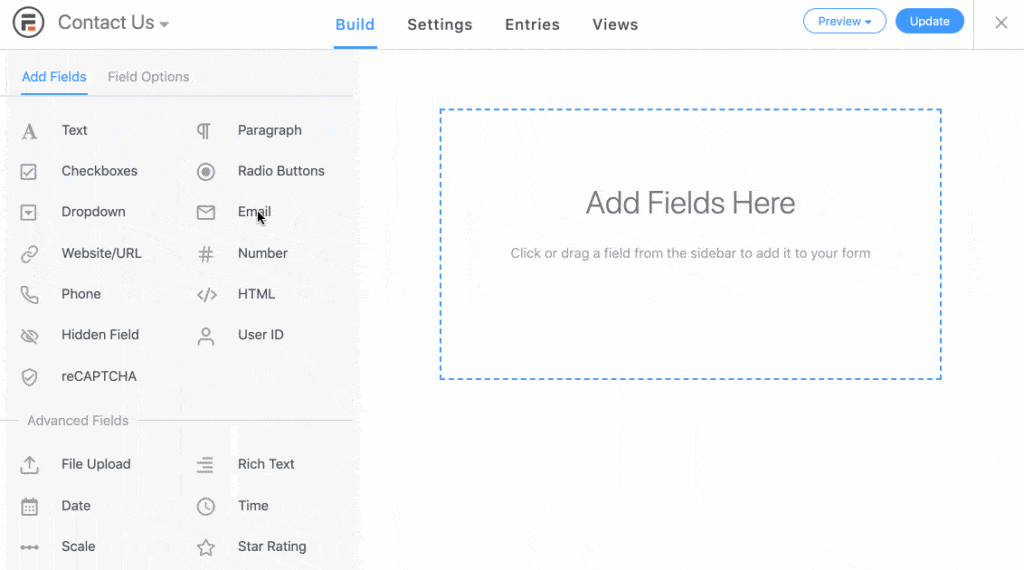
That's where Formidable Forms comes in. It's a form builder for WordPress with MailPoet and Mailchimp add-ons that send form entries straight to your list.
Add an email field to any form, map it to a list, and every new entry becomes a subscriber on submit.
We think you'll like the Mailchimp and MailPoet add-ons.
For more detail, check out our pricing page to see what this form maker offers.
Also, follow us on Facebook, X, and YouTube for great email marketing tips and tricks!
Read more about email marketing!
 How To Add a ConvertKit Form to WordPress [Only 5 Steps!]
 How to Make a Good Landing Page with Forms
 How to Add Email Subscription Forms in WordPress
This article may contain affiliate links. Once in a while, we earn commissions from those links. But we only recommend products we like, with or without commissions.