
What a pleasure to have support within minutes. Brillant, accurate answer, and solved the question. Thanks to the Formidable Team. Eric


Last updated on September 27, 2026 by Formidable Team
5 Best WordPress Calendar Plugins [Compared]
Find the best WordPress calendar plugins to organize events, bookings, and schedules easily. Perfect for businesses and event planners. Start managing today!

Approximate read time: 6 minutes
Need an easy way to manage events on a WordPress site?
A calendar plugin streamlines scheduling, lowers missed opportunities, and handles events. There are many options, so finding the best ones can be difficult.
But we've installed and tested the best WordPress calendar plugins, so you don't have to. Along with a quick review and the top features to help figure out if it works for your situation.
So, let's dive in.
| Best for | Top features | Pricing | |
|---|---|---|---|
| 1. Formidable Forms | Calendars built from form submissions | Event calendar, drag and drop form builder, payment integrations (PayPal, Stripe, etc.) | Lite version available, premium plans start at $39.50/year. |
| 2. The Events Calendar | Event organizers, businesses | Multiple calendar views, connects to Google Calendar and iCal, Event Tickets add-on | Free version available, Premium starts at $149/year |
| 3. Events Manager | Event planners, small businesses | Easy booking management, recurring events, payment options (PayPal, Stripe) | Free version available, Premium starts at $129/year |
| 4. My Calendar | Businesses with accessibility needs | Recurring event support, customizable calendar views, accessibility-focused design | Free version available, Premium starts at $69/year |
| 5. Sugar Calendar | Small businesses, individuals | Simple event management, multiple calendar views, Google Maps integration | Free version available, Premium starts at $49.50/year |
Upgrade your WordPress site with powerful, flexible forms.
5 Best WordPress calendar plugins
1. Formidable Forms

Rating: 4.8 stars (1,230+ reviews) | 400,000+ active installations
Formidable Forms is a WordPress form builder that handles any type of form you need.
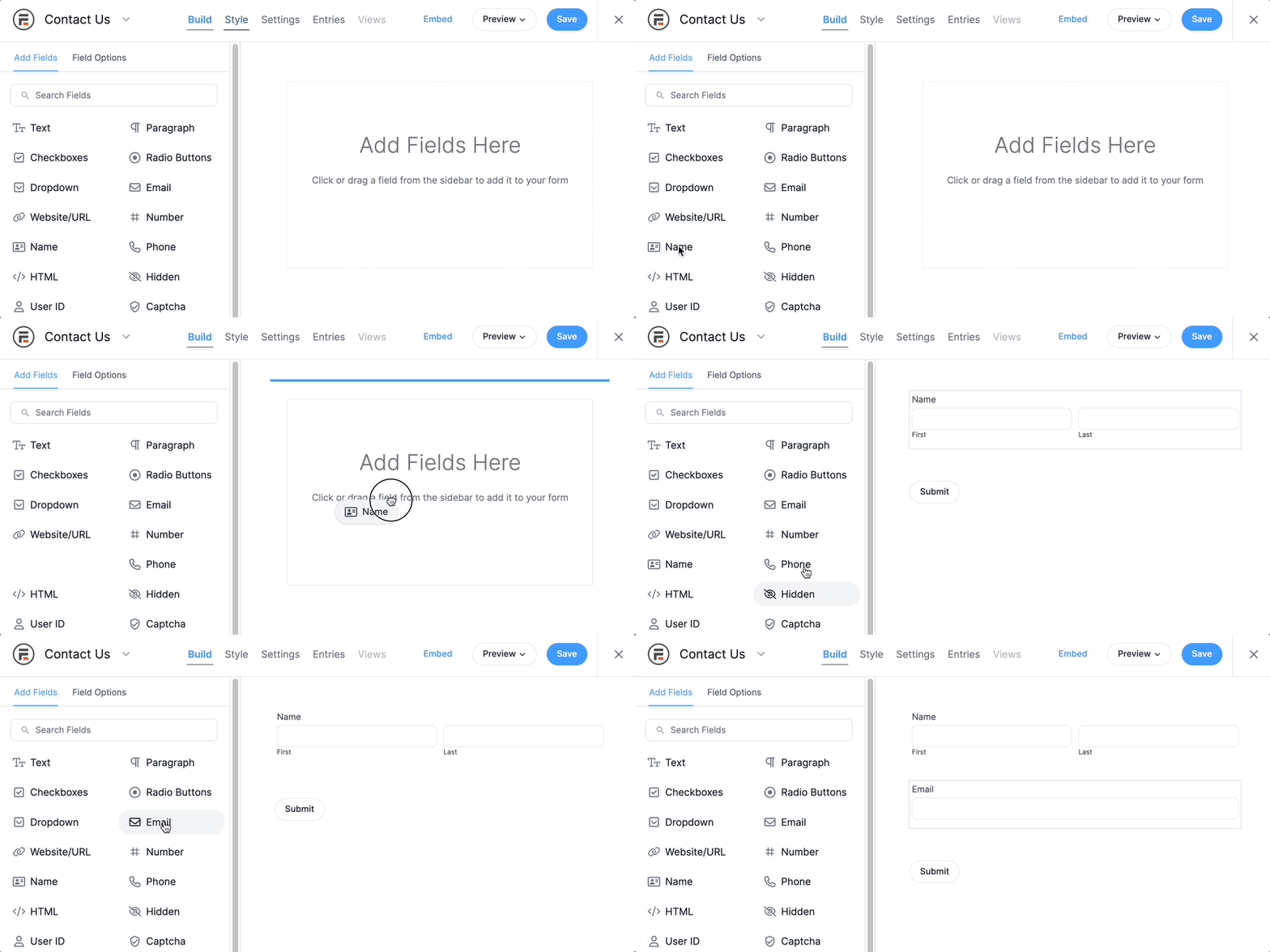
And that includes creating and managing calendars using its Formidable Views feature. With Views, you can create a form to accept form submissions. Whether it's adding an event calendar, appointment calendar, or simply a itinerary — Formidable can create the form.
Then Views does the rest of the work. It takes the form submissions and displays them in a calendar view (with some tweaking, of course).
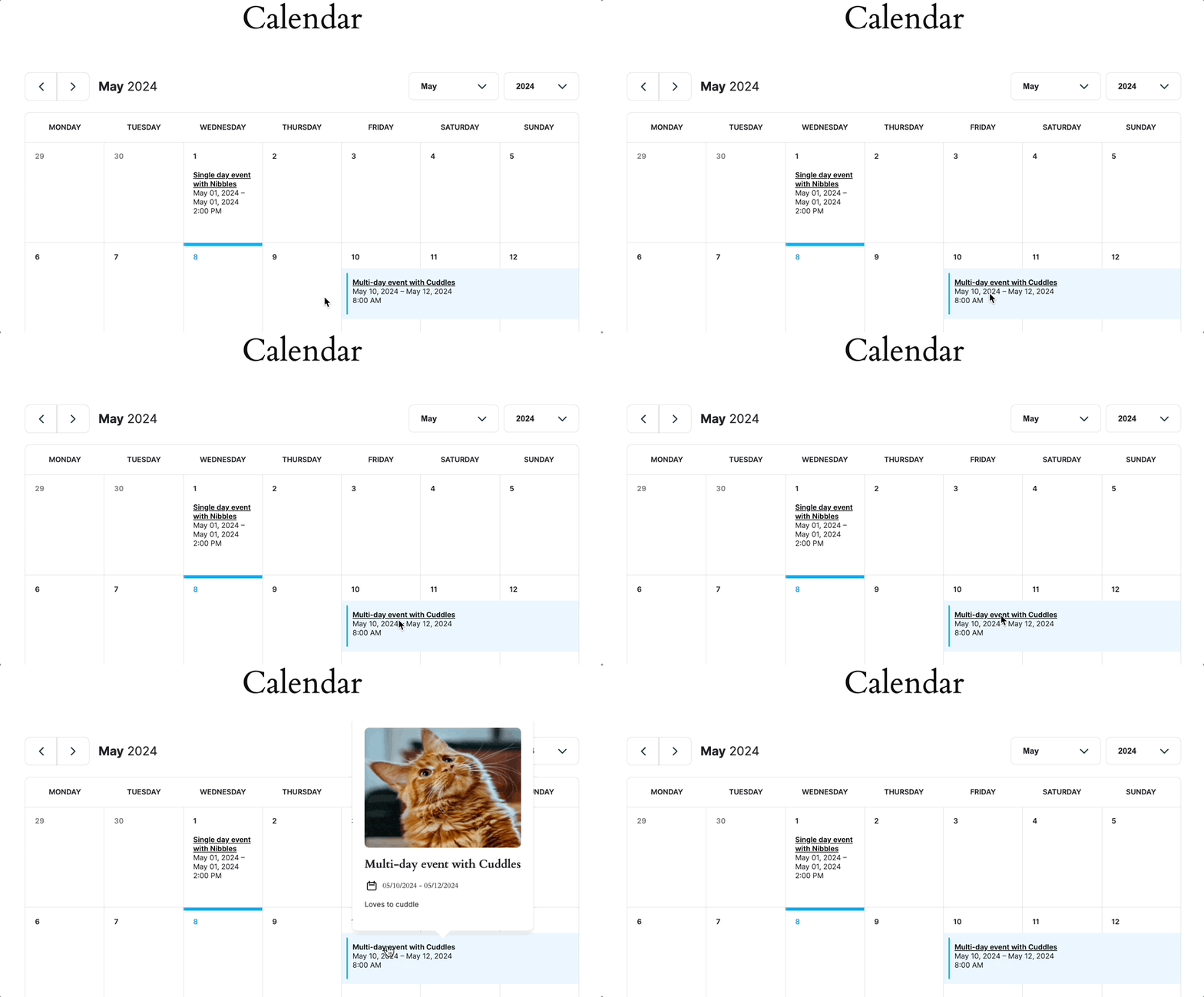
This event calendar plugin is great for businesses, event planners, and travel agencies that need an entire booking system and also calendars to show upcoming events.
Top features:
- Event calendar with Formidable Views
- Drag and drop from builder
- Payment integrations (Stripe, PayPal, etc.)
Pricing: Formidable Forms has a Lite version to test the plugin. Calendar Views is available in the Formidable Plus plan, which starts at $99.50/year.
2. The Events Calendar

Rating: 4.3 stars (2,260+ reviews) | 700,000+ active installations
The Events Calendar is simply one of the best WordPress events calendar plugins.
It's easy to use, no matter your level. In the WordPress dashboard, you can create events, manage attendees, view the calendar or event page, and more. You can also manage tags or event categories and add venues in a few clicks.

There's also a free option for event tickets. For example, you get RSVPs, ticket sales, PayPal and Stripe, and more. But with the premium version of the add-on, you get all of that plus things like QR code check-in, Apple Pay and Google Pay, and no ticketing fees.

Event Tickets is just one of the add-ons, though.
If you want extras like Events Calendar Pro, Event Aggregator to import events, filter bars, or share events across websites and other add-ons, you must bundle them together. This can get expensive, so it's worth looking at the bundles to see if they work for you.
Top features
- Multiple calendar views (day, week, and month views)
- Connects to Google Calendar and iCal
- Event Tickets (add-on)
Pricing: The Events Calendar has a free version. Its premium plugin starts at $149/year. It has bundles with its add-ons to add more abilities to the plugin.
3. Events Manager

Rating: 4.2 stars (505+ reviews) | 90,000+ active installations
Events Manager also has a good reputation in the WordPress community. And its almost 100,000 active installations prove that.
Its simple registration system helps design forms to collect attendee information. This includes information like name, address, email, and payment details. You can also enter attendees manually through the WordPress dashboard.

Like the other plugins, Events Manager handles tickets and payments (PayPal), calendars, and emails (Mailchimp). So, it can be a total calendar solution if needed.
Key features
- Easy booking management
- Recurring events
- Payment options (PayPal, Stripe, etc.)
Pricing: Events Manager has a free plugin. It also has a premium version with plans starting at $129/year.
4. My Calendar

Rating: 4.7 stars (145+ reviews) | 20,000+ active installations
My Calendar is an excellent choice for managing events with customizable display options.
The plugin can show individual event calendars or filter events based on category, location, or author. You can also choose from various calendar views, including text-based ones, for a simple choice.

One of My Calendar's best features is its accessibility.
It was created to provide a seamless experience for users and administrators who need assistive technology. The plugin dashboard allows you to describe ADA compliance features for events and venues, making it much easier to ensure accessibility for all visitors.

You'll need the premium version for more advanced features, like allowing user event submissions, advanced search, and logged-in user editing.
Top features:
- Recurring event support with custom dates
- Custom calendar views (grid, card, list)
- Accessibility-focused design
Pricing: My Calendar has a free version with basic calendar features. Premium plans start at $69/year.
5. Sugar Calendar

Rating: 4.5 stars (15+ reviews) | 2,000+ active installations
Sugar Calendar is a lightweight and efficient WordPress calendar plugin.
The best part about Sugar Calendar is its simplicity. It eliminates the bloat and complexity of other plugins and keeps things to the point.

Because of that, creating and managing events is easy. And you can display the events in multiple calendar types: day, week, or month. It even includes a Google Maps location on the event details (once connected).
And if you need to sell tickets, Sugar Calendar integrates with Stripe in the free version. But you can get WooCommerce in the premium add-on. It also connects with Zapier, giving you access to over 3,000 apps.

As with the other plugins, Sugar Calendar Pro offers even more features. The Pro version has extra features including recurring events, calendar feeds, and more.
Top features:
- Simple event management
- Multiple calendar views (day, week, and month)
- Google Maps integration
Pricing: Sugar Calendar has a free version and a premium version. Premium plans start at $49.50/year.
From Idea to Reality in Minutes. Build Powerful Forms, Dashboards, Apps and More.
Formidable Forms makes advanced site building simple. Launch forms, directories, dashboards, and custom WordPress apps faster than ever before.
Bonus: Add an appointment calendar today
As we mentioned, Formidable Forms can be a total booking solution — no matter the type of calendar you need.
One example is using it as an appointment calendar. If that's what you're looking for, we have the perfect blog post for you.
Check out our guide on how to add an appointment calendar in WordPress so you can start today!
And if you're ready to start with Formidable Forms today, hit the button below and grab Formidable Forms Pro today! You get 14 days to try it out and see if you like it. If not, you get your money back, no questions asked.
Also, join our community on Facebook, Twitter, and YouTube for more WordPress tips and tricks!
This article may contain affiliate links. Once in a while, we earn commissions from those links. But we only recommend products we like, with or without commissions.

