
What a pleasure to have support within minutes. Brillant, accurate answer, and solved the question. Thanks to the Formidable Team. Eric


Last updated on August 12, 2026 by Formidable Team
How to Set Up a Likert Scale for More Responses (With Examples)
A "yes or no" survey question feels efficient, but it's quietly throwing away the most useful part of every answer: how strongly someone actually feels. A Likert scale puts that range back in, giving respondents room to land somewhere between the extremes instead of forcing a one-word verdict.

Approximate read time: 9 minutes
Upgrade your WordPress site with powerful, flexible forms.
What a Likert scale actually is
A Likert scale is a psychometric tool, which is a fancy way of saying it's a method researchers use to measure attitudes. It's commonly used in surveys and questionnaires, and it usually runs on a 5-point or 7-point scale to give respondents a real range of options.
A Likert question starts with a statement rather than a yes-or-no prompt. From there, respondents choose where they fall along a series of options like strongly agree, agree, neutral, disagree, and strongly disagree. The classic 5-point version looks like this:
- Strongly disagree
- Disagree
- Neither agree nor disagree
- Agree
- Strongly agree
The middle option is neutral, and the two ends mirror each other. That balance is the whole point, because it keeps the data clean enough to actually analyze.
The benefit is that people can give a more detailed answer than "yes" or "no." If someone only sometimes uses a feature, a yes-or-no question forces them to pick one or the other, while a Likert scale lets them pick the option that genuinely matches how they feel. That extra detail is information you can use to improve a product and raise customer satisfaction.
From Idea to Reality in Minutes. Build Powerful Forms, Dashboards, Apps and More.
Formidable Forms makes advanced site building simple. Launch forms, directories, dashboards, and custom WordPress apps faster than ever before.
Why use a Likert scale in your surveys?
Even if you don't recognize the name, you've almost certainly answered a Likert scale before. It sits in the middle ground between a yes-or-no question and an open-ended response: more detailed than a binary choice, but simpler than asking people to write out a full reply. That makes it a smart compromise when you want richer information without overwhelming the people taking your survey.
It's also quick for respondents. They can share an opinion with a single click, which is part of why Likert questions get answered so consistently. A few use cases where they shine:
- Customer satisfaction surveys. Find out how people feel about your product, your service, and your support, with enough range to tell "fine" apart from "delighted."
- School and education feedback. Schools ask students to use Likert scales to share what they think about classes and teachers, which helps instructors see what's working and what could make learning more engaging.
- Understanding feelings and behavior. Psychologists use Likert scales to learn about how people feel and act, which helps them understand how someone is doing mentally and emotionally.
If you're trying to measure something fuzzy ("How do you feel about this?") rather than something factual ("Did you buy this?"), a Likert scale is usually the right tool.
Five Likert scale question types that pull better responses
Likert scales give your surveys a lot of flexibility, and that freedom can make building one from scratch feel daunting. These five patterns are tried-and-true starting points you can adapt to your own survey.
1. Degree of satisfaction
This is one of the more flexible Likert question types. It's a simple way to gauge how happy a customer or employee is, and it works for evaluating a product, a service, or a recent support interaction.
When you build it, add as many columns as you need (a 5- or 7-point scale), though we recommend sticking to around 5. That's the standard, and it helps people understand the scale at a glance. It's also a good place to collect a little extra feedback: pair the scale with a short text field so respondents can explain their answer. Keep that field optional, since not everyone will fill it out, but the ones who do will tell you exactly where the rating came from.

2. Importance level
Likert scales are great for figuring out how much customers value a specific service. If most responses land on "extremely important," that's a green light to move ahead. A less positive result can save you from investing in something nobody asked for.
It helps to add a little context to these questions, like a price point or a brief overview of the service you're asking about. Even a short explanation helps respondents answer more accurately.

3. Recommendation survey
Many businesses rely on word-of-mouth, but because recommendations usually happen in casual conversations, they're hard to measure. A Likert scale gives you the next best thing.
You can keep it general with a question like "How likely are you to recommend us?" to get a rough read on your popularity, or drill down to individual platforms for more specific data. Asking where people are most likely to share a brand tells you which channels are worth your effort, and the question itself can nudge people to leave a review. For a more formal version of this metric, a Net Promoter Score (NPS) survey is the dedicated tool, but a Likert question gets you most of the way there.

4. Agree or disagree
This format has been popular for years, and it's the default option in Formidable Forms. It goes beyond a plain "agree or disagree" by using a 5-point scale to measure how strongly someone agrees, with options that usually run from "strongly disagree" to "strongly agree" and a neutral choice in the middle.
One of the best ways to use this type is to stack multiple statements as rows under the same scale, which helps people respond more accurately to a set of related prompts. Just like with columns, keep it to 3 to 5 rows for simplicity, so respondents don't start clicking the same answer down the line.

5. Frequency of use
Frequency questions tell you what people actually do, not just what they say they care about. That's useful when you're deciding whether to keep or cut a service, since something with low usage might be worth dropping.
Frequency scales can also surface opinions that are otherwise hard to gather. Knowing how often customers think about switching to a competitor, for example, is valuable for a retention strategy, and spotting your most-used services tells you what to highlight to encourage more conversions.

How to add a Likert scale to a WordPress survey
With Formidable Forms, anyone can build a Likert scale without writing code. The Surveys and Polls add-on is included with the Business and Elite licenses, so you'll want one of those to use the survey features.
Once you have a license, install and activate Formidable Forms on your WordPress site, then go to Formidable → Add-Ons and click Install and Activate on the Surveys and Polls add-on.
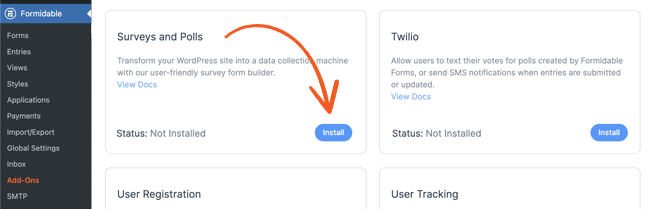
Step 1: Create your survey
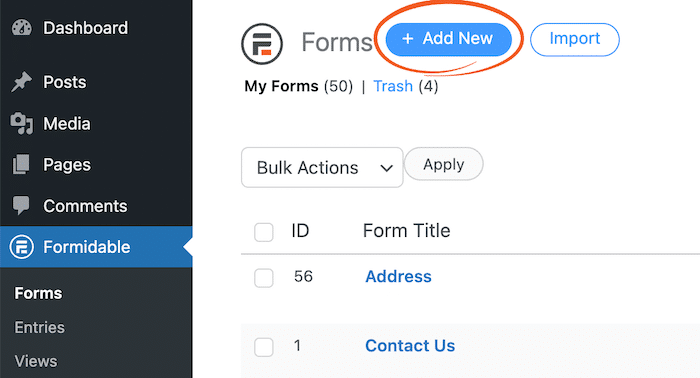
Go to Formidable → Forms and click the + Add New button to start a survey form.
You can use one of the pre-built survey templates or build from scratch by selecting Blank Form. Name your form, click Create, and you'll land in the drag and drop builder.
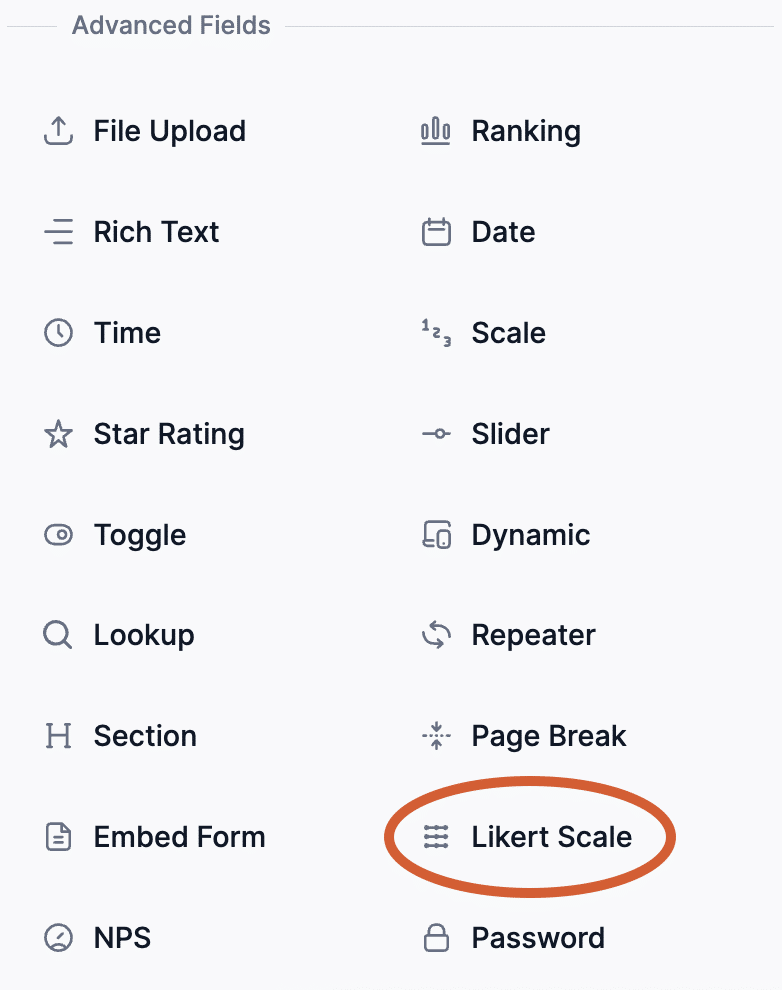
In the field panel on the left, find the Likert Scale field under the Advanced Fields section and drag it onto your form.
Click the field to open the Field Options menu, where you can edit the questions, answers, and rating scale. You can add multiple questions to a single Likert field, which works well when you want to use the same scale across several prompts.

You can also combine the Likert scale with other field types in the same survey, including yes-or-no questions, multiple choice, and open-ended text. Mixing formats keeps respondents engaged. When your survey looks right, click Update to save it.
Step 2: Publish your Likert scale survey
Open the WordPress post or page where you want the survey to appear. Click the + to add a block in the editor and select the Formidable Forms block.

Then pick your survey from the dropdown in the block. Your survey goes live as soon as you hit Update or Publish.

Ready to add a Likert scale to your survey?
A Likert scale gives your respondents room to be honest and gives you data that's clean enough to act on. With a Formidable Forms Business license, you can add Likert questions to your surveys or regular forms, include as many questions as you need, and design your own rating scale.
Ready to build one? Get Formidable Forms and add your first Likert scale this week. And if you're still weighing your options, our guide to the best WordPress survey plugins compares the main choices.
- What's the difference between a Likert scale and a rating scale?
-
A rating scale is the broader category. Any scale that asks respondents to rate something on a range is a rating scale, including star ratings, NPS, and Likert scales. A Likert scale is a specific type: a balanced, symmetrical scale (usually 5 or 7 points) anchored by mirror-image extremes like "strongly disagree" and "strongly agree."
- How many points should a Likert scale have?
-
Five is the most common, and it works for almost every use case. Seven points give you finer granularity when you need it, useful in academic research or detailed customer studies. Avoid even-numbered scales (4, 6) unless you have a specific reason to remove the neutral option and force a lean.
- Can you use Likert scales for quantitative analysis?
-
Yes, with a caveat. Likert data is technically ordinal (the spacing between "agree" and "strongly agree" isn't necessarily the same as between "neutral" and "agree"), but most researchers treat aggregated Likert responses as interval data and run averages, medians, and standard analyses on them. Just be clear about your methodology when you report results.
- How long should a Likert scale survey be?
-
Shorter than you think. Five to ten questions is a strong target for most consumer surveys. Anything longer and completion rates drop fast. If you need more depth, split the survey into stages or send follow-ups to a subset of respondents instead of cramming everything into one form.
- Are Likert scales free to use in WordPress?
-
You can build basic rating fields with Formidable Forms Lite, but the dedicated Likert scale field and the survey reporting tools are part of the Surveys and Polls add-on, which is available on the Business and Elite licenses.
This article may contain affiliate links. Once in a while, we earn commissions from those links. But we only recommend products we like, with or without commissions.

