
What a pleasure to have support within minutes. Brillant, accurate answer, and solved the question. Thanks to the Formidable Team. Eric


Last updated on September 28, 2026 by Kyle Cash
How to Change the Email Address in a WordPress Contact Form
Discover the simple steps to change the email address in a WordPress contact form. Ensure your site's messages reach the right inbox!
Approximate read time: 3.5 minutes
Changing the email address in a WordPress contact form isn't only great for email notifications.
It's also great for reducing spam and improving organization. Plus, it looks better when sending emails from a business or professional email address.
So, that's why I'm here. I'll show you how to change the email address in a WordPress contact form in two ways. One way is to update the admin email address in the WordPress email settings. The second way is using a WordPress plugin.
By the end, you'll choose the best method for you.
So, let's dive in!
Upgrade your WordPress site with powerful, flexible forms.
Why change the contact form email in WordPress?
There are several reasons to update the email address for a WordPress website.
The reasons vary from site to site, but here are some of the top reasons to change:
- Better delivery: WordPress's default administration email address may be outdated or get caught in spam filters. Either way, important messages may not be seen.
- Separating notifications: Keeping personal and business email notifications separate is essential. And updating the notification email address is the best way to help.
- Security: Changing the email address lowers the chance the WordPress admin email becomes a target for spammers who get them from the contact page.
So, just updating the email address solves tons of additional problems that a contact form normally has. And since changing the email doesn't take much, there's no reason to put it off any longer!
Now, let me show you exactly how to do it in WordPress.
From Idea to Reality in Minutes. Build Powerful Forms, Dashboards, Apps and More.
Formidable Forms makes advanced site building simple. Launch forms, directories, dashboards, and custom WordPress apps faster than ever before.
How to change the email address in a WordPress contact form
There isn't just one way to update the email in WordPress.
Changing the default email address in the WordPress settings is a basic way to do it. There's also the use of a form plugin, which updates the email and has many more features to help a WordPress website.
I'll cover both here.
1. Change site email address
The easiest solution is to change the default administration email address in WordPress.
First, go to Settings → General. This is where you can adjust many of the website settings. But we want to focus on the Administration Email Address.
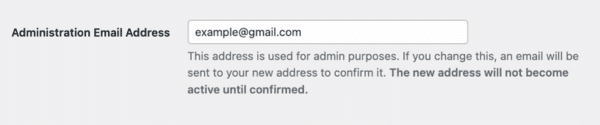
Update this to the organization or business email, and click the Save Changes button to update it on the site. Now, all notification emails will be sent to the updated email.
2. Use a form plugin
Updating the WordPress settings is a great way to change the contact form email in WordPress.
It still has its problems, though. First, they're subject to spam, and that means unnecessary emails. Plus, they're not the best looking and don't give you much functionality.
So, a better option is to use a WordPress form plugin. And I recommend using Formidable Forms.
It's the most advanced WordPress form builder, and it helps create beautiful forms in a matter of minutes with its drag and drop form builder. You can also use its free plugin to create a form and update the email address.
And it's just as easy to change the email address for a WordPress contact form.
First, install and activate Formidable Forms. Then, go to Formidable → Global Settings → General Settings. Then, change the email in the email field next to Default Email Address.
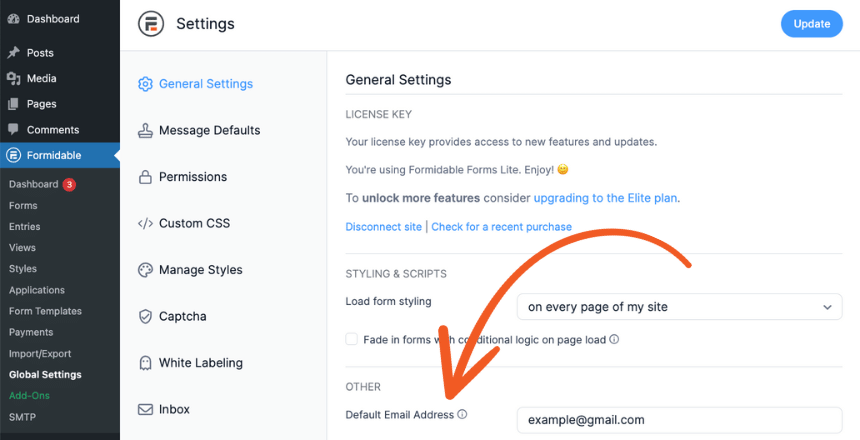
Now, every time someone creates a form and it has a form submission, the sender's email address will receive a notification email.
You can even set multiple emails to get an email in the individual form settings. That way, if there are multiple recipients or a team, everyone gets what they need.
Pair Formidable with an SMTP plugin
Formidable's notification email service is perfect for sending out email notifications — to users or owners.
But pairing it with an SMTP plugin is always good to ensure everything gets sent properly. I recommend reading our post on using the WP Mail SMTP plugin to send emails in WordPress.
Also, now's the chance to try out Formidable Forms Pro. You get all the excellent features you need from a WordPress contact form plugin, plus much more. And you get 14 days to try it out and get your money back if you don't like it! No questions asked.
And join our community on Facebook, Twitter, and YouTube for more WordPress tips & tricks!
Get the Formidable Forms Newsletter ⬇️
Read more about emails in WordPress!
 Make Your WordPress Form Notification Emails Look Professional
 Add Charts and Graphs in Emails & PDFs with Formidable Forms!
 How To Set Up WordPress Form Notifications
This article may contain affiliate links. Once in a while, we earn commissions from those links. But we only recommend products we like, with or without commissions.

