
What a pleasure to have support within minutes. Brillant, accurate answer, and solved the question. Thanks to the Formidable Team. Eric


Last updated on August 12, 2026 by Kyle Cash
8 Best Viral Quiz WordPress Plugins [Buzzfeed Style!]
Millions of people fill out BuzzFeed-style quizzes every day, and every one of those results that lands in someone's feed is free traffic back to whoever built the quiz. The good news is you don't need BuzzFeed's budget to make one. You just need the right viral quiz WordPress plugin behind it, and there are some genuinely good ones.
Approximate read time: 16 minutes
Below we compare the best viral quiz WordPress plugins, starting with our pick, then walk you through building a shareable quiz step by step so you can see exactly how it comes together.
Upgrade your WordPress site with powerful, flexible forms.
The best viral quiz WordPress plugins at a glance
| Plugin | Best for | Free version | Starting price |
|---|---|---|---|
| Formidable Forms | Versatile, customizable outcome and scored quizzes | Yes | From $199.50/yr |
| Quiz and Survey Master | Simple quizzes and surveys with email capture | Yes | From $149/yr |
| HD Quiz | A capable quiz without paying anything | Yes (fully free) | Free |
| Quiz Maker by AYS | Beginners who want a guided builder | Yes | From $75/yr |
| Quiz Cat | Lightweight BuzzFeed-style personality quizzes | Yes | From $69/yr |
| Thrive Quiz Builder | Lead generation with branching logic | No | From $99/yr |
| WordPress Viral Quiz | Pure BuzzFeed-style viral quizzes | No | From $36 (one-time) |
| Interact | Hosted quizzes with built-in templates | No | From $27/mo |
From Idea to Reality in Minutes. Build Powerful Forms, Dashboards, Apps and More.
Formidable Forms makes advanced site building simple. Launch forms, directories, dashboards, and custom WordPress apps faster than ever before.
1. Formidable Forms

A form builder might seem like an odd pick to lead a quiz roundup, and since Formidable Forms is our own plugin we're clearly not the neutral party here, but once you've built a quiz with it you'll see why it's first.
It builds both scored and outcome quizzes natively, which is the one feature most quiz plugins either charge extra for or skip entirely. That means you can make a true BuzzFeed-style outcome quiz, the kind that tells someone which Hogwarts house they're in, without bolting on a second tool.
It's also a tool plenty of site owners already trust, with more than 300,000 active installations and a 4.8 out of 5 rating from over 1,300 reviews on WordPress.org. You get ready-made templates, conditional logic, and the ability to display quiz data anywhere with Formidable Views. A few quiz formats it handles well:
- Personality and outcome quizzes (BuzzFeed-style)
- Trivia and scored quizzes
- Product recommendation quizzes
- Quiz funnels that branch based on answers
- Multi-step quizzes that show one question per screen
The biggest practical advantage is that everything stays on your own site, so the leads and data a quiz collects are yours, not a third party's.
Formidable Forms has a free version on WordPress.org, and the outcome and scored quiz features come with the Business license ($199.50 for the first year, then $399 on renewal). That's more than the single-purpose quiz plugins here, but it buys a different thing: one license that runs every form on your whole site, not just quizzes, and includes the scored and outcome types most of the cheaper plugins charge extra for or skip.
If a quiz is the only thing you'll ever build, one of the $69–$99 options below is plenty; if you want one tool for everything, Formidable Forms is hard to beat.

2. Quiz and Survey Master

Quiz and Survey Master (QSM) is one of the most popular quiz tools in the WordPress directory, and it's easy to see why.
It has a clean setup and a block editor for building quizzes right in the post editor. You also get support for timers and media, plus email notifications that send results automatically. It's a solid choice if you want something approachable that still handles trivia, personality quizzes, and surveys.
It holds a 4.7 out of 5 rating from more than 1,200 reviews on WordPress.org with over 40,000 active installations. Because it grew out of a survey tool, it's especially good when a quiz doubles as research, like a "which plan is right for you?" quiz that also gathers feedback in the same flow.
If your main goal is capturing leads from quizzes, QSM's built-in contact form and email integrations make that straightforward.
The core plugin is free, and a paid add-on lineup unlocks advanced assessments, integrations, themes, and conditional logic. The honest tradeoff is that those genuinely useful pieces are split across separate add-ons, with paid bundles starting around $149 per year, so the free version can feel limited once you push past basic quizzes and want logic or deeper reporting.
3. HD Quiz

HD Quiz is the pick if you want a capable quiz without spending anything. It's completely free, with unlimited quizzes, scored and personality quiz types, question pools, timers, tooltips, and social sharing built in. It also inherits your theme's styling automatically, so quizzes look like they belong on your site instead of dropped in from somewhere else.
It carries a 4.9 out of 5 rating on WordPress.org across roughly 144 reviews, with more than 7,000 active installations.
Because it's genuinely free with no upsell wall, it's the natural pick for a hobby blog or a teacher who wants a fun knowledge quiz without a budget conversation, and the theme-matching styling means it looks built-in rather than bolted on.
The tradeoff is reach. There's no built-in email capture or CRM (customer relationship management) connection, so HD Quiz is better for engagement and shareable fun than for serious lead generation, and you'll lean on a separate plugin if you want to turn quiz takers into subscribers. A handful of optional paid add-ons extend it, but for anything funnel-shaped you'll eventually want a heavier tool.
4. Quiz Maker by AYS

Quiz Maker by AYS leans into a guided, step-by-step building experience, which makes it a friendly option for beginners. It supports a wide range of question types and quiz formats, from trivia and personality tests to BuzzFeed-style quizzes, and it's actively maintained.
It has a 4.9 out of 5 rating from more than 580 reviews on WordPress.org, with over 20,000 active installations. The guided builder and large template library make it a comfortable place to build your first scored or personality quiz, and extras like completion certificates and basic reporting are handy for simple courses or training quizzes.
A common use is a lead-gen personality quiz or a simple knowledge test for a course, with results emailed automatically or shown on-screen with a custom message based on the score. Paid plans start at $75 per year for up to 5 sites.
The free tier is generous, but interval timers, advanced reporting, and some question types sit behind the upgrade. If you're more experienced the step-by-step hand-holding can feel slow, yet for getting a clean quiz live quickly it does the job well.
5. Quiz Cat

Quiz Cat is built specifically around viral, BuzzFeed-style quizzes, and it's deliberately lightweight so it won't drag down your page speed. The free version covers knowledge tests and trivia, while the premium version adds personality quizzes, weighted answers, email capture, and social sharing buttons, which are the features that actually drive shares.
It holds a 4.7 out of 5 rating on WordPress.org with more than 5,000 active installations, and it's GDPR-friendly (compliant with the EU data-privacy law) with a Gutenberg block for easy embedding.
It's a good fit for a publisher who mainly wants BuzzFeed-style personality quizzes that load fast and look native, without a heavy builder to learn first.
Setup is quick enough to publish a personality quiz in an afternoon, and the share buttons prefill the result text so quizzes spread on their own. Pro starts at $69 per year.
The flip side of that tight focus is range: Quiz Cat is deliberately light on assessment features like detailed grading, question pools, and analytics, so if you need real exams or deep reporting you'll outgrow it quickly. As a focused personality-quiz builder, though, it's worth a look.
6. Thrive Quiz Builder

Thrive Quiz Builder is aimed specifically at lead generation. It comes with branching logic, media support, and a results flow built to capture email addresses, so it fits businesses that treat a quiz as the top of a marketing funnel rather than just entertainment.
It shines when the quiz is a funnel: visual, share-ready result pages, dynamic outcomes, and tight integration with the rest of the Thrive conversion tools, which is why marketers running list-building campaigns reach for it. You can buy it standalone for about $99 per year, or get it inside Thrive Suite ($299 per year) alongside their other plugins.
Built-in A/B testing on the quiz itself is a genuine differentiator, letting you test different questions or result pages and keep the version that lifts opt-ins over time. The catch is there's no free version to test first, so you're committing before you build. And its strengths only fully pay off if you're already in (or planning to join) the Thrive ecosystem; as a one-off quiz plugin for a site that uses nothing else from Thrive, it's harder to justify.
7. WordPress Viral Quiz

WordPress Viral Quiz (sold as WP Viral Quiz on CodeCanyon) does exactly what the name says. It builds BuzzFeed-style viral quizzes. It's mobile responsive, quick to set up, and designed from the ground up for social shares and traffic rather than exams or surveys.
It's the cheapest way onto this list: a one-time $36 on CodeCanyon with no recurring fee, which appeals if you want a share-ready viral quiz and nothing more. It handles both trivia (single correct answer, scored) and personality formats, with shareable result cards designed to pull traffic back from social feeds.
It's earned a solid rating across hundreds of buyers as one of the marketplace's best-selling quiz plugins, and it's purpose-built for exactly that job.
Because it's a marketplace plugin, the tradeoff is support and longevity: updates depend on a single author rather than a company, so confirm it's still actively maintained and tested against your version of WordPress before you rely on it for anything important.
8. Interact

Interact is a hosted quiz tool rather than a self-contained WordPress plugin, which is the main thing to know before choosing it. You build quizzes on Interact's platform and embed them on your WordPress site, and it leans heavily on ready-made templates and lead-capture features.
It's built for marketers who want a polished lead-gen quiz fast, with AI-assisted quiz creation, a large template gallery, and native integrations to email and CRM tools, so a "which product is right for you?" quiz can route results straight into your marketing stack. Plans start at $27 per month billed annually, with no free tier for ongoing use.
Two things to weigh: it's a recurring SaaS (software as a service) subscription rather than a one-time or annual plugin license, so the cost keeps coming, and because quizzes are hosted on Interact, both the quiz and the data it collects live off your WordPress site. That's the core trade-off against a native plugin that keeps everything on your own domain.
How to make a viral quiz with Formidable Forms
Reading about plugins is one thing. Seeing how a viral quiz actually comes together is another, so here's a full walkthrough using Formidable Forms. Before we build, a quick word on what makes a quiz spread in the first place, because the plugin can't do that part for you.
A quiz goes viral based on its social shares and the attention it picks up on social media. There's no exact formula, but three things reliably help, and most of them come down to choices you make before you build a single question.
Be relevant. Quizzes built around trending topics get shared more, so pay attention to pop culture, the news, and whatever people are already arguing about online. A Harry Potter house quiz still works because Harry Potter still works.
Write a catchy title. People scan the internet, which means the title does most of the work of pulling someone in. "Which Hogwarts house are you really in?" beats "Take our Harry Potter quiz" because the word "really" promises the quiz knows something about them.
Make the results shareable. This sounds obvious, but it's where most quizzes fall flat. Personalized outcomes, named results, and an appealing graphic on the results screen are what get screenshotted and passed around. If the result is just a number, nobody's sharing it.
Three quiz formats go viral far more often than the rest:
- Trivia quizzes trigger competitiveness, framed as a challenge like "Only true 90s kids will score above 80 percent."
- Knowledge quizzes are a close cousin, framed around expertise so the result reflects on the reader's identity.
- Outcome quizzes are the most effective of all, assigning a category like a Hogwarts house or a U.S. state.
One outcome quiz that told people which state they actually belong in was taken more than 40 million times according to Buzzfeed.
The walkthrough below uses a Hogwarts house quiz as the example, and the steps work for any outcome quiz. For a trivia or knowledge quiz, the only real difference is choosing Scored Quiz instead of Quiz Outcome in step 2.
Step 1: Create a quiz form and add fields
Once Formidable Forms is installed and activated, head to your WordPress dashboard and go to Formidable → Forms, then click Add New.
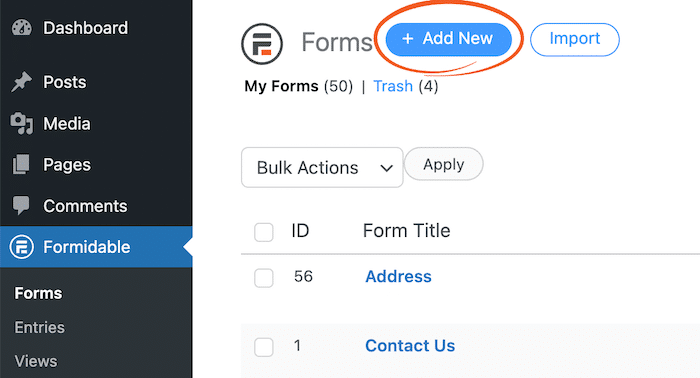
Choose Blank Form and give your form a name like "Hogwarts House Quiz." The plugin opens Formidable Forms' form builder, where you can start dragging in and customizing your fields.

You have many fields to choose from, but these four are the most common for quizzes:
- Text for open-ended written answers
- Radio Buttons for single-answer multiple choice (the workhorse for outcome quizzes)
- Checkboxes for "select all that apply" questions
- Likert Scale for personality and agree-or-disagree questions
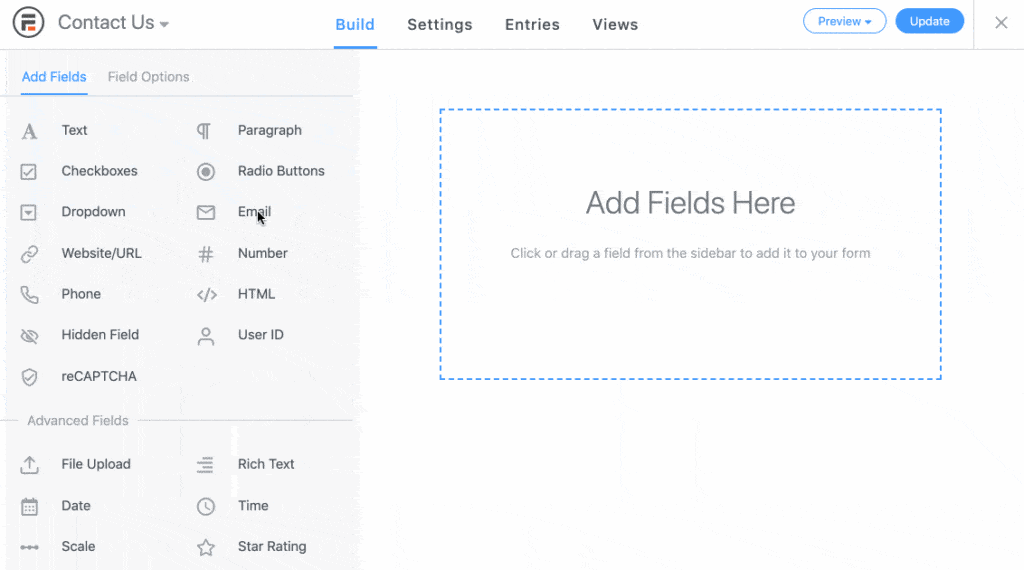
For a Hogwarts house quiz, you want Radio Buttons for each question, with one answer option mapped to each house. Write the questions in a voice that matches the premise. "You find a wounded creature in the forest. What do you do first?" pulls people in more than "Which color do you prefer?"
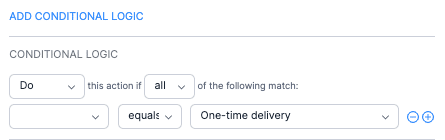
If you want different users to see different questions based on their earlier answers, click any field, open Conditional Logic in the field settings, and set your rules. For most viral quizzes this is overkill, but it's there if you want to build a branching quiz funnel.
Once your questions are in place, click Update and head to step 2.
Step 2: Choose your quiz type
Now let's turn your form into a quiz. Go to Settings → Actions and Notifications. You'll see two quiz options:
- Scored Quiz for trivia and knowledge quizzes, where answers have right and wrong values
- Quiz Outcome for outcome and personality quizzes, where answers map to a result

For the Hogwarts house example, choose Quiz Outcome. A menu opens below with options for each outcome you want to create.
For each outcome, you can:
- Change the action name (only you see this)
- Choose when to trigger the outcome
- Upload an image to attach to the outcome, like a house crest
- Add the result text with the Visual or Text editor
- Add more outcomes
- Add the conditions for the outcome to be met

The result text is the entire payoff, so treat it like ad copy, not a confirmation message. "You're a Hufflepuff. Loyal, patient, and a genuinely better person than most of your friends" lands harder than "You're a Hufflepuff!" For a 4-house quiz, create 4 outcomes: Gryffindor, Hufflepuff, Ravenclaw, and Slytherin.
Step 3: Set your outcome logic
Now you need to choose which answers lead users down each path. For our quiz, certain answers should point toward one of the four Hogwarts houses, so you have to define which answers lead to which house. Click the Add Outcome Conditions button you saw in the last step, then map answers to that outcome.

Each outcome gets its own set of answers. If you want to weight some questions more heavily than others, simply add the same outcome condition multiple times. The result with the highest number of matching answers at the end wins, and if there's a tie, the outcome with the lower ID wins, so order matters when ties are likely.
A few patterns keep an outcome quiz from feeling mechanical:
- Avoid mapping every answer one-to-one to a single house, so users can't game it.
- Mix in a few answers that score for two houses.
- Keep the quiz long enough that the result feels earned but short enough that people finish it.
Once you've customized your outcomes, click Update and move on to showing your quiz.
Step 4: Display your viral quiz
Displaying your form is easy with Formidable Forms, and there are two ways to do it: the WordPress block or a piece of shortcode.
For the block, go to the post or page where you want the quiz to appear, add a new block, and search for the Formidable Forms block. Choose your quiz from the dropdown menu and it's ready to go.

For the shortcode, go to Formidable → Forms and click the <> icon underneath Actions, then choose Insert Manually and copy the shortcode. Add a shortcode block to your post or page, paste the shortcode in, and update the page.

For a viral quiz, the page itself matters almost as much as the quiz. A clean intro, a strong hero image, and social share buttons that prefill the result text all help. You can even use Formidable Views to pull your other quizzes into a related-quiz block at the bottom of the page, which updates itself as you add more.
How to choose the right viral quiz plugin
If you want the widest range of quiz types and you'd rather keep your data on your own site, Formidable Forms is the pick, and it doubles as the form builder for the rest of your site without slowing it down.
If you want something free to start, HD Quiz and the free tiers of Quiz and Survey Master, Quiz Maker, or Quiz Cat all get you a working quiz at no cost.
And if lead generation is the whole point, Thrive Quiz Builder or a hosted tool like Interact lean hardest in that direction. Match the plugin to the job, and don't pay for power you won't use.
Pick one, build it, and let it spread
You've now seen the best viral quiz WordPress plugins and exactly how to build a shareable quiz from scratch in Formidable Forms.
Any of these tools can get a quiz live, but if you want one builder that handles outcome quizzes, scored quizzes, and the rest of your site's forms while keeping your data on your own site, Formidable Forms is where we'd start.
If you want to keep going, our guide on how to create a quiz in WordPress walks through other ways to build a quiz.
Get Formidable Forms and build your first quiz today.
- What is the best WordPress plugin for viral quizzes?
-
Formidable Forms covers the widest range of quiz formats and gives you the most control over results and logic, and because it's a native form builder it keeps your quiz data on your own site instead of routing it through a third party. Quiz and Survey Master, HD Quiz, Quiz Cat, and Thrive Quiz Builder are common alternatives, but they tend to be more limited in either quiz types, customization, or what you can do with the data after the quiz is finished.
- How long should a viral quiz be?
-
Long enough that the result feels earned, but short enough that people actually finish it. If a quiz drags on, completion rates fall, and a quiz nobody finishes is not a quiz that gets shared. You can also turn it into a conversational form, which shows one question at a time and tends to lift completion rates.
- How do I make quiz results shareable on social media?
-
Two things matter. First, design the result screen so it looks good as a screenshot, with named outcomes, a strong visual, and a one-sentence description. Second, add social share buttons that prefill the share text with the result name, so people can post in one tap. Most WordPress social share plugins handle this, and you can pass the result into the share URL using Formidable Forms' view shortcodes.
This article may contain affiliate links. Once in a while, we earn commissions from those links. But we only recommend products we like, with or without commissions.

