Formidable Forms

Formidable Forms

  • Features
  • Templates
  • Pricing
  • Resources
    • Docs & Support
    • Blog
    • Community
  • Solutions
    • Web Applications
    • Calculators
    • Surveys
    • Directories
    • Payments
    • Contact forms
  • Login
  • Get Formidable Forms

Formidable Team / Last Updated October 16, 2023

WordPress Not Sending Emails? Here’s How To Fix It!

Even if everything's properly configured, you can still run into problems with WordPress not sending emails. Here's how to fix the most common issues.

WordPress Not Sending Emails

Approximate read time: 5 minutes

This probably isn't news to you... but there's a lot that can go wrong when you run a WordPress site.

And one of the biggest pains in the a**? 🫢 Automated transactional emails.

It doesn't seem to matter what you do or how perfectly you configure your WordPress website email settings. Sometimes those darn automatic emails just won't work. 😤

Get Better Forms FREE!
 

So how do you fix WordPress emails not sending? Let's first learn a little more about how sites send emails. Then we'll show you an easy way to solve the most common problems.

  • How WordPress sends emails
    • Sending emails through your web host
      • Sending emails through an external mail server
    • So how do you set up SMTP for WordPress?
      • How to send SMTP emails from WordPress
      • Fix WordPress forms not sending emails

      How WordPress sends emails

      There are two different ways to send emails from your WordPress website: through your web host via the wp_mail function or through an external mail server using Simple Mail Transfer Protocol (SMTP).

      Sending emails through your web host

      WordPress has a built-in email functionality: the wp_mail function. Since it doesn't require any setup or specific know-how, this is usually how new WordPress users first try sending email notifications from their sites. 📤

      These automatic WordPress emails are handled by your web host.

      When your website triggers an email, it essentially tells your web host to send the email for you. 🗣️ And some web hosts are more reliable than others. But even the best WordPress hosting won’t have 100% deliverability rates.

      Hosting servers then use the PHP mail() function to send emails on your behalf, so problems pop up if your PHP is configured incorrectly. And honestly, it’s easy to make mistakes when coding the backend of your web server in PHP. 😬

      The importance of your web host

      If you're having trouble sending emails, the issue may come from your hosting server.

      Although shared hosting is often cheaper, there is a serious downside: thousands of other sites/domains are on your same IP address and mail server.

      All it takes is one unscrupulous user to start spamming, and BOOM! 💥 The reputation of every message sent through that server takes a hit. And that means your messages are more likely to be marked as spam. 👎

      Sending emails through an external mail server

      One of the best ways to keep your WordPress emails from ending up in spam is to use SMTP.

      This method connects your website with a trusted external mail server for sending email messages. 🔗 Although adding SMTP to your WordPress site does require some initial setup, it offers huge advantages and is definitely worth the effort!

      Since SMTP specializes in reliable email and completely bypasses your web host, you'll have much better deliverability rates. 📈

      So how do you set up SMTP for WordPress?

      Subscribe on YouTube

      Luckily, you don't need to know how to code to set up SMTP on WordPress. You just need an SMTP plugin.

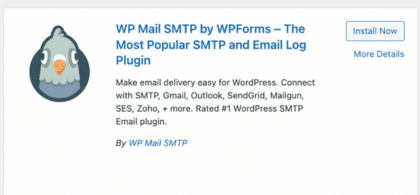
      And WP Mail SMTP is the best SMTP plugin you'll find! Plus, its premium version is especially useful if you're sending a lot of transactional emails every day.

      wp mail smtp

      Whether you want to send order confirmations or send an email from a contact form in WordPress, this plugin ensures your receipts are received and that you don't miss any questions from customers. 📬

      Check out this step-by-step guide to setting up SMTP in WordPress, or keep scrolling for a summary of the basic steps below.

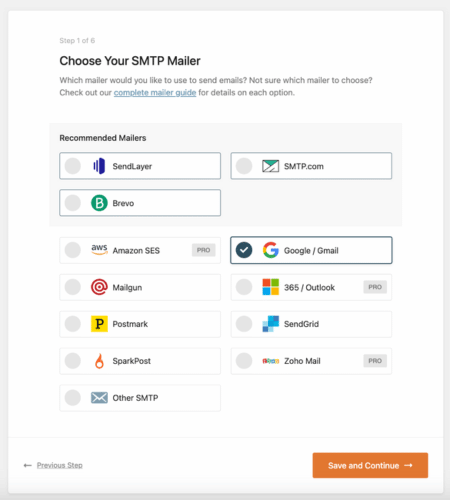
      We should point out that you also need an SMTP service to make this work. We recommend Sendgrid, but there are other choices too:
      • SendGrid (Recommended)
      • SMTP.com
      • Brevo SMTP (formerly SendinBlue)
      • Mailgun SMTP
      • Gmail SMTP
      • Microsoft SMTP
      • Amazon SES SMTP

      How to send SMTP emails from WordPress

      1. Install the WP Mail SMTP plugin
      2. Configure the plugin settings
      3. Enter your SMTP mail server details
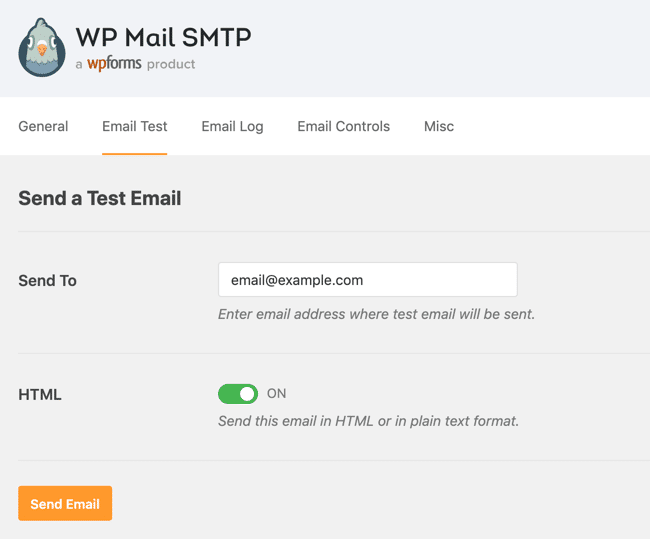
      4. Send a test email

      The best thing about this plugin is that it takes all the guesswork out of the equation by allowing you to send test emails right from your WordPress dashboard.

      WP Mail SMTP send test email from WordPress

      With a plugin like this, you don’t need to know anything about the technical aspects of email providers or web hosting. Just configure the settings, click save, and you're done! ✅

      For advanced users, you're able to configure options based on SMTP servers, SMTP ports, and email addresses as well.

      Fix WordPress forms not sending emails

      Formidable and WP Mail SMTP

      To make sure you don't have any issues with your WordPress contact forms not sending emails, you'll want to connect your WordPress form plugin to your SMTP plugin. 🔌

      If you're using Formidable Forms, ensuring your notification emails are sent out reliably is easy. In fact, we’ve partnered with WP Mail SMTP to offer direct SMTP integration.

      All you need to do is go to Formidable → SMTP from your WordPress dashboard. From there, you just need to follow a quick two-step process to get things rolling. Easy as pie! 🥧

      Formidable Forms SMTP emails in WordPress

      Are you using a different contact form plugin on your site? See how Formidable compares to WP Forms and Contact Form 7 (CF7).

      Give Formidable Forms a try with our free form builder plugin or upgrade to our premium form maker for even more features. We're so sure you'll love it, we offer a 14-day money-back guarantee!

      Try Formidable Forms now!

      Make WordPress not sending emails a thing of the past

      We hope you now feel confident you can fix emails not sending in WordPress! 🧑‍🔧 And by using an SMTP service and a plugin or two, you can also feel confident that your readers and customers are receiving your emails, regardless of which email client they use. 📨

      Now that you know your emails are sending correctly, learn more about setting up form notifications on your website.

      For more WordPress tips, keep it glued to Formidable's WordPress blog. Until next time!

      Read more about WordPress email

      • WordPress Mailgun subscribe form How To Create a Mailgun Subscribe Form in WordPress
        Read More
        How to use WP Mail SMTP plugin in WordPress How the WP Mail SMTP Plugin Sends Emails in WordPress
        Read More
        How to verify email addresses in WordPress How to Verify Email Addresses in WordPress
        Read More

      Using WordPress and want to get Formidable Forms for free?

      Get Formidable Forms Lite Now

      Get Email Updates

      This article may contain affiliate links. Once in a while, we earn commissions from those links. But we only recommend products we like, with or without commissions.

      Comments

      1. goatcloud says

        May 27, 2017 at 5:54 am

        Nice post, Nathanael. I moved to SendGrid and never looked back.

        Reply
      2. phil salt says

        June 7, 2017 at 1:20 pm

        Mailgun is good service too

        Reply
        • seoactivist says

          May 2, 2018 at 4:06 pm

          I use Mailgun and really like it, would be great to have FormidablePro integrate with Mailgun's Email Validation API 🙂

          Reply
      3. Carol Undy says

        July 27, 2017 at 7:12 am

        Great explanation as to why my emails have been so unreliable. Thanks.

        Reply
      4. DesignME says

        October 20, 2017 at 12:02 pm

        I've installed an smtp server but emails are still not being sent using the "resend" method.

        Reply
        • Nathanael Jones says

          October 20, 2017 at 12:19 pm

          If you open a ticket in our helpdesk, our support team will help you get to the bottom of this.

          Reply
      5. scott Gutman says

        December 11, 2017 at 8:17 am

        Postman SMTP is now available under a new plugin name. And I agree, its the BEST smtp plugin and so simple.

        Post SMTP Mailer/Email Log

        Reply
      6. kizi4 says

        August 1, 2020 at 10:14 pm

        Hi there everyone, it's my first pay a quick visit at this website, and post is
        truly fruitful for me, keep up posting such articles.

        Reply
      7. Carl Williams says

        December 29, 2020 at 7:44 pm

        I believe this is among the most significant info
        for me. And i am satisfied reading your article. However want to remark
        on some normal things, The web site taste is wonderful,
        the articles is really nice : D. Excellent job, cheers

        Reply
      8. Richard says

        February 1, 2021 at 11:35 am

        For people connecting WordPress with MS ID (like Azure AD integration) this is a great plugin that also offers the possibility to send emails via O365 account

        Related to Formidable not sending emails I noticed that when using a link to update a value inside an existing entry field, the update action is not triggered. Some custom code is necessary to check that field update then trigger the action.

        Reply
      9. Dido Sanchez says

        July 8, 2021 at 2:59 pm

        Nice and informative article ! In my case on my hosting the port 25 was blocked so I found smtp service called smtpboxes.com that works on port 2525 and 8025 as well. This neat workaround worked great with WP Mail.

        Reply
      10. olabisi says

        October 28, 2021 at 3:26 am

        I've installed an WP SMTP server but emails are still not being sent. I tried to use test mail also and the message i got was that there is a problem sending email or something like that

        Reply
        • srwells says

          October 28, 2021 at 11:36 am

          Hi there,
          We actually just completed a video tutorial showing how to do this. It may be worth watching and if it doesn't help, you may need to contact our support team: https://youtu.be/vUuSc9bR8Hk

          Reply

      Leave a Reply Cancel reply

      Your email address will not be published. Required fields are marked *

      Popular Resources

        • How To Create a Searchable Database on a WordPress Site
        • How To Create a Custom Calculator in WordPress [6 Steps!]
        • How To Create a Fitness Tracker in WordPress
        • Formidable Views: The Best WordPress Custom Application Plugin
        • How To Require Email To Download Files in WordPress
        • How to Create a WordPress Forms Drop Down List
        • Best Gravity Forms Alternative for WordPress: Formidable Forms vs. Gravity Forms
        • WPForms Alternative: Formidable Forms vs. WPForms Compared

      Take on bigger projects Right Now

      Get the tools you need to revolutionize your workflow and architect a masterpiece. Build the most advanced WordPress forms and actually use the data you collect in meaningful ways.

      Get the most advanced WordPress form plugin and the only form builder with integrated Views.

      Get Formidable Forms Now

      Resources

      • Community
      • Affiliates
      • Contact
      • Free Online Form Builder

      Top Features

      • Application Builder
      • Calculator Plugin
      • Surveys & Polls
      • Quiz Maker
      • Form Templates
      • Application Templates
      • Directory Plugin
      • Donation Plugin

      Company

      • About Us
      • Giving Back
      • Careers
      • Newsletter
      • WP Tasty
      • Nutrifox

      Copyright © 2023 Strategy11, LLC. Formidable Forms® is a registered trademark Strategy11, LLC.
      Privacy Policy | Terms of Service | Sitemap

      Join 300,000+ using Formidable Forms to create form-focused solutions fast. Get Started See User Reviews