
What a pleasure to have support within minutes. Brillant, accurate answer, and solved the question. Thanks to the Formidable Team. Eric


Last updated on August 18, 2026 by Formidable Team
WordPress Forms for Zapier: The Ultimate Integration
Want to unlock the power of WordPress forms for Zapier? With the right Zapier integration, it's easy! Learn how a form builder can help automate everything.

Approximate read time: 5 mins
Tired of boring contact forms that sit there?
Wish you didn't waste time copying data between apps?
Frustrated by how hard it is to make your website work the way you want?
Formidable Forms and Zapier are here to help! Unlock new features like automatically updating your email list, getting notified of new leads, and building crazy-smart workflows. Plus, it's surprisingly easy to set up.
Let's show you why Formidable answers your WordPress forms for Zapier!
Upgrade your WordPress site with powerful, flexible forms.
The power of Formidable Forms + Zapier
Think your website forms are limited to basic data collection?
Formidable Forms and Zapier will change that! Together, they unlock a whole new world of automation and integration, making your website work smarter and saving you money.
Here's how connecting your forms to Zapier can streamline your workflows:
- Streamline follow-ups: Instantly send form entries to your CRM or email marketing tool.
- Eliminate tedious tasks: Automatically create tasks, spreadsheets, or documents based on specific form answers.
- Customize user experiences: Trigger different actions based on the user's information. Want to offer tailored support based on their needs? You can!
Formidable Forms allows you to collect specific data using various form fields. Then, you can use that data to power amazing Zapier workflows.
But it gets even better here: Formidable Forms helps you stretch your Zapier budget! Since their pricing is based on tasks, every automation counts. Our advanced features, like conditional logic and built-in integrations (Mailchimp, ManyChat, etc.), let you do more in Formidable.
And that reduces the number of external Zaps you need.
This powerful pairing of Formidable Forms and Zapier saves you time, boosts efficiency, and maximizes your investment in both tools.
From Idea to Reality in Minutes. Build Powerful Forms, Dashboards, Apps and More.
Formidable Forms makes advanced site building simple. Launch forms, directories, dashboards, and custom WordPress apps faster than ever before.
Solving problems with Formidable + Zapier workflows
So, we've talked a lot about how Formidable and Zapier can help you.
But that's all talk unless we show you some real examples of how this can benefit you. Here's how:
- Instant lead notifications: Never miss a potential customer. Get a Slack message, email, or even an SMS whenever someone submits a form on your site. This ensures a faster response time and can improve lead conversion.
- Automated CRM updates: Add new leads to your CRM (Salesforce, HubSpot, etc.) instantly, eliminating manual data entry. This reduces errors and keeps your customer data up-to-date.
- Personalized follow-up: Based on the information the user provides in the form, send different follow-up emails. For example, offer a special discount to people who indicate they're interested in a specific product. This helps you build stronger relationships with potential customers.
- Spreadsheet tools: Automatically track form entries in Google Sheets for analysis and reporting.
And more!
There are no limits to taking your form data and sending it to Zapier!
With our Zapier integration, you can connect your WordPress site to any app that works with Zapier (with no Zapier webhook required).
Need inspiration? Browse Zapier's complete list of integrations, or check out our case study on how a gamer monetized his hobby! He integrated Formidable Forms and Zapier to solve his website problems and boost his overall business.
? Did you know?
You can send all your form data to Google Sheets...and you don't need Zapier! Formidable Forms can handle sending your form data to Google Sheets. No extra plugin needed.
How to integrate Zapier with WordPress forms
Setting up a link between Zapier and your WordPress forms is surprisingly simple.
As we mentioned, Formidable Forms is the best WordPress form plugin you can find. And when you add Zapier to it, you can do more than you can imagine with your forms.
And there’s no need for technical experience or know-how. Everything can be set up by simply activating our Zapier WordPress add-on. By the way, there's even more information on our Zapier help doc page here to guide you.
But it's just a couple of steps to get up and running:
Step 1: Install and activate Formidable Forms
Install and activate your Formidable Forms Business license on your website if you haven't already.
After confirming your license, go to Formidable → Add-Ons in your WordPress dashboard and click Install on the Zapier WordPress plugin.

Perfect. Now, it's time to head to your Zapier account.
Step 2: Set up Zapier API integration
First, go to your Zapier dashboard and make a Zap like normal. If you don't have an account yet, sign up for one to get started
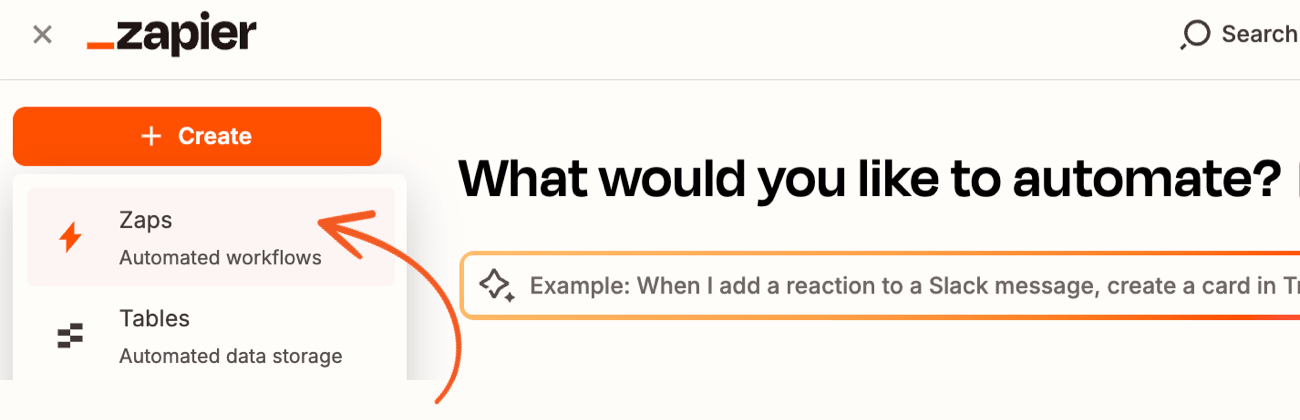
Next, you must choose Formidable Forms as the app under the Trigger event.

Then, choose an event that triggers the Zap. This can be either a new or deleted entry, which triggers instantly.

Now, Zapier will ask you to choose an existing Formidable Forms account from the dropdown. If it's not connected yet, you can add a new account.

Next, follow the instructions in the popup window to connect your Formidable Forms account and Zapier. You need your API Key and site URL (including the https:// and trailing /). You can find your API Key under Formidable → Global Settings → API.

Last, make sure you are NOT using the default WordPress permalinks.
If unsure, go to your WordPress dashboard and go to Settings → Permalinks to check. If you try to authorize your Zap using default permalinks, you will get 404 errors in Zapier.
Ready to start using your WordPress forms for Zapier?
It's that simple to get started with the Formidable Zapier integration. We hope you are feeling inspired. Think of all the time you could save by automating... everything!
If you've found this post helpful, check out the Formidable blog for more WordPress tips. Until next time!
More WordPress forms for Zapier posts
 How to Use WordPress to Upload Files to Google Drive
 How to Set Up a ManyChat WordPress Integration (With Zapier)
 How to Integrate Zoho CRM with WordPress
This article may contain affiliate links. Once in a while, we earn commissions from those links. But we only recommend products we like, with or without commissions.

