
What a pleasure to have support within minutes. Brillant, accurate answer, and solved the question. Thanks to the Formidable Team. Eric


Last updated on August 18, 2026 by Emma Wells
How to Build a Calculator That Recommends Actions (Not Just Numbers)
Most calculators output a number and stop. They calculate, they display, they wait. Recommendation-based smart calculators output a number and then tell you exactly what to do with it.
And with Formidable Forms, you can build them without writing a single line of code.

Approximate read time: 9 minutes
If you've read about why most pricing calculators fail to qualify leads, you already understand the problem. Calculators that only calculate leave a gap between the number and the decision. The user sees $15,000 or $50,000 or $100,000 and has to figure out what that means and what happens next. That gap is where momentum dies.
Recommendation-based calculators close that gap. They don't just produce numbers. They interpret those numbers in context and recommend specific actions based on what the inputs reveal. "Book a call now." "Download the planning guide." "See alternative options." "Start with Phase 1."
This isn't about adding more features to your calculator. It's about fundamentally changing what the calculator does after it runs the math. Instead of displaying a result and waiting for the user to decide what to do, it makes a recommendation. A specific one. Based on what it learned.
The calculator becomes active instead of passive. It doesn't just inform. It directs. And that direction comes from understanding what those inputs mean when you look at them together.
Formidable Forms gives you the tools to build this: powerful calculation fields that handle the math, flexible conditional logic that classifies patterns, outcome quizzes for complex routing, and Confirmation actions that control exactly what users see after submission. Everything you need is already built in.
Upgrade your WordPress site with powerful, flexible forms.
What Makes a Recommendation Different From a Number
Traditional calculators treat all users the same. You input data, it calculates, it displays the result. Everyone with the same inputs gets the same output. The number might change based on what you enter, but the experience afterward doesn't. Same result page. Same generic next step. Same "thanks for using our calculator" message.
Recommendation-based calculators treat inputs as signals that reveal context. And context changes everything. The same $50,000 project estimate means completely different things depending on what else the calculator learned:
Whether the timeline is 6 months or 30 days. Whether the user has done this before or it's their first time. Whether budget is the main concern or speed is the priority. Whether they're ready to commit or still comparing options.
The math produces the same number. But the recommendation? Completely different based on these patterns.
Here's how the flow differs:
Traditional calculator: Inputs → Calculation → Display number → Wait for user action
Recommendation-based calculator: Inputs → Classification → Calculation → Match to pattern → Recommend action
The difference is the classification layer. Before showing results, the calculator asks itself: "Based on what this person told me, what action makes sense?" Then it recommends that action. Specifically. Directly. No ambiguity about what should happen next.
This is where Formidable Forms' conditional logic becomes essential. It's not just about showing or hiding fields during form completion. It's about routing users to completely different outcomes after the calculation runs. The same conditional logic engine that powers dynamic forms also powers recommendation-based results.
From Idea to Reality in Minutes. Build Powerful Forms, Dashboards, Apps and More.
Formidable Forms makes advanced site building simple. Launch forms, directories, dashboards, and custom WordPress apps faster than ever before.
The Three Components of Recommendation Logic
Building a calculator that recommends actions requires three components working together. With Formidable Forms, you get all three out of the box.
Component One: Classification Questions
These are questions that don't feed into the math. They exist purely to understand context. And context is what makes recommendations possible.
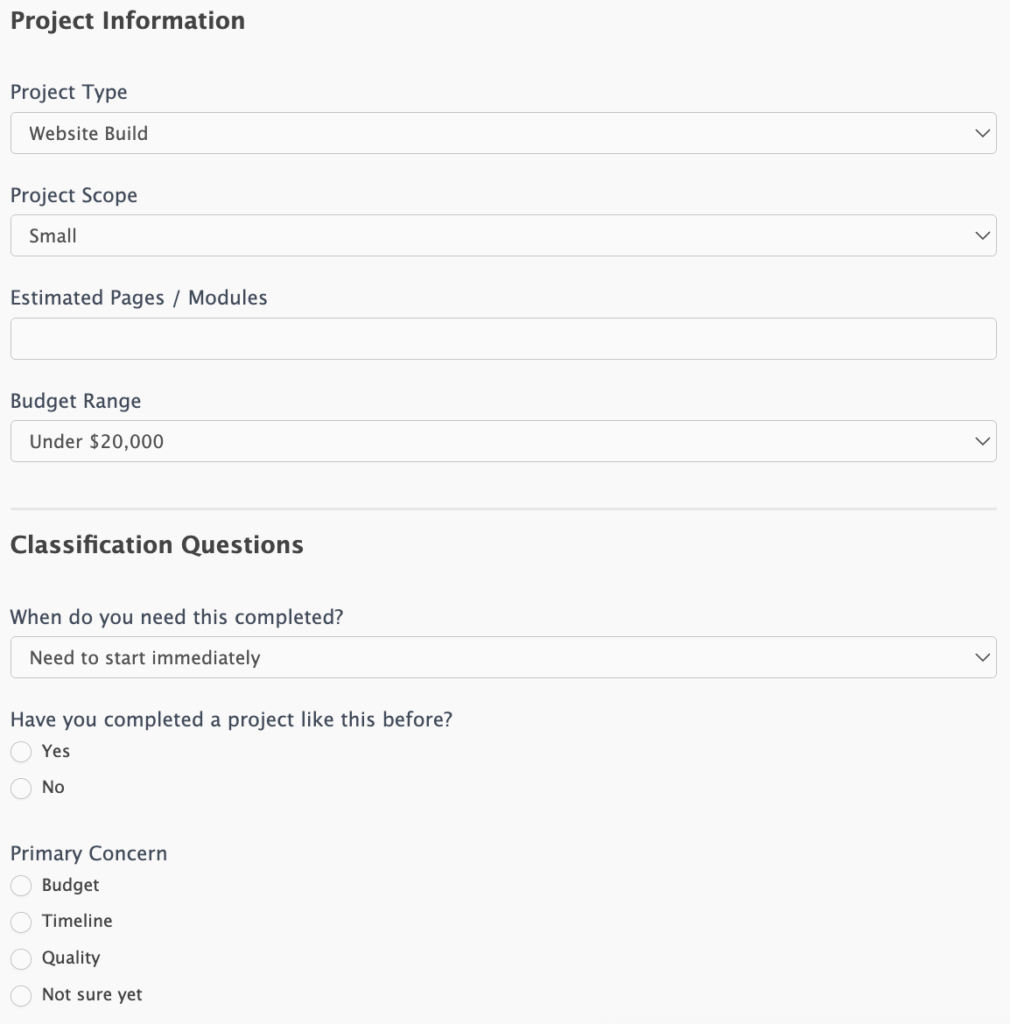
Questions like "When do you need this completed?" or "What's your primary concern: budget, timeline, or complexity?" or "Have you done this type of project before?" don't change the calculation at all. They change what the calculator recommends doing with that calculation.
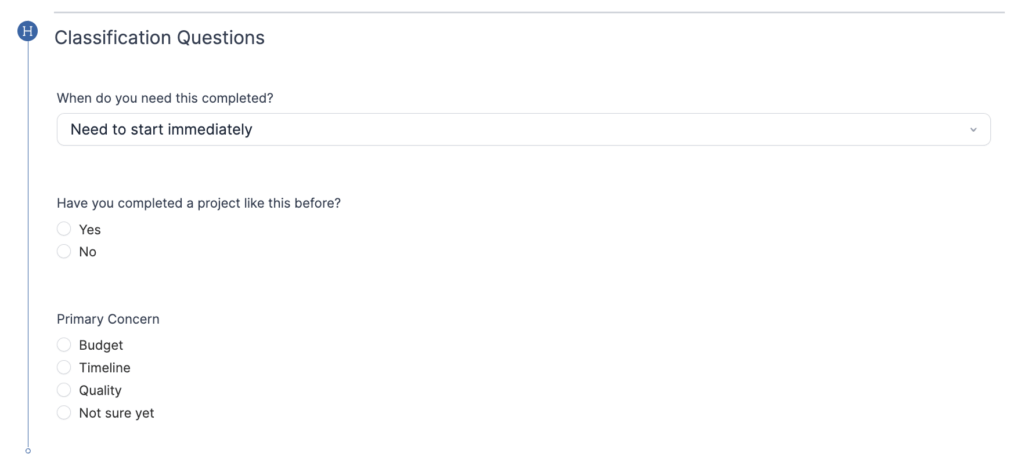
A user who answers "Need to start immediately" + "Done this before" + "Main concern is timeline" gets classified into an urgency pattern. The calculator recognizes this combination and will recommend fast-execution actions when it shows results.
A user who answers "Just exploring" + "First time" + "Main concern is budget" gets classified into a planning pattern. The calculator sees this very different combination and will recommend educational actions instead.
The classification happens automatically based on answer combinations. No human interpretation required. The logic is built into the calculator itself, and it fires the moment the user submits.
Component Two: Pattern-Based Routing Logic
This is where the calculator decides what to recommend. It uses conditional logic to match classifications to actions. Formidable's conditional logic builder makes this visual and intuitive instead of requiring code.
The logic looks something like this:
IF timeline = urgent AND experience = high
  THEN recommend: immediate booking

IF timeline = exploring AND experience = low
  THEN recommend: planning guide download

IF budget < scope_minimum AND timeline = moderate
  THEN recommend: phased approach consultation
This isn't a formula. It's decision logic. The calculator isn't just computing numbers. It's evaluating patterns and routing people to different actions based on what those patterns reveal.
Different input combinations trigger different recommendations. Someone with a $50,000 budget and tight timeline gets booking recommendations. Someone with the same budget but loose timeline gets planning recommendations. Same calculator structure. Same mathematical accuracy. Different actions recommended based on context.
Component Three: Action-Matched Outcomes
The calculator shows different result screens with specific calls to action based on classification. Here's what that looks like:
Urgency Pattern: Shows the calculated price ($50,000), timeline confirmation ("We can start in 2 weeks"), and action recommendation with calendar scheduling: "Book your kickoff call this week"
Planning Pattern: Shows the calculated price range ($45,000-$55,000), context explanation, and action recommendation with direct download: "Download your complete planning guide"
Budget Constraint Pattern: Shows both the full scope price ($50,000) and realistic budget scope ($25,000), with action recommendation: "See phased implementation options"
Notice the pattern: same calculator, same user inputs for project scope. But the classification logic routes them to different result screens with different recommended actions. The calculator isn't showing everyone the same "here's your price, contact us" page. It's showing outcomes matched to what each classification needs, with specific CTAs like "Book your January 15 kickoff call" or "Download: How to Plan a $50K Project" or "Start with Phase 1 ($25K)."
How to Build This in WordPress with Formidable Forms
You can build recommendation-based calculators using Formidable Forms' powerful conditional logic and outcome quiz features. Unlike basic calculator plugins that only do math, Formidable gives you the tools to classify inputs and recommend different actions based on what users tell you.
Formidable offers two different approaches, depending on how complex your recommendations need to be. Both leverage features built directly into Formidable Forms Pro, so you're not cobbling together multiple plugins or writing custom code.
Option One: Outcome Quizzes for Multiple Result Paths
Formidable's Quiz Maker add-on is designed specifically for routing users to different outcomes based on their inputs. While it's called a "quiz maker," it's actually a sophisticated classification and routing engine. Perfect for recommendation-based calculators.
Here's what makes outcome quizzes powerful: they use a matching system where each answer can be mapped to one or more outcomes. When the form is submitted, Formidable counts up which outcome got the most matches and displays that one. This means the calculator can intelligently determine the best fit even when answers point in different directions.
Here's how it works:
Step 1: Build your calculator form
In Formidable's drag-and-drop form builder, add your calculation fields to collect budget, scope, timeline, and other math inputs. Then add classification questions like "When do you need this?" and "What's your primary concern?" and "Have you done this before?" These don't affect the calculation but they drive the recommendation.
Formidable's calculation fields handle all the math automatically. You set the formula once, and it calculates in real-time as users fill out the form. No coding required.
Step 2: Add the Outcome Quiz action and create your outcomes
In Formidable's form settings, create an Outcome Quiz action. For each pattern you identified, create a separate outcome. Give each outcome its own result message, image, and recommended action. The urgency pattern gets "Book your call now" content. The planning pattern gets "Download your guide" content. The budget pattern gets "See alternatives" content.
Formidable lets you create unlimited outcomes. Each one can be completely unique with its own design, messaging, and calls to action.
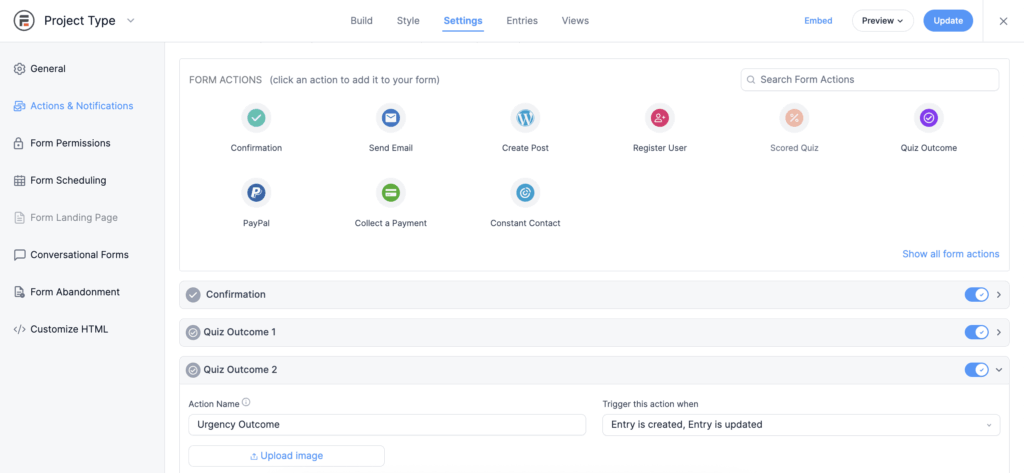
Step 3: Design each outcome
Each outcome gets its own custom content using Formidable's rich text editor. Write the message, upload an image, and include the specific recommended action with embedded links or calendars. You can use any of Formidable's field shortcodes to display the calculated values alongside your recommendations.
This is where Formidable shines. You're not limited to generic templates. Every outcome can be fully customized to match what that pattern needs.
Step 4: Map each answer to outcomes
Here's where outcome quizzes differ from conditional logic. Instead of setting up IF/THEN rules, you map each answer option to one or more outcomes.
For example:
- "Need to start immediately" → maps to Urgency Pattern outcome
- "Done this before" → maps to Urgency Pattern outcome
- "Main concern is timeline" → maps to Urgency Pattern outcome
- "Just exploring" → maps to Planning Pattern outcome
- "First time" → maps to Planning Pattern outcome
- "Main concern is budget" → maps to Budget Pattern outcome
When someone submits the form, Formidable counts up the matches for each outcome. If three answers map to the Urgency Pattern and two map to the Planning Pattern, the Urgency Pattern wins and that's what the user sees.
This scoring system is incredibly powerful because it handles the complexity of real human behavior. People don't fit into perfect boxes. Someone might be urgent but inexperienced, or budget-conscious but ready to start now. The outcome quiz finds the best match based on the weight of their answers, not requiring perfect alignment.
Each outcome includes the calculated price plus the pattern-specific recommendation. The user sees the number and the action in one result screen. No ambiguity about what happens next.
This approach gives you complete control over each result screen. Different images. Different messaging. Different CTAs. Different actions. Each pattern gets its own outcome designed specifically for what that pattern needs. And it all happens within Formidable Forms, using features that are already built in.
The matching system means you don't need to anticipate every possible combination of answers. You just map answers to outcomes, and Formidable figures out which outcome best fits the pattern.
Option Two: Conditional Confirmations for Simpler Routing
If you don't need the full outcome quiz features, Formidable's Confirmation actions give you a simpler way to recommend different actions. This uses conditional logic with exact rule matching instead of the scoring system.
Formidable's Confirmation action is specifically designed to control what happens after a form is submitted. It's not an afterthought feature. It's built to give you complete control over the post-submission experience. And when you add conditional logic to multiple Confirmation actions, you transform a simple success message into a recommendation engine.
The key difference from outcome quizzes: conditional confirmations require exact matches. The conditions you set must be met completely for that confirmation to display. This gives you more control but requires thinking through your combinations more carefully.
Here's how it works:
Step 1: Build your form with classification questions
Same as Option One: add your calculation fields and classification questions to your Formidable form. The form builder works exactly the same way. You're just choosing a different action on the backend.
Step 2: Create multiple Confirmation actions
Instead of outcomes, create multiple Confirmation actions in Formidable's form settings. This is where Formidable's power shows up. You're not limited to one confirmation. You can stack as many as you need, each with its own conditions.
Each confirmation action represents a different recommendation. One confirmation for urgent users with booking calendar embedded. One confirmation for exploratory users with guide download. One confirmation for budget-conscious users with alternatives.
Formidable evaluates all your Confirmation actions when the form is submitted. Here's the critical part: it only displays the confirmations whose conditions are met exactly. If you set up a confirmation that triggers when timeline = "immediate" AND experience = "high," it will only show if BOTH those conditions are true.
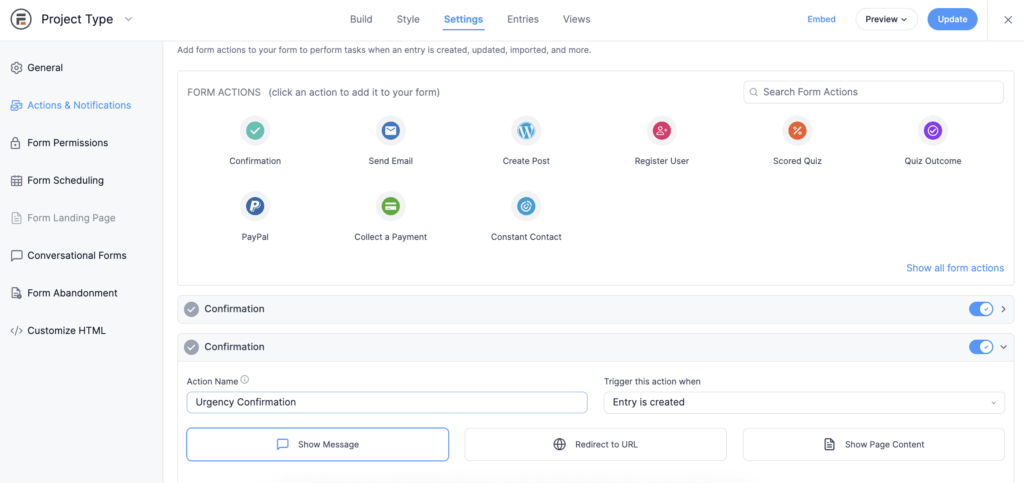
Step 3: Write each confirmation message
Each confirmation includes your calculated result using Formidable's field shortcodes, plus the specific recommendation. You can use Formidable's rich text editor to format the message, add images, embed calendars, insert download links, or include any HTML and CSS you want.
The flexibility here is key. You're not stuck with generic templates. Every confirmation can be completely customized to match what that pattern needs. Show the calculated price. Explain what it means. Recommend the specific action. Include the CTA that makes it happen.
Step 4: Set up conditional logic for exact pattern matching
Add conditional logic to each confirmation using Formidable's visual condition builder. No code required. Just click "Add Conditional Logic" and set up your rules.
This is where you need to think through your patterns carefully. Unlike outcome quizzes that count matches, conditional logic is binary: either the conditions are met or they're not.
For example:
- Urgency confirmation triggers if: Timeline = "Need to start immediately" AND Experience = "Done this before" AND Primary concern = "Meeting the deadline"
- Planning confirmation triggers if: Timeline = "Just exploring" AND Experience = "First time" AND Primary concern = "Understanding what's involved"
You can use AND logic (all conditions must match) or OR logic (any condition can match). The key is being explicit about what combination triggers each confirmation.
This means you need to think through the specific combinations that matter. If someone is urgent but inexperienced, which confirmation should they see? You need to create a confirmation action for that specific combination, with its own conditions set up.
The advantage of this approach is precision. You're explicitly defining which combinations trigger which recommendations. The disadvantage is you need to anticipate the combinations that matter and create confirmation actions for each one.
This works best when you have clear, distinct patterns that don't overlap much. If someone fits multiple patterns at once, you may need to prioritize which confirmation shows or set up your conditions more carefully to avoid conflicts.
Which Approach to Use
Use Formidable's outcome quizzes when:
- You want the calculator to find the best match even when answers point in different directions
- Your users don't fit into perfect boxes (someone might be urgent but inexperienced, or budget-conscious but ready)
- You need completely different result experiences (different images, messaging, layouts)
- You want a more forgiving system that handles the messiness of real human behavior
The scoring system makes outcome quizzes ideal when patterns overlap or when you need the calculator to figure out the best fit automatically.
Use Formidable's conditional confirmations when:
- You have clear, distinct patterns that require exact matching
- You want precise control over which combinations trigger which recommendations
- Your patterns don't overlap much (someone is either urgent or exploring, not both)
- Your result screens are similar but the recommended action changes
Conditional logic gives you more control but requires more upfront thinking about combinations.
Both approaches let you build recommendation-based calculators that classify inputs and recommend actions. The difference is how they match: outcome quizzes count matches and show the winner, while conditional confirmations require exact rule matching.
And both are built directly into Formidable Forms. You're not installing separate plugins, writing custom code, or trying to hack together a solution. Formidable was designed to handle this exact use case. The calculation fields, conditional logic, outcome quizzes, and confirmation actions all work together seamlessly to turn your calculators into recommendation engines.
Why Recommendations Change Outcomes
When calculators recommend actions instead of just displaying numbers, three things fundamentally change.
Users don't wonder what to do next. Traditional calculators create decision paralysis. You see a number and think "Is this good? Should I proceed? Do I need more quotes? What's the next step?" The calculator gave you information but no direction. Recommendation-based calculators eliminate that uncertainty entirely. The calculator tells you directly: "Download this guide." "Book this call." "Start with this phase." The next step is clear because the calculator made a specific recommendation based on what it learned about your situation.
Every classification gets an appropriate path. Traditional calculators have one path for everyone: see number, submit form, hope for follow-up. That's it. One funnel. One outcome. One generic next step. Recommendation-based calculators create multiple paths based on patterns. Urgent users get fast execution options. Exploratory users get planning resources. Budget-constrained users get scaled alternatives. No one hits a dead end where the calculator says "here's a number, good luck figuring out what to do with it."
The calculator does the thinking. This is the critical shift. Traditional calculators dump the interpretation work onto users. They have to figure out what the number means for their situation and what action makes sense given their constraints. That's cognitive load the calculator could handle but doesn't. Recommendation-based calculators do that interpretation automatically and recommend the appropriate action immediately. The user doesn't have to guess. The calculator analyzed the pattern and made a recommendation based on it.
This isn't optimization of an existing flow. It's not A/B testing button colors. It's structural change. The calculator goes from passive information tool to smart calculator that directs people to specific actions.
How Recommendations Connect to Larger Systems
A WordPress smart calculator that recommends actions becomes infrastructure, not just a feature. Here's why that matters.
Think about the downstream connections:
Booking recommendations connect directly to scheduling systems. When the calculator recommends "Book your kickoff call," the user clicks and goes straight to calendar availability. No intermediate forms. No "we'll contact you" messages. Immediate action because the recommendation was specific enough to enable it.
Download recommendations trigger content delivery and sequences. When the calculator recommends "Download your planning guide," it delivers the PDF immediately and can start an educational email sequence that matches the classification pattern. The recommendation doesn't end with the download. It initiates a workflow.
Alternative recommendations generate customized proposals. When the calculator recommends "See phased options," it produces a breakdown specific to their budget and scope with actionable Phase 1 details they can actually act on. The recommendation includes the information needed to make the decision.
Consultation recommendations route to specific conversation types. When the calculator recommends "Schedule a project walkthrough," the booking system knows this is a planning call, not a sales call. The conversation starts from the right context because the recommendation carried that context forward.
Each recommendation connects to a system designed for that action. The calculator isn't a dead end that produces information and stops. It's the sorting mechanism that routes people to appropriate downstream actions.
And here's where it gets even more powerful: every calculator submission is stored as form data. With Formidable Views, you can display that data anywhere on your site. Build admin dashboards that show submissions organized by classification. Create internal tools where your team can review calculator results before following up. Display your form data publicly. The calculator classifies and recommends, Formidable Views displays and organizes your data. Together, they turn your calculator into a complete infrastructure.
Start With Recommendations, Not Just Calculations
If you're building a calculator, the shift starts with one question: "What action should the user take based on these inputs?"
Not "What number should I show?" The math still matters, but that's just the foundation. The real question is what happens next.
Map out the patterns in your audience. Urgent + experienced users need immediate execution. Exploratory + inexperienced users need education. Budget-constrained users need alternatives. High-complexity users need consultation. Your patterns might look different, but the principle is the same: identify them, name them, and build logic that recognizes them automatically.
Then create different outcomes for each pattern. Different result screens. Different recommendations. Different actions. The calculator interprets the pattern and directs people accordingly.
Numbers inform. Recommendations direct. Build smart calculators that direct.
Ready to build recommendation-based calculators? Get Formidable Forms and start building calculators that actually direct people to the right actions.
This article may contain affiliate links. Once in a while, we earn commissions from those links. But we only recommend products we like, with or without commissions.

