What a pleasure to have support within minutes. Brillant, accurate answer, and solved the question. Thanks to the Formidable Team. Eric


Last updated on November 1, 2026 by Kyle Cash
6 Best Grid Plugins for WordPress
Is your best content buried under whatever you posted last? A post grid layout shows many posts at once, so visitors can spot the one they want in seconds. In this guide, we’ll compare the 6 best post grid plugins for WordPress and help you pick the right one for your site.

Approximate read time: 5 minutes
Upgrade your WordPress site with powerful, flexible forms.
What is a WordPress grid?
A WordPress grid shows your content as a set of cards in a tidy layout, so visitors can scan many items at once. Each card can include an image, a title, and a few key details, like a date, price, or location.
Grids work for almost any kind of content. You might use one for blog posts, portfolio projects, products, team members, events, or directory listings. Whatever you’re showing, a grid fits more items in one place and makes it easy for visitors to find the one they want.
From Idea to Reality in Minutes. Build Powerful Forms, Dashboards, Apps and More.
Formidable Forms makes advanced site building simple. Launch forms, directories, dashboards, and custom WordPress apps faster than ever before.
6 best grid plugins for WordPress
A simple search for a blog post grid plugin for WordPress brings up many results. So, we've filtered through them to find the best WordPress plugins to display posts in a grid.
1. Formidable Views

Rating: 4.8 stars (1,300+ reviews) | 300,000+ active installations
As you might expect from the name, Formidable Forms is a form-building plugin at heart.
It can also display your data in a grid. Views, combined with front-end editing, shows form entries as cards with pagination.
You don’t have to build a grid from scratch. Formidable Forms has ready-made templates for everything from a link in bio page to a directory, and you can edit any of them. Or connect an AI assistant through MCP, describe the layout you want, and let it build the View for you.
All in all, Formidable Forms is a unique multi-tool. You can apply its power to many situations, including directories and listings.
Top features
- Create any layout with Views
- Easy setup
- Many templates
- Handle all your forms in one place
Pricing: Formidable Forms offers a free plugin and paid licenses. Views is included with the Plus license and above.

2. Content Views
Rating: 4.8 stars (330+ reviews) | 100,000+ active installations
If you want to apply grid formatting to existing content, consider Content Views.
Content Views can help you display pages and posts in interesting new ways. Additionally, it comes full of other features that make it a powerful option.
Create a grid or list for your recent posts, then easily display them using a shortcode. Or, you can organize your posts by category, tag, post type, or author. In addition, it's fully responsive, so your WordPress post grid will look great on any device.
Content Views is a solid decision if you're looking for a great and easy way to display your post grid block.
Top features
- 100% responsive
- SEO-friendly
- Easy-to-use shortcode
- Filter by title, category, tag, or keyword
Pricing: Content Views offers a free version and a premium version. Premium plans start at $39/year for one site.
3. The Post Grid
Rating: 4.8 stars (260+ reviews) | 100,000+ active installations
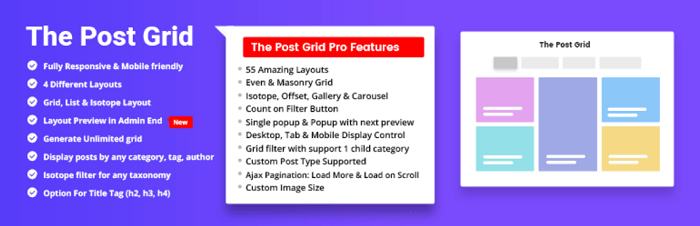
The Post Grid is another excellent blog grid plugin for your WordPress site.
Elegant grids become easy with a simple shortcode. Or, if you're using Elementor, you can use the Post Grid Elementor add-on.
And the grid looks fantastic on any device. Choose from eight layouts to display your recent posts, and easily customize the number of posts. It's easy to choose the specific categories you want to show and customize the title and button color.
Top features
- Fully responsive
- Eight layouts to choose from
- Separate Elementor add-on
- Advanced customization options
Pricing: The Post Grid offers a free version and a pro version. Pro plans begin at $31/year for one site.
4. Essential Grid
Rating: 4.7 stars (1,440+ reviews) | 47,000+ sales
The Essential Grid plugin for WordPress is one of the most popular plugins.
Due to its ease of use, a library of features, and simple customization, users all over the internet turn to the Essential Grid plugin.
Quickly sort your recent posts into a grid gallery, or do the same with your images, video, or audio. The choice is yours. Plus, with the help of other plugins, you can even connect it to the top social media outlets: Instagram, YouTube, Vimeo, and more.
While it's only a premium option, it's hard to pass up the Essential Grid WordPress plugin.
Top features
- 50+ grid starter templates
- Advanced customization
- Easy social media connection
- Visual Skin Editor
Pricing: Essential Grid is a premium-only option, now sold directly rather than through CodeCanyon. Plans start at $39/year for one site.
5. Premium Addons for Elementor
Rating: 4.9 stars (1,600+ reviews) | 600,000+ active installations
Premium Addons for Elementor isn't specifically a WordPress plugin for post grids.
But it's one of the included features among the many others it offers. And if you're using Elementor, this makes it even easier for you. Whether you want to display a photo gallery, WooCommerce product grid, or simply blog posts, Premium Addons can handle this with ease.
So, if you're already using Elementor, it's a great choice to get your grid layout, among many other features.
Top features
- Image Grid widget
- Built-in Elementor support
- Easy WooCommerce integration
- Live Editor tool
Pricing: Premium Addons for Elementor offers a free and pro version. The pro version starts at $36/year.
6. Visual Portfolio
Rating: 4.8 stars (340+ reviews) | 50,000+ active installations
Looking for an excellent WordPress portfolio plugin that can also display blog posts in a grid layout?
Visual Portfolio does both. Whether you’re an agency, artist, or photographer, you can display all your work quickly and beautifully, and it runs smoothly on your site.
You can also adjust your featured image, title, and more inside its builder.
Top features
- Multiple layout types
- Live grid builder
- Advanced customization
- Portfolio post types
Pricing: Visual Portfolio offers a free and paid option. Paid plans start at $49/year for one site.
Which grid plugin should you use?
If you want a quick grid of your existing posts, Content Views and The Post Grid are simple places to start. Essential Grid suits sites that want a design-heavy gallery, and Premium Addons and Visual Portfolio fit Elementor and portfolio sites.
If your grid shows data people submit, like a directory or a set of listings, Formidable Views is the one built for that.
This article may contain affiliate links. Once in a while, we earn commissions from those links. But we only recommend products we like, with or without commissions.