
What a pleasure to have support within minutes. Brillant, accurate answer, and solved the question. Thanks to the Formidable Team. Eric


Last updated on August 12, 2026 by Emma Wells
Stripe versus Square for WordPress Forms
Choosing the wrong payment gateway for your WordPress forms can cost you thousands in lost revenue. With cart abandonment rates hovering around 70%, your payment process needs to convert browsers into buyers—not drive them away with friction and limited options.

Approximate read time: 7 minutes
Formidable Forms supports both Stripe and Square integrations, giving you two powerful choices. But which one will maximize your conversions and revenue? The answer depends on your business model, customer base, and growth plans.
In this comprehensive guide, we'll break down exactly when to use Stripe versus Square, show you how modern payment methods can increase conversions by 30%, and help you make the decision that drives the most revenue for your business.

Upgrade your WordPress site with powerful, flexible forms.
The Quick Decision Framework
Choose Stripe if you want:
- Maximum conversion rates with Apple Pay, Google Pay, and other wallet payments
- Global reach with international customers and currencies
- Advanced subscription and recurring billing features
- Modern payment methods that customers expect in 2024
Choose Square if you:
- Already run Square payment terminals in a physical store
- Want unified reporting across online and offline sales
- Prefer simpler setup with fewer configuration options
- Primarily serve domestic customers with traditional payment preferences
From Idea to Reality in Minutes. Build Powerful Forms, Dashboards, Apps and More.
Formidable Forms makes advanced site building simple. Launch forms, directories, dashboards, and custom WordPress apps faster than ever before.
Why Mobile Payments Matter More Than Ever
Before diving into the comparison, let's address the elephant in the room: mobile commerce now accounts for over 70% of e-commerce traffic, but mobile conversion rates still lag behind desktop. The primary culprit? Checkout friction.
Traditional checkout requires customers to type 16-digit card numbers, expiration dates, CVV codes, and billing addresses on small screens. It's frustrating, error-prone, and a conversion killer.
This is where Stripe's advantage becomes clear: wallet payments like Apple Pay and Google Pay let customers complete purchases with just a fingerprint or face scan. No typing, no friction, no abandonment.
Real-World Impact:
- 30% average increase in mobile conversion rates
- 53% reduction in checkout abandonment
- 10-second checkout vs 2-minute traditional process
Square's integration with Formidable Forms currently only supports traditional credit and debit cards—no Apple Pay, Google Pay, or other modern wallet options.
Stripe: The Conversion Rate Champion
Stripe has become the gold standard for online payments, especially for businesses prioritizing conversion rates and customer experience.
Modern Payment Methods That Convert
Apple Pay and Google Pay These aren't just nice-to-have features—they're conversion rate multipliers. When customers can pay with biometric authentication instead of typing card details, checkout completion rates soar.
Additional Wallet Options:
- Link: One-click checkout for returning Stripe customers
- Cash App Pay: Popular with younger demographics
- Buy Now, Pay Later: Klarna, Afterpay, and other BNPL options
- Bank Transfers: ACH, SEPA, and direct bank payments
Global Payment Methods
Stripe automatically displays the most relevant payment methods based on your customer's location:
- iDEAL for Netherlands customers
- SOFORT for German customers
- Bancontact for Belgian customers
- 40+ other regional methods without additional setup
This localization isn't just convenient—it builds trust. When customers see their preferred local payment method, they're significantly more likely to complete the purchase.
Advanced Subscription Features
For recurring payments, Stripe offers enterprise-level capabilities:
- Complex billing scenarios with multiple pricing tiers
- Proration for mid-cycle plan changes
- Dunning management for failed payments
- Usage-based billing for SaaS products
- Automatic retry logic for declined payments
Setting Up Stripe with Formidable Forms
Step 1: Choose Your Integration
Formidable Forms Lite includes both Stripe and Square payment processing. You can start accepting payments immediately, even with the free version. Formidable takes a small processing fee on the Lite version. When you upgrade to Formidable Forms Business or Elite, you can connect directly to your Stripe or Square account and avoid the additional fee while getting lower transaction rates.
Step 2: Enable Modern Payment Methods In your Stripe Dashboard:
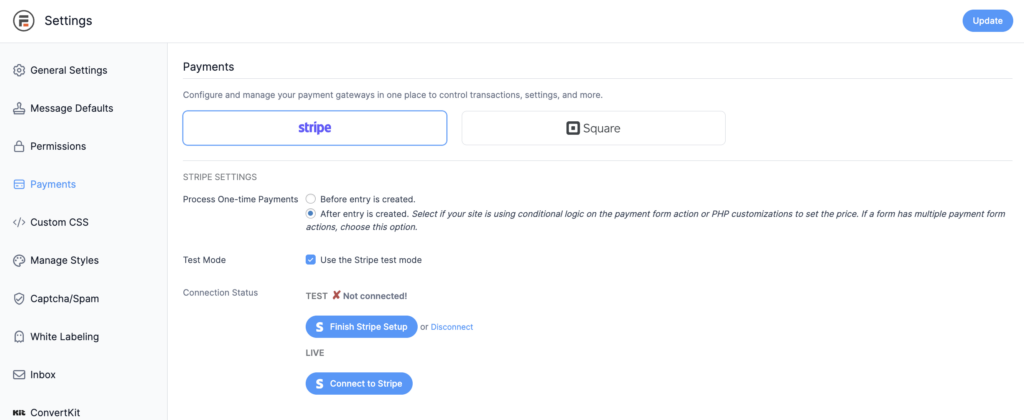
- Go to Global Settings → Payments
- Connect to Stripe or Square
- Navigate to your Stripe account
- Enable Apple Pay, Google Pay, Link, and other desired methods
- Verify your domain for Apple Pay (required)
- Configure supported countries and currencies
Step 3: Configure Your Form
- Create your form
- Add a payment field
- Navigate to your form settings
- Add a "Collect a Payment" action
- Fill out the information, select your preferred gateway, and enable Stripe link
- Set up automated emails using the "Successful Payment" trigger
Step 4: Test on Mobile Devices This is critical—wallet payments are primarily mobile features. Test on actual iOS and Android devices to ensure Apple Pay and Google Pay appear and function correctly.
For more information on setting up Stripe, check out our detailed documentation here.
Square: The Unified Commerce Solution
Don't dismiss Square entirely—it's the perfect choice for specific business models, particularly those with both online and offline components.
When Square Makes Perfect Sense
Unified Commerce Operations If you're already using Square terminals, readers, or POS systems in your physical location, keeping everything in the Square ecosystem offers significant operational advantages:
- Unified Inventory: Manage stock across all channels from one dashboard
- Consolidated Reporting: All sales data in one place for easier analysis
- Customer Data Integration: Online and offline customer information combined
- Simplified Accounting: One payment processor for all transactions
- Tax Reporting: Streamlined tax preparation with unified transaction data
Simpler Management Square's philosophy is "less is more." Fewer payment method options mean fewer configuration decisions and less complexity. For businesses that want reliable payment processing without diving into advanced features, Square delivers exactly what you need.
Transparent Pricing Square's pricing structure is straightforward: 2.9% + $0.30 for most online transactions. No monthly fees, no setup costs, and no surprises.
Square's Current Limitations
While Square excels in simplicity and POS integration, it has constraints that could impact your conversion rates:
Payment Method Limitations:
- Only credit and debit cards supported in Formidable Forms
- No Apple Pay or Google Pay options (yet)
- Limited international payment methods
- No buy-now-pay-later options
Geographic Focus: Square primarily serves North American markets, with limited international expansion compared to Stripe's global reach.
Subscription Features: While Square supports recurring payments, it lacks Stripe's advanced subscription management capabilities for complex billing scenarios.
The Mobile Conversion Rate Reality
Here's where the choice becomes clear for many businesses: mobile conversion rates directly impact your bottom line, and payment method availability is the key differentiator.
Traditional Checkout Problems on Mobile
User Experience Issues:
- Small screen keyboards make typing card details frustrating
- Multiple form fields increase abandonment opportunities
- Security concerns about entering financial information on mobile
- Slow loading times compound frustration
Conversion Rate Impact:
- Mobile conversion rates typically 2-3x lower than desktop
- Cart abandonment increases 15-20% on mobile devices
- Complex forms see up to 86% abandonment rates on mobile
How Wallet Payments Solve Mobile Friction
Apple Pay Benefits:
- Biometric authentication (Touch ID, Face ID)
- Pre-stored payment and shipping information
- No typing required on mobile devices
- Familiar, trusted Apple branding
- Works across Safari and mobile apps
Google Pay Advantages:
- Wide Android device compatibility
- Integration with Google ecosystem
- Secure tokenization of payment data
- Quick setup for users already in Google ecosystem
Real Results: Businesses implementing wallet payments with Stripe typically see:
- 25-30% increase in mobile conversion rates
- 40% reduction in checkout abandonment
- 60% faster checkout completion times
- Higher customer satisfaction scores
Feature-by-Feature Comparison
Payment Methods
Stripe: Credit cards, Apple Pay, Google Pay, Link, Cash App Pay, BNPL options, bank transfers, 40+ international methods
Square: Credit and debit cards only
Mobile Optimization
Stripe: Wallet payments optimized for mobile with biometric authentication
Square: Standard mobile credit card processing
International Support
Stripe: 40+ countries, 135+ currencies, automatic localization
Square: Primarily US, Canada, UK, Australia, Japan
Recurring Payments
Stripe: Advanced subscription management with complex billing scenarios
Square: Basic recurring payment functionality
Reporting Integration
Stripe: Comprehensive online payment analytics
Square: Unified online + offline reporting (if using Square POS)
Setup Complexity
Stripe: More options require more configuration decisions
Square: Simpler setup with fewer choices
Developer Features
Stripe: Extensive API, webhooks, and customization options
Square: Limited API access, focused on simplicity
Implementation Best Practices
For Stripe Users
Maximize Conversion Rates:
- Enable all relevant payment methods in your Stripe dashboard
- Test wallet payments thoroughly on mobile devices
- Use single-step forms when possible
- Place payment fields at the end of multi-step forms
- Set up automated email confirmations using Formidable's "Successful Payment" trigger
Avoid Common Mistakes:
- Not verifying your domain for Apple Pay (it won't appear)
- Filtering payment methods with hooks that exclude "card" and "link" types
- Placing payment fields in conditional form sections initially
- Not testing on actual mobile devices
Monitor Performance: Track payment method usage and conversion rates in Formidable → Payments to optimize your setup over time.
For Square Users
Optimize Your Setup:
- Connect your existing Square account to Formidable Forms
- Configure your payment amounts and form flow
- Set up email notifications for successful payments
- Test the entire process from form submission to Square dashboard
Leverage POS Integration: If you use Square hardware, take advantage of unified reporting and customer data to understand your complete business performance.
Advanced Considerations
Security and Compliance
Both Stripe and Square are PCI DSS Level 1 compliant and handle security automatically. However, Stripe's tokenization system and advanced fraud detection provide additional layers of protection, especially important for high-volume businesses.
Scalability
Stripe grows with your business, supporting everything from small startups to enterprise corporations with complex needs.
Square is designed for small to medium businesses and may require additional solutions as you scale internationally or need advanced features.
Cost Analysis
Formidable Forms Pricing Structure:
- Lite Version: Includes Stripe and Square payments with a small Formidable processing fee
- Pro Version: Direct connection to your payment accounts with no additional fees and lower transaction rates
While the Lite version has an additional fee, you can start accepting payments immediately and upgrade to Business or Elite later for better rates as your volume grows.
Square Pricing:
- 2.9% + $0.30 per transaction
- No monthly fees or setup costs
While Square appears cheaper, Stripe's conversion rate improvements often result in higher net revenue despite slightly higher fees.
The Bottom Line: Revenue Impact
Your payment gateway choice directly affects your revenue in two ways: transaction fees and conversion rates.
Scenario Analysis: Let's say you have 1,000 monthly form submissions with a $50 average transaction:
With Square:
- 2% conversion rate = 20 sales = $1,000 revenue
- Fees: $58 (2.9% + $0.30 × 20 transactions)
- Net revenue: $942
With Stripe (including wallet payment boost):
- 2.6% conversion rate = 26 sales = $1,300 revenue
- Fees: $83.28 (3.4% + $0.30 × 26 transactions with Stripe Lite)
- Net revenue: $1,216.72
Result: $274.72 more monthly revenue (+29%) despite higher fees
This example shows why focusing solely on transaction fees misses the bigger picture. Higher conversion rates often more than offset higher processing costs.
Making Your Final Decision
The choice between Stripe and Square isn't just about payment processing—it's about maximizing your revenue and providing the best customer experience.
Choose Stripe if:
- Mobile users are a significant portion of your traffic
- You want to maximize conversion rates with modern payment methods
- You serve international customers or plan to expand globally
- You need advanced subscription billing features
- You prioritize customer experience and conversion optimization
Choose Square if:
- You already use Square POS systems and want unified reporting
- Your customers primarily use traditional payment methods
- You prefer simplicity over advanced features
- You serve primarily domestic customers
- Unified commerce operations are more important than payment method variety
Getting Started Today
Ready to improve your payment processing and boost conversions?
For Stripe:
- Start with Formidable Forms Lite to begin accepting payments immediately (includes small processing fee)
- Enable wallet payments in your Stripe dashboard
- Test on mobile devices to ensure Apple Pay and Google Pay work
- Upgrade to Pro as your volume grows to get lower rates and direct account connection
- Watch our Apple Pay setup video for step-by-step guidance
For Square:
- Start with Formidable Forms Lite to begin accepting Square payments immediately (includes small processing fee)
- Connect your existing Square account or create a new one
- Set up your first payment form with Formidable Forms
- Configure email notifications for successful payments
- Test the complete flow from form to Square dashboard
- Upgrade to Business or Elite to connect directly to your Square account and eliminate additional fees
- Leverage unified reporting if you use Square POS systems
The Future of Payments
Payment preferences continue evolving rapidly. Stripe's focus on innovation means you're positioned for future payment methods and global expansion. Square's focus on unified commerce means you're optimized for omnichannel retail operations.
Consider where your business will be in 2-3 years:
- Will you serve international customers?
- How important are mobile conversions to your growth?
- Do you need advanced subscription features?
- Will you expand beyond your current market?
Your answers should guide your decision today.
The right payment gateway can transform your business by increasing conversions, expanding your market, and providing better customer experiences. Choose wisely—your revenue depends on it.
Ready to get started? Set up your payment processing with Formidable Forms today and start converting more visitors into customers with the power of modern, friction-free payments.
This article may contain affiliate links. Once in a while, we earn commissions from those links. But we only recommend products we like, with or without commissions.

