
What a pleasure to have support within minutes. Brillant, accurate answer, and solved the question. Thanks to the Formidable Team. Eric


Last updated on September 30, 2026 by Emma Wells
How to Create a WordPress Company Timeline with Formidable Forms
Want to showcase your company's journey and build trust with visitors? This step-by-step guide will show you how to create a stunning WordPress company timeline that highlights your milestones, achievements, and growth story!

Approximate read time: 7 minutes
Your company has a story worth telling, but are you presenting it in a way that captivates visitors and builds credibility?
A professional company timeline is one of the most powerful tools for establishing trust, showcasing growth, and demonstrating your expertise. Whether you're a startup highlighting rapid progress, an established business celebrating decades of success, or anywhere in between, a well-designed timeline transforms your company history into an engaging visual story.
That's why I'm going to show you how to create a professional company timeline in WordPress easily and efficiently using the Formidable Application Builder.
So, let's get started!
Upgrade your WordPress site with powerful, flexible forms.
What is a company timeline?
Think of a company timeline as your business biography brought to life in an interactive, visually compelling format!
It's a chronological display of your most important milestones, achievements, and pivotal moments that shaped your organization. Unlike static "About Us" pages, a timeline creates an engaging journey through your company's evolution, making your history both memorable and meaningful to visitors.
Here's where company timelines are making a powerful impact:
- Startups and growing businesses use them to showcase rapid development, funding rounds, product launches, and team expansion to build investor and customer confidence.
- Established companies highlight decades of innovation, market leadership, and community impact to reinforce their industry authority.
- Service providers demonstrate their evolution from small beginnings to trusted experts, showing potential clients their growth trajectory.
- Product companies trace their innovation journey from initial concepts to market-leading solutions, building credibility with prospective customers.
They're essential tools for transforming corporate history into compelling storytelling that builds trust and connection.
From Idea to Reality in Minutes. Build Powerful Forms, Dashboards, Apps and More.
Formidable Forms makes advanced site building simple. Launch forms, directories, dashboards, and custom WordPress apps faster than ever before.
Why create a company timeline in WordPress?
Traditional "About Us" pages often fail to capture the full scope of your company's journey and achievements.
Building your timeline directly in Formidable Forms creates a dynamic storytelling platform that keeps visitors engaged. Instead of overwhelming visitors with dense paragraphs about your history, a timeline presents your journey in digestible, visually appealing segments that naturally guide them through your story.
With Formidable's WordPress company timeline, you get complete design control. You can match your brand aesthetics, highlight the achievements that matter most to your audience, and update your story as new milestones occur. Unlike static content, you own your narrative completely and can customize every aspect of the presentation.
Creating an engaging company timeline typically requires either hiring designers and developers or settling for generic templates that don't reflect your unique brand story.
While various WordPress plugins offer timeline functionality, most provide limited customization options or require editing in the backend.
Fortunately, there's a complete solution that handles every aspect of company timeline creation, just fill out a simple form to create a fully customizable company timeline using a ready-made template.
That solution is the Formidable Application Builder.
How to create a WordPress Company Timeline
Formidable Forms is the most versatile WordPress form builder available, and when combined with the Application Builder, it becomes a powerful platform for creating custom WordPress applications without code!
Here's how to build your company timeline in six straightforward steps:
- Install and activate Formidable Forms Pro
- Toggle the Visual Views add-on to "On"
- Install the "Company Timeline" template
- Customize your milestone submission form
- Configure your timeline display
- Publish your company timeline
Step 1: Install and activate Formidable Forms Pro
Formidable Forms is the best WordPress application builder available, especially when you need to create professional presentations like company timelines.
With Formidable, you can easily create milestone entry forms, generate dynamic timeline displays, and build a complete company story management system - all from the front-end! The Company Timeline template provides a solid foundation, requiring only customization to reflect your unique brand and journey.
Start by purchasing one of the premium plans (Plus plan or above) to access the Timeline Views functionality.

Step 2: Toggle the Visual Views add-on to "On"
The Visual Views add-on is essential for displaying your company milestones in timeline format. This powerful feature transforms your milestone data into beautiful, interactive timeline displays that captivate visitors.
To install and activate Views, go to Formidable → Add-Ons in your WordPress dashboard. Find the Visual Views plugin and click on the corresponding toggle to enable it.

Next, you'll need to access the Application Builder, which organizes your forms and views into a cohesive timeline application that works seamlessly together.
To access it, navigate to Formidable → Applications after activating Formidable Forms Pro. The Application Builder dashboard shows your existing applications and available templates. This is where you'll find the Company Timeline template in the next step.

Step 3: Install the company timeline template
The company timeline template provides a pre-built solution that saves you hours of development time. Instead of creating timeline components from scratch, you can use this template as a foundation and customize it to tell your unique company story.
From the Applications page, locate the "Company Timeline" template in the Application Templates section. Click on the template, then select "Install Application."
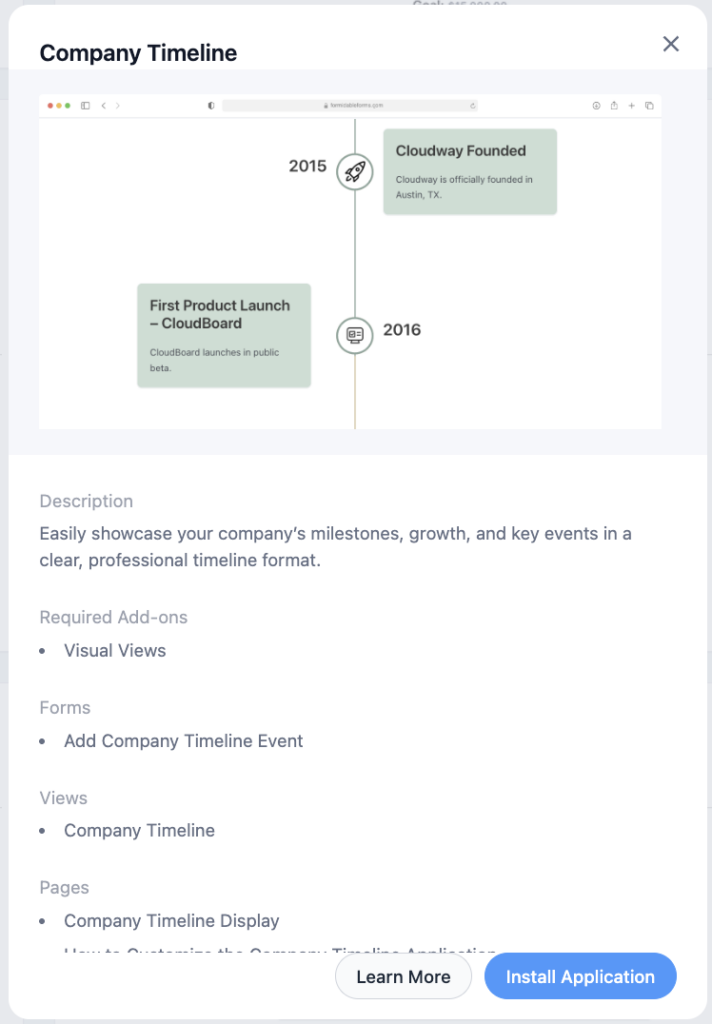
Give your application a name (like "Our Company Journey" or "[Company Name] Timeline") and click "Install Application" again.
The system will now create all the necessary components for your company timeline. These components work together to create a complete milestone management system:
- Add a Company Timeline Event Form: This form allows you or team members to add new milestones to your timeline.
- Company Timeline View: This displays all your milestones in an elegant timeline format with interactive features.
- Company Timeline Display Page: This pre-built page has the timeline view already embedded, making it easy to publish your company story quickly.
Once installation completes, click "Open Application" to begin customizing your timeline!
Step 4: Customize your milestone submission form
The Company Timeline Event form collects all the important information about your company milestones. It comes pre-configured with essential fields, but you can easily customize it to capture the specific details that matter for your company story.
Click on the "Add a Company Timeline Event" form to open it in the form builder. Review the default fields that come with the template:
- Event title
- Description
- Date
- Event category
- Featured image
- Additional details
The form is designed to capture the essential information needed to create compelling timeline entries, but you can customize it extensively based on your needs.
Consider adding fields that enhance your company story, such as:
- Key personnel involved in the milestone
- Impact metrics (revenue, customers, team size, etc.)
- Related links to press coverage or blog posts
- Department or division responsible for the achievement
- Location where the milestone occurred
- Awards or recognition received
Adding fields is simple – just drag the desired field type from the left sidebar onto your form. You can rearrange fields by dragging them into new positions and use conditional logic to show or hide fields based on previous selections.
For example, you might only display award details if a milestone is categorized as "Recognition," or only show location information for physical expansion milestones.
Step 5: Configure your timeline display
Now it's time to customize how your company milestones will appear to visitors. The timeline view transforms your milestone data into an interactive, visual story that showcases your company's journey.
Return to your application dashboard by going to Formidable → Applications and selecting your company timeline application. You'll see the pre-built timeline view: Company Timeline.
Click on the view to customize its appearance and functionality in the Formidable Views editor.
The Timeline Settings panel in the left sidebar provides comprehensive customization options for your company timeline. You can select your preferred theme, choose between vertical or horizontal layouts, customize event markers, configure spacing, add interactive popups, and organize long timelines with automatic dividers.
Customizing popup information
One of the most engaging features of your company timeline is the ability to display detailed information when visitors click on milestone entries. To customize what appears in these popups, navigate to the Detail Page Content section in the view editor.
Here you can design exactly what information appears when someone clicks on a timeline entry. Add rich descriptions, include additional images, display metrics and achievements, or provide links to related content like press coverage or case studies. This popup content is where you can really dive deep into the story behind each milestone without cluttering your main timeline view.
For detailed guidance on all available timeline customization options, check out our complete Timeline Views feature guide, which covers every setting and styling option in depth!
Step 6: Publish your company timeline
With your timeline configured, it's time to make it accessible to your visitors. The Application Builder makes this incredibly simple by providing several options for publishing your timeline.
Using the Pre-created Page:
The Company Timeline Display page comes pre-created with your timeline view already embedded, so you can simply publish it without any additional setup. By default, this page is set to draft status, so you'll need to publish it before visitors can see it.
From your application dashboard, you'll see the Company Timeline page listed. To publish it, click on the page name to open it in the WordPress editor, then change the status to "Published."
Embedding the Timeline on Your Own Pages
If you prefer to place your timeline on a different page (like your main About Us page), you have several options:
Option 1: Using the Embed Button Click the "Embed" button next to the Company Timeline view and choose from:
- Select an existing page where you want to embed the timeline
- Create a new page specifically for your timeline
- Copy the shortcode to paste manually wherever you need it

Option 2: Using WordPress Blocks While editing any page:
- Add a new block and search for "Formidable"
- Select the "Formidable Views" block
- Choose your Company Timeline view from the dropdown menu

Option 3: Using Shortcodes For more advanced placement needs, copy the shortcode from your application dashboard and paste it using the WordPress shortcode block wherever you want your timeline to appear.
Once published, your company timeline is ready to tell your story! Visitors can now explore your company's journey in an engaging, interactive format that builds trust and demonstrates your growth.
Transform your company story today
Your company's journey is unique and valuable, make sure you're presenting it in a way that builds trust, demonstrates growth, and engages your audience.
The Formidable Forms Company Timeline application template gives you everything you need to create a professional, interactive company story that works as hard as you do to build credibility and connection with your visitors.
Ready to showcase your company's amazing journey? The Formidable Application Builder makes it simple to create timelines that tell your story with style and impact.
More about the Application Builder
The Formidable Application Builder is what makes creating professional presentations like company timelines easy without coding.
With the Application Builder, you can create applications from scratch or use one of our 35+ pre-built templates like the company timeline. You can organize related forms and views in one central location, and update everything from the front end using our intuitive forms, making management simple!
Embedding application components on your WordPress site is easy, and you can update and maintain all parts of your application from one dashboard.
Using the Formidable Application Builder saves you time and eliminates the frustration of trying to piece together different plugins or services to create a professional company timeline. Everything you need is in one place, with a consistent interface and seamless integration between components.
To learn more about the Application Builder's capabilities beyond company timelines, check out our comprehensive Application Builder guide.
This article may contain affiliate links. Once in a while, we earn commissions from those links. But we only recommend products we like, with or without commissions.

