
What a pleasure to have support within minutes. Brillant, accurate answer, and solved the question. Thanks to the Formidable Team. Eric


Last updated on August 12, 2026 by Formidable Team
4 Best AI Plugins for WordPress in 2026
Most AI plugin roundups are a list of chatbots with a few writing tools mixed in. In 2026, the best AI plugins for WordPress do much more.
They write your SEO copy, draft your page layouts, and, in Formidable's case, build and run entire forms and applications from a plain-language description. Here are the 4 worth installing, one for each job.

Approximate read time: 7 minutes
Upgrade your WordPress site with powerful, flexible forms.
How we picked these AI plugins
We picked plugins with install counts you can check on WordPress.org and an AI feature that does a specific job well. Installs and prices were verified on WordPress.org and each vendor's site in October 2026.
From Idea to Reality in Minutes. Build Powerful Forms, Dashboards, Apps and More.
Formidable Forms makes advanced site building simple. Launch forms, directories, dashboards, and custom WordPress apps faster than ever before.
1. Rank Math: AI-assisted SEO

Rank Math has 4 million or more active installs, making it one of the most widely used SEO plugins for WordPress. Its Content AI feature sits right inside the same SEO analysis panel you already use to check a post's score: type in your target keyword, and it drafts titles, meta descriptions, and on-page content suggestions.
It works from your focus keyword and can run live competitor research on it, so its suggestions stay tied to what you're trying to rank for.
Content AI is free to try in the free version of Rank Math, with a handful of uses per feature. For regular use, you'll need a paid Content AI plan, starting at €5.99 a month billed annually, which sets monthly limits on each AI tool. That makes it a better fit for a few focused rewrites than for drafting every post on your site.
Best for: sites already running Rank Math that want AI help with SEO copy.
2. Jetpack: AI writing assistant

Jetpack has 3 million or more active installs and builds its AI Assistant directly into the WordPress block editor, the same place you already write and format posts. Highlight a block, or start a new one, and it drafts content, adjusts tone, fixes grammar, translates text, and can generate images and tables, all from a plain-language prompt without leaving the editor.
Because it lives inside the editor, there's no new interface to learn. A prompt box appears right where you're typing, which also makes it handy for small edits like tightening a paragraph or rewriting a clunky sentence.
The free plan includes 20 AI requests to try it. After that, the paid plan is $4.95 a month for the first year, billed yearly, then $9.95 a month.
Best for: sites that want AI drafting inside the block editor without adding a separate app.
3. Elementor: AI page building

Elementor is the most installed WordPress plugin on this entire list, with 10 million or more active installs, and its AI features now go well beyond writing copy. Describe a section or layout in plain language, "a three-column pricing table with a highlighted middle plan," for example, and Elementor AI generates the layout, widgets, and copy for you, all still editable by hand in the normal page builder.
For anyone who builds pages in Elementor regularly, that turns a blank canvas into a usable starting point, even if you end up rearranging half of what it generates.
After the free trial, Elementor AI runs on its own subscription, starting at $3.99 a month. You don't need Elementor Pro to use it.
Best for: sites already building pages in Elementor who want to skip manual widget-by-widget setup.
4. Formidable Forms: AI that builds forms and applications

Formidable Forms has 300,000 or more active installs, and it puts AI to work on something none of the plugins above touch: the actual forms, data, and applications your site runs on. It does this two ways, and together they cover everything from a two-minute form draft to a fully built application.
Describe a form, and the AI form builder drafts it. Type something like "a job application form with a resume upload and a cover letter field," and Formidable's built-in AI form builder generates the fields for you, ready to fine-tune in the normal drag and drop builder. It's the fastest way to go from a blank page to a working form draft, and it's included with the Business license and up.
Connect an AI agent through MCP, and it builds and manages your whole site's forms. This is the deeper layer: Formidable connects to AI agents like Claude, ChatGPT, and Cursor through MCP (Model Context Protocol), an open standard that lets your AI assistant work inside your site directly.
Where the AI form builder drafts one basic form, MCP can:
- Build full forms with conditional logic and calculations
- Search and update entries when you ask
- Assemble whole Views and applications, like a directory, dashboard, or booking system, from one plain-language description
Ask for a change afterward, like adding a field to an existing directory card, and it edits the existing build in place.
Elementor and Jetpack now offer MCP connections too, but Formidable's covers the part of your site that collects and displays data: forms, entries, Views, and applications.
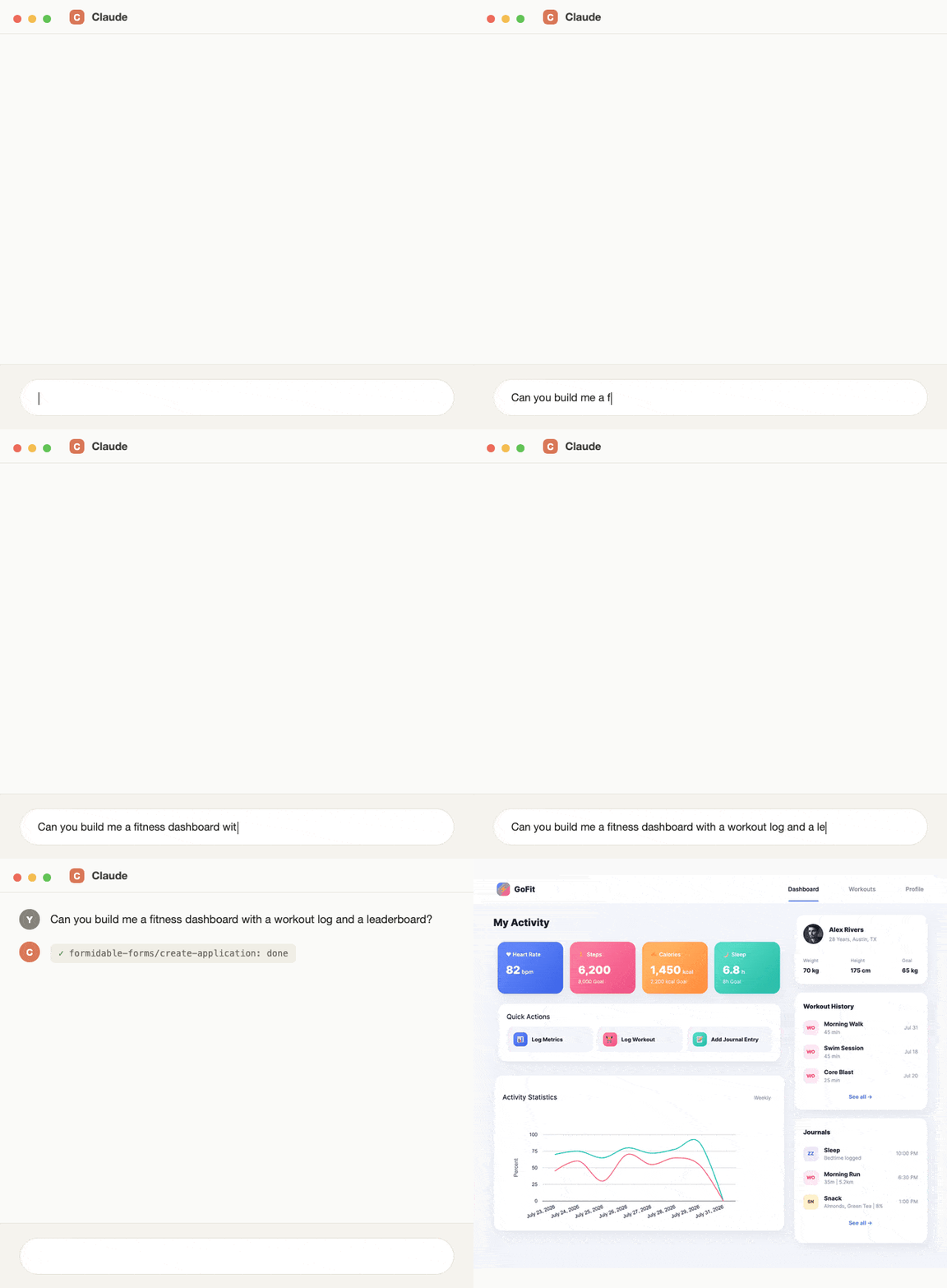
Everything it builds ends up as a normal Formidable form, View, or application. Open it in the builder and every field and setting is there to edit by hand, the same as if you'd built it yourself. The connection uses a revocable password made just for this purpose, never your real login, and it only exposes Formidable's own tools: forms, entries, Views, styles, and applications.
MCP requires the Formidable API Add-on on the Business license and up. See the full build in our guide to connecting an AI agent to Formidable with MCP.
Best for: anyone who wants AI to build and maintain their forms, data, and applications.
Start with one job
The best approach to AI plugins for WordPress is to pick one job and solve it well: SEO, writing, page design, or building and managing your forms and applications.
If your site runs on forms, data, or an application of any kind, that job is the one with the most room to grow: start with the AI form builder for a quick draft, then see what MCP can do once you're ready to let AI build the whole thing.
Get Formidable Forms and build your next form with AI. Every license comes with a 14-day money-back guarantee.
What is the best AI plugin for WordPress?
It depends on the job. Rank Math is a strong pick for AI-assisted SEO, Jetpack for AI writing help in the block editor, Elementor for AI-assisted page building, and Formidable Forms for building and managing forms, entries, and entire applications with AI.
Are AI WordPress plugins free?
Most offer a free tier or trial with limited AI features, then charge for full access. Rank Math's Content AI, Jetpack's AI Assistant, and Elementor AI all work this way. Formidable's AI form builder and its MCP connection both come with the Business license and up (MCP also needs the API Add-on).
Can AI build a WordPress form for me?
Yes, two ways, and both come from Formidable. The built-in AI form builder creates fields, labels, and field types from a plain-language description, then opens it in the normal drag and drop builder so you can fine-tune it. For more than a basic form, connecting an AI agent like Claude through Formidable's MCP integration builds full forms with conditional logic and calculations, plus entire Views and applications.
What is MCP, and what can it do in Formidable?
MCP, short for Model Context Protocol, is an open standard that lets AI assistants like Claude, ChatGPT, and Cursor connect to other software and take action inside it. Other plugins offer MCP support too, but Formidable's connection covers the part of your site that collects and displays data: an AI agent can build and edit forms, entries, Views, and applications, and everything it builds is a normal Formidable item you can still open and edit by hand.
This article may contain affiliate links. Once in a while, we earn commissions from those links. But we only recommend products we like, with or without commissions.