
Your web host sets server limits for memory, form data, run time, and file uploads. When a large form or export goes over one of these limits, the form builder may show a blank page. Changes may not save, or an export may stop partway.
Check your limits first. Then raise the one that's too low, or lighten the load on your server.
Upgrade your WordPress site with powerful, flexible forms.
Check your server limits
WordPress lists your server's PHP limits in Site Health.
- In your WordPress admin, go to Tools → Site Health.
- Click the Info tab.
- Click Server to open the panel. The PHP limits are listed there: PHP max input variables, PHP time limit, PHP memory limit, Upload max filesize, and PHP post max size.

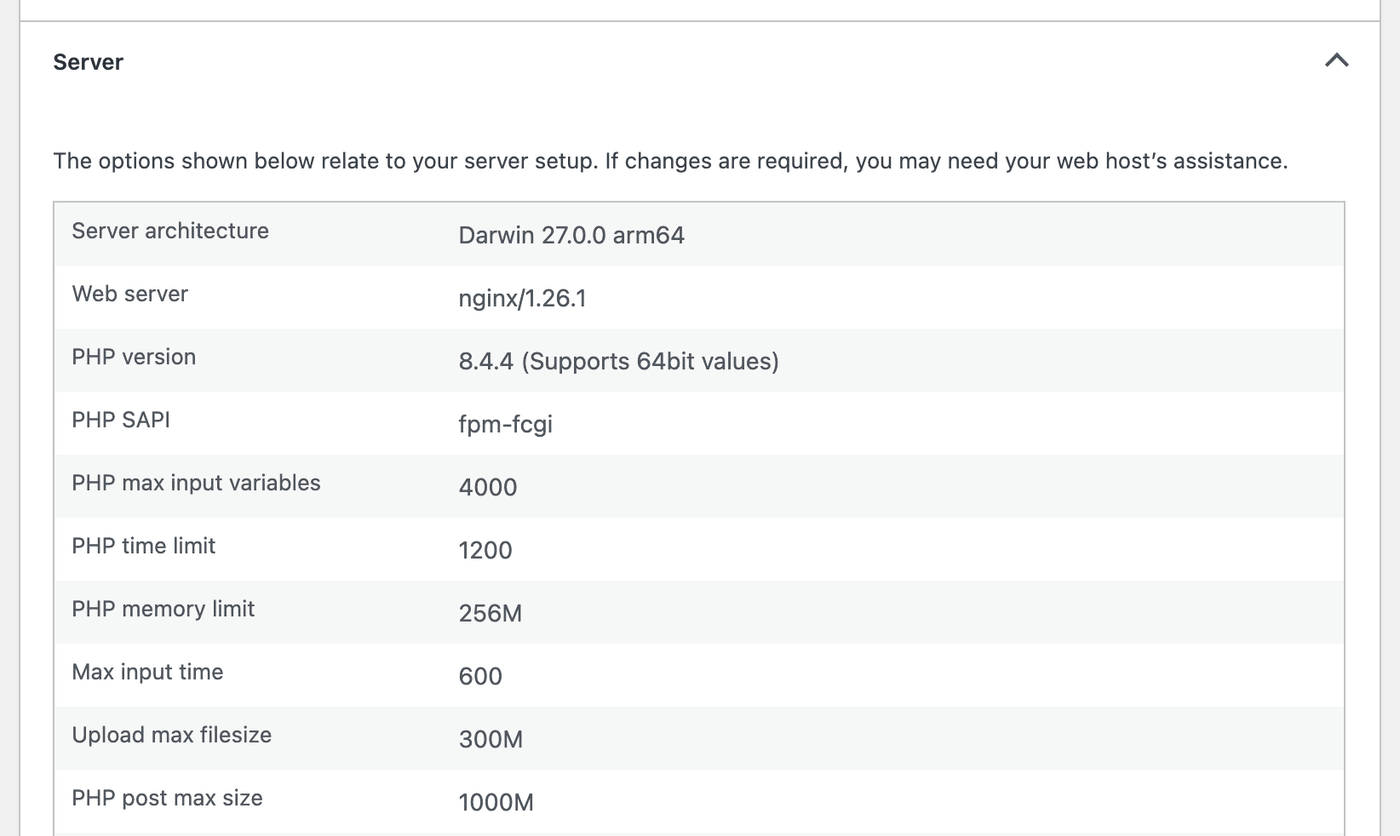
The WordPress Constants panel on the same tab shows WP_MEMORY_LIMIT and WP_MAX_MEMORY_LIMIT. These are the amounts WordPress asks for, not always what your server allows. Use the PHP memory limit row in the Server panel to see the real limit.
From Idea to Reality in Minutes. Build Powerful Forms, Dashboards, Apps and More.
Formidable Forms makes advanced site building simple. Launch forms, directories, dashboards, and custom WordPress apps faster than ever before.
Which limit causes which problem
Each limit shows up in Formidable in its own way.
| Limit (Site Health row) | What happens in Formidable | What helps |
|---|---|---|
| PHP memory limit | The form builder shows a blank screen. An XML export of many entries stops partway. | Raise the memory limit. Export large sets of entries as CSV. |
| PHP post max size | Form builder changes are lost after you edit many fields before clicking Update. A front-end submission larger than the limit isn't saved. File uploads are capped at this size too. | Raise the post max size. Click Update more often in the builder. |
| Upload max filesize | A File Upload field shows "That file is too big. It must be less than 1.05MB." as soon as a larger file is picked. The number is your limit in decimal megabytes, so a 1M limit shows as 1.05MB. If the field isn't required, the form is still submitted without the file. | Raise both the upload max filesize and the post max size. The smaller of the two is the real limit. |
| PHP time limit | An XML export of many entries stops partway. CSV exports and imports lift the time limit themselves, so they keep running. | Raise the time limit, or export as CSV. |
| PHP max input variables | A very long form submitted from your site isn't saved, and the user sees "We're sorry. It looks like you've already submitted that." In Formidable → Global Settings, settings near the end may not save, even though the page says "Settings Saved". | Raise the max input variables well above the number of fields in your largest form. In our test, a form with 150 fields sent 160 values. |
Raise a server limit
Ask your web host to raise the limit first. Some hosts lock these values, so changes you make yourself may have no effect. Tell them which limit you need raised and the value you want.
If your host lets you change PHP settings, add the lines you need to your php.ini file. You can also use a .user.ini file in your site's main folder. These are example values. Pick values your host supports.
memory_limit = 256M
post_max_size = 64M
upload_max_filesize = 64M
max_execution_time = 300
max_input_vars = 3000
Then open Tools → Site Health → Info → Server again and check the new values.
.user.ini file can take up to 5 minutes to apply. On some servers, a post_max_size set in .user.ini isn't used for every request. If changes still don't save after you raise it, ask your host to set it in php.ini.Raise the memory limit in wp-config.php
WordPress asks for 40M of memory on your site's pages and 256M in the WordPress admin, unless your server already allows more. To ask for more on your site's pages, add this line to wp-config.php, above the line that starts with /* That's all, stop editing!:
define( 'WP_MEMORY_LIMIT', '256M' );This only works when your host lets WordPress change the memory limit. If your host sets a fixed limit, the PHP memory limit row in the Server panel doesn't change. The WordPress Constants panel still shows 256M. Ask your host to raise it instead.
Lighten the form builder
When you click Update, the form builder sends every field you changed in one request. If that request is larger than your post max size, nothing is saved and no message is shown. The builder reloads with the settings it had before.
On a form with many fields, click Update after every few changes, or raise the post max size.
To make a long form lighter to open, load the builder with AJAX:
- Go to Formidable → Forms and edit your form.
- In the form builder, go to Settings → General.
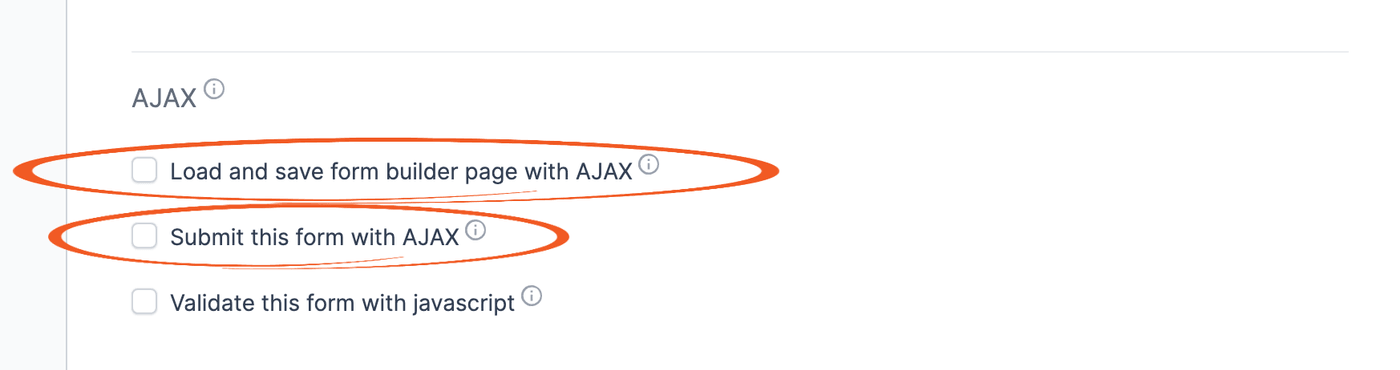
- In the AJAX section, check Load and save form builder page with AJAX. The builder then loads field settings as you open them instead of all at once.
- Click Update to save your changes.
If the form is still slow to load or save, split it into smaller forms.
Lighten your forms and pages
- Submit forms with AJAX. Check Submit this form with AJAX in the same AJAX section. The server then sends back only the form's message instead of the whole page. In our test, the reply was under 1 KB instead of 75 KB.
- Filter long Lookup lists. Every option of a Lookup or Dynamic field is added to the page. In our test, a Lookup field with 3,000 options made the page more than 3 times larger. Use Watch a Lookup field to filter it by another Lookup field instead. Its options then load only after the user picks a value in the first field. Lookup and Dynamic fields are a premium feature.
- Split long Views into pages. Set a Page Size in the View's Advanced Settings so each page loads only some of the entries. Views are a premium feature.
- Check slow emails. If a form is slow only after you click Submit, an email action is often the cause. Follow the steps for slow form submission.
Keep fewer entries
Store only the entries you need, so exports and Views have less data to work through.
- Don't store entries you don't need. Use it for a form that only sends an email. Edit the form and go to Settings → General. In the On Submit section, check Do not store entries submitted from this form. There is no way to get back entries that aren't saved.
- Delete old entries automatically. Turn on Automatically delete entries in the form's GDPR settings. Deleting entries automatically is a premium feature.
- Delete old spam automatically. Set Delete spam entries automatically in the Captcha/Spam global settings. Deleting spam automatically is a premium feature.
- Clean up the database. Delete the forms you no longer need, and find the data left behind by rows deleted directly in the database. Learn how to clean up the database.

Troubleshooting
There has been a critical error on this website.
A blank form builder, or a page that ends with this message, can mean PHP ran out of memory. Your PHP error log then has a line with "Allowed memory size of".
Raise the memory limit. If your host's limit is already high, look for a conflict with another plugin or your theme.
That file is too big. It must be less than 1.05MB.
The number in this message is the largest file the field accepts, in decimal megabytes. For example, a 1M server limit shows as 1.05MB. It's the smaller of your server's upload max filesize and post max size. If the field's own Max file size setting is lower, that number is shown instead.
To accept larger files, raise both server limits. If you set a Max file size on the field, raise it too. Or ask users for a smaller file.
My form builder changes don't save
If the builder reloads with your earlier settings after you click Update, the changes were larger than your server's post max size. Make fewer changes before each Update, or raise the post max size.
We're sorry. It looks like you've already submitted that.
Formidable shows this message when it couldn't save an entry. If it appears on a form with many fields, the form may send more values than your server's max input variables allows. Raise the max input variables well above the number of fields in the form.
My XML export stops partway
An XML export of a form with thousands of entries can run out of memory or time. The file still downloads, but it ends early, sometimes with "There has been a critical error on this website." at the end. Export the entries as CSV from the form's Entries page instead, or raise the memory and time limits.
