
What a pleasure to have support within minutes. Brillant, accurate answer, and solved the question. Thanks to the Formidable Team. Eric


Last updated on September 30, 2026 by Formidable Team
10 Best WordPress Job Application Plugins (Free and Paid)
Tired of good applicants' resumes getting buried in your inbox? The right WordPress job application plugin catches resumes, posts your openings, and keeps your hiring in one place. Below, we've rounded up the 10 best, free and paid, so you can pick the right one for your site.
Approximate read time: 18 minutes
Upgrade your WordPress site with powerful, flexible forms.
How we picked these plugins
A job application plugin should do more than look nice in a screenshot, so we weighed each one on a few practical things:
- Whether it actually collects applications, or just posts openings and sends applicants off to an email link
- Resume and file upload that handles real PDFs and cover letters
- Search and filter options for both you and your visitors
- Clear pricing, with a free version where possible
- Whether the plugin is still actively maintained
A few of these started life as job board plugins, and a few are form builders that double as application tools. We've noted which is which so you can match the plugin to what you're actually building. The ratings and install counts below come from WordPress.org and were current when we last checked in June 2026.
From Idea to Reality in Minutes. Build Powerful Forms, Dashboards, Apps and More.
Formidable Forms makes advanced site building simple. Launch forms, directories, dashboards, and custom WordPress apps faster than ever before.
The 10 best WordPress job application plugins
- Formidable Forms
- WP Job Manager
- Simple Job Board
- WPForms
- Apply Online
- Everest Forms
- WP Job Portal
- WPJobBoard
- WP Job Openings
- Gravity Forms
1. Formidable Forms
Rating: 4.8 stars (1,300+ reviews) | 300,000+ active installations
Full transparency: Formidable Forms is our own plugin, so we're the ones putting it at the top of our list, but it earns its spot on its own merits.
It's the only tool here that handles the entire hiring pipeline from one place: the application form, a public job board, and a private applicant dashboard, all built from the same submissions.
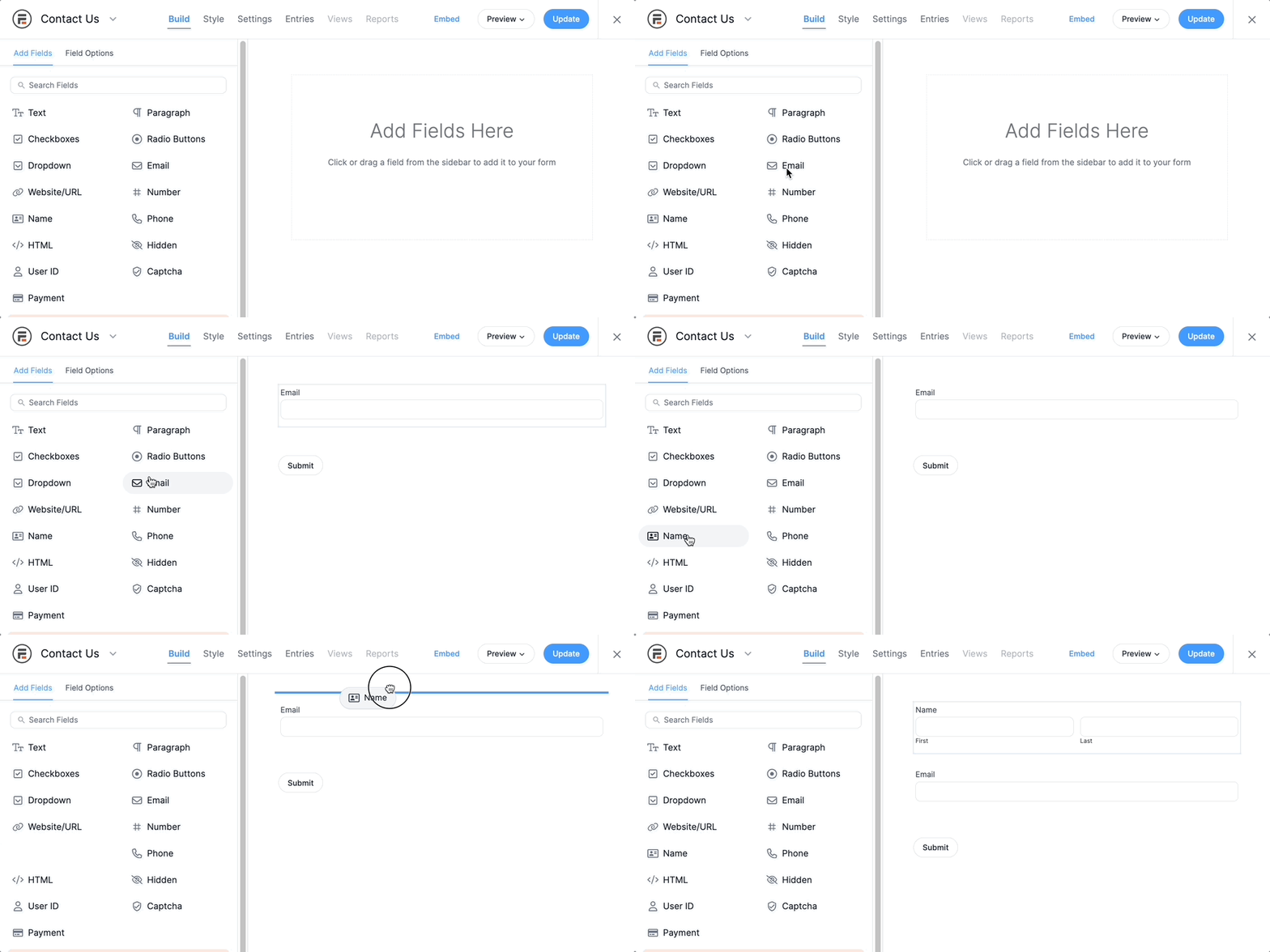
A drag and drop builder gets a form live in seconds, with a file upload field for resumes and cover letters. And you don't have to start from scratch, since there's a ready-made job application form template to build on.
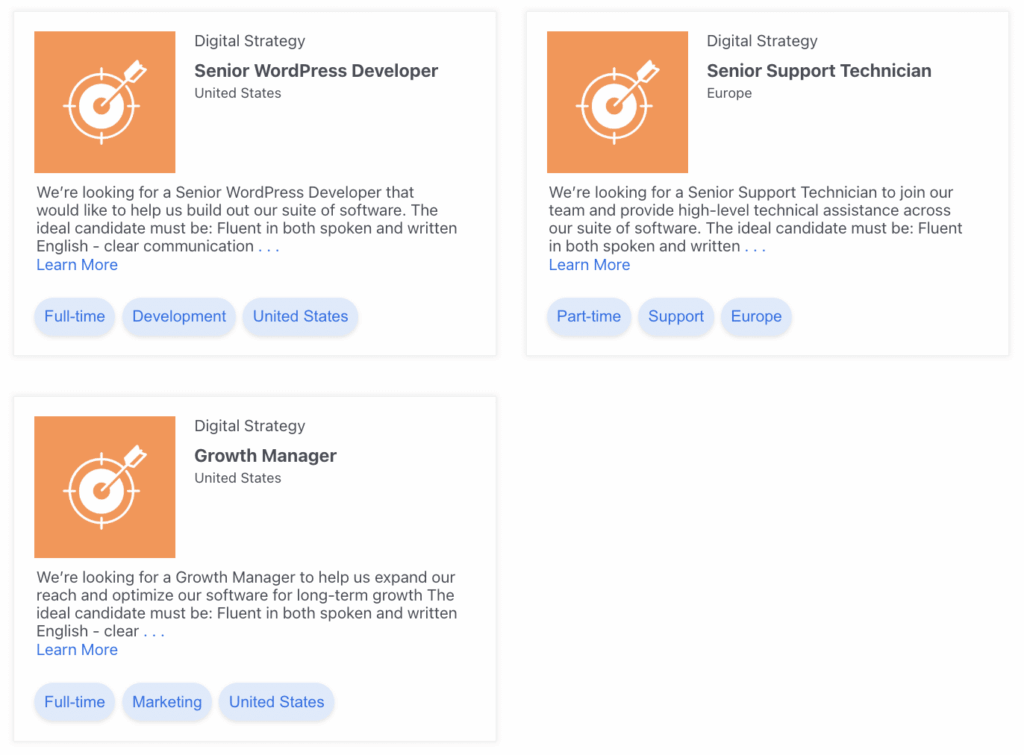
However, what really sets it apart is Views, our feature for displaying form data on the front or back end of your site. With Views you can run a job board for visitors and an applicant dashboard for your hiring team off the same entries from the same form, which no other form builder on this list can do. And if you want to archive an application as a PDF, our PDF add-on handles it in a few clicks.
- Simple drag and drop form builder
- Visual Form Styler for complete control of the design
- Unique Views feature for displaying job listings and applicant data
- 150+ pre-made templates, including job application and registration forms
- Multiple field types so you can customize the form exactly how you need
Pricing: Formidable Forms Lite is free on WordPress.org. Paid licenses start at $39.50 for the first year (then $79 on renewal), and Views is available on any paid license.

2. WP Job Manager

Rating: 4.4 stars (235+ reviews) | 80,000+ active installations
WP Job Manager, built by Automattic, sits at the top of most job board plugin lists, and for good reason. You add, manage, and categorize listings right inside the familiar WordPress editor, and because the whole plugin is shortcode-based, it drops into almost any theme without a redesign.
It's deliberately lightweight, so it won't slow your site down, and it ships with a front-end employer dashboard where logged-in users post and manage their own listings. That makes it a natural fit for a community board or a multi-company careers site rather than a single hiring page.
The catch is that the free core doesn't collect applications on its own. That lives in the premium Applications add-on, and a real board usually means a few more add-ons on top, for resume management, job alerts, or paid listings through WooCommerce. The pieces are well built and widely supported, but two things are worth knowing going in: the default listing design looks dated without a premium theme, and the add-on costs stack up the more you bolt on.
Features:
- Shortcode-based, so it works with almost any theme
- Front-end employer dashboard for managing listings
- Job alerts and strong category and job-type filters
- Optional WooCommerce add-on for paid listings
Pricing: WP Job Manager's core plugin is free. Application collection and other advanced features come as paid add-ons.
3. Simple Job Board

Rating: 4.7 stars (130+ reviews) | 10,000+ active installations
Simple Job Board does what its name promises: adding listings and accepting applications is genuinely straightforward, and the plugin stays light and quick. PressTigers keeps it well supported, and the free version covers more than you'd expect, including customized application forms per posting, shortcode display, multilingual compatibility, and the ability to read applications and leave notes right from your dashboard. For a small team that just needs a careers page with a real apply flow, it's a clean fit.
The trade-off is reach and depth. With around 10,000 installs it's a smaller community than the big job boards here, and the more advanced pieces, like accepting applications by email or attaching multiple files, are paid add-ons you buy as you need them. For basic application forms, though, the free core handles the job.
Features:
- Customized application forms
- Useful shortcode for displaying forms
- Compatible with WordPress multilingual plugins
- Good job filtering options
Pricing: Simple Job Board's core is free with its basic features. You pay for add-ons as you need them, like email applications, each with a year of support.
4. WPForms
Rating: 4.9 stars (14,000+ reviews) | 6 million+ active installations
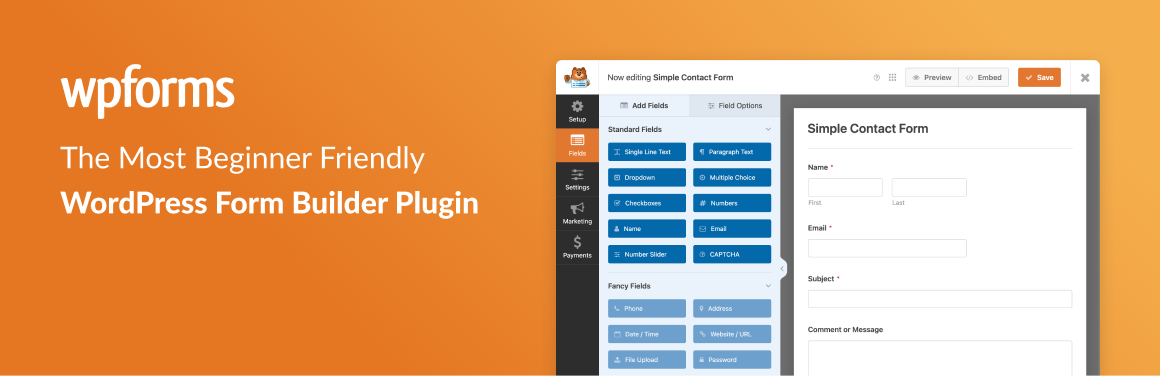
WPForms is one of the most popular form builders in WordPress, with more than 6 million installs and a near-perfect rating, and it doubles as a solid job application tool. A drag and drop builder and a library of templates get a form live in minutes, and you get the full range of fields you'd want, including name, email, phone, and a file upload for resumes, plus easy control over fonts, button styles, and colors so the form matches your brand. It's about as beginner-friendly as form builders get.
Like the other form builders here, WPForms collects applications well but doesn't publish job listings on its own, so it's the right call when you need a clean form on a careers page rather than a browsable board. File uploads and the more powerful features sit on the paid tiers, and the entry price is a first-year promotional rate that renews higher, so it's worth checking the renewal before you commit.
Features:
- Simple form builder
- Responsive design
- Many integrations
- Good spam protection
Pricing: The free plugin gives you basic form-building options. Paid plans start at $49.50 for the first year for the more powerful job application features.
5. Apply Online

Rating: 4.1 stars (40+ reviews) | 2,000+ active installations
Apply Online sets up application forms with a drag and drop builder that takes no time to learn. Its real differentiator is multiple ad types: you can run careers, classes, registrations, and admissions side by side from one plugin, which makes it a good fit for schools and training programs that collect more than just job applications. A dedicated AOL Manager user role lets someone handle incoming applications without giving them the run of your whole WordPress admin.
The core plugin is free, with paid add-ons like an Application Tracker, Applications Exporter, conditional fields, and Captcha sold individually or bundled. It's a smaller plugin, with around 2,000 installs and some mixed reviews about support response times, so it suits a specific multi-program use case more than a high-volume hiring pipeline.
Features:
- Drag and drop form builder
- Lightweight and fast
- Easy integration with your WordPress site
- Email notifications when an application comes in
Pricing: The plugin is free, and you pay for the add-ons you need.
6. Everest Forms

Rating: 4.9 stars (370+ reviews) | 100,000+ active installations
Everest Forms is another WordPress form builder that handles job applications well, and its free version is unusually generous. File uploads, Stripe and PayPal payments, survey fields, and pre-built templates are all included at no cost, so applicants can attach resumes and portfolios without an upgrade, something most competitors gate behind a paid plan. The drag and drop builder is quick to learn, and the form designer gives you real control over layout.
It's a form builder, though, not a job board, so it collects applications rather than publishing listings. Conditional logic, the bigger CRM (customer relationship management) and email integrations, and multi-step forms move to the paid plans, but for a straightforward careers-page form the free version covers more ground than you'd expect.
Features:
- Drag and drop form builder
- File uploads in the free version
- Advanced form designer
- Spam protection
Pricing: Everest Forms has a capable free plugin with file uploads, templates, and Stripe and PayPal payments. Paid plans add conditional logic, more integrations, and survey fields.
7. WP Job Portal

Rating: 4.3 stars (30+ reviews) | 8,000+ active installations
WP Job Portal is a full recruitment system that doubles as an application tool, and it's leaned hard into AI lately, with add-ons for AI-powered job search and resume matching.
Even the free version is genuinely featured: separate employer and job seeker dashboards, a resume builder, a Quick Apply option that lets visitors upload a resume without creating an account, and a setup wizard that configures the plugin as either a single-employer careers page or a public board. It can even import your existing listings straight from WP Job Manager.
The catch is that the strongest pieces are gated. AI search, paid listings, the credit and membership system, and the advanced resume tools all live in premium add-ons, and with around 8,000 installs and a smaller pool of reviews, it's less battle-tested than the biggest names here. If you want a feature-dense recruitment hub and don't mind assembling add-ons, it goes deep.
Features:
- Employer and job seeker dashboards
- Resume builder and Quick Apply
- AI-powered job and resume search (add-on)
- Imports existing listings from WP Job Manager
Pricing: You can download the free plugin from WordPress.org. Paid plans start at $49 per year.
8. WPJobBoard

WPJobBoard is primarily a standalone job board, but it has genuinely capable form-building through a drag and drop builder, and its customization options go further than most application plugins here. It's premium only, so you can't test it for free first, but a purchase includes a job board theme, which saves you a separate design project when you're standing up a board from scratch.
You get a lot in one package: a strong built-in applicant tracking system, PayPal and Stripe integrations for paid listings, resume and CV uploads, and direct support. Because it isn't on WordPress.org there's no public rating to point to, and the up-front cost is higher than the add-on-based boards, but for a dedicated, monetized job site you want running out of one well-supported plugin, it's a serious option.
Features:
- Drag and drop form builder
- Upload CVs and resumes
- Included WordPress theme
- Advanced application tracking system
Pricing: WPJobBoard is premium only. A single-site Personal license starts at $97 per year, which includes a year of upgrades, support, and the WordPress theme.
9. WP Job Openings

Rating: 4.8 stars (190+ reviews) | 40,000+ active installations
WP Job Openings (recently rebranded HireZoot) is a job board plugin that looks great out of the box, and its version 4 redesign added grid, list, and stack layouts, instant filtering, and a resume preview built into the free core. You list jobs, take applications, and manage every applicant from inside your WordPress dashboard, which makes it a strong, low-fuss choice for a company careers page.
There's one thing to know upfront: the custom application-form builder is a Pro feature, so the free version uses a fixed default form until you subscribe. Pro also adds the ability to shortlist and rate candidates, attach files to notifications, and export applications, so the tools that turn it into a real applicant-tracking workflow are the paid ones. For a clean, modern listings page you manage in WordPress, though, it's hard to beat.
Features:
- Easy setup
- Responsive layouts
- Advanced search and filter
- Application management inside WordPress
Pricing: A free version is available. The Pro version adds a custom application form builder, candidate rating, and application exports.
10. Gravity Forms

Gravity Forms is our last general-purpose form builder, and a long-time favorite among WordPress developers for its reliability and deep add-on ecosystem. The drag and drop builder is straightforward, there's a wide set of fields for building a thorough application form, and a large library of official and third-party add-ons connects it to almost any CRM, payment, or email tool you already use. If you're comfortable writing CSS (the code that controls styling), you can push the design as far as you like.
Like the other form builders here, it collects applications but doesn't publish job listings on its own. The bigger thing to weigh is that Gravity Forms has no free version at all, so it's best suited to teams already invested in it, or developers who want its add-on flexibility and don't mind paying from day one.
Features:
- Responsive plugin
- Many integrations
- Drag and drop builder
- Easy file upload
Pricing: Gravity Forms doesn't have a free version. Paid pricing starts at $59 per year.
Comparison table
| Plugin | Free version | Starting price | Best for |
|---|---|---|---|
| Formidable Forms | Yes | $39.50 first year | Form-first careers pages and full job boards with Views |
| WP Job Manager | Yes | Paid add-ons | Standard public job board |
| Simple Job Board | Yes | Paid add-ons | Small teams on a budget |
| WPForms | Yes | $49.50 first year | Simple application forms, no listings |
| Apply Online | Yes | Free plus add-ons | Schools and admissions workflows |
| Everest Forms | Yes | Free core | A generous free form builder with file uploads |
| WP Job Portal | Yes | $49 per year | Recruitment sites that want a resume builder |
| WPJobBoard | No | $97 per year | Standalone job board with included theme |
| WP Job Openings | Yes | Paid Pro | Polished company careers pages |
| Gravity Forms | No | $59 per year | Teams already on Gravity Forms |
How to choose
The right plugin depends on what kind of job application problem you actually have. A few quick paths:
You need a careers page on a company site. A few openings, applications coming in, a hiring manager reviewing them. Formidable Forms or WP Job Openings both set up fast and look good. Formidable Forms wins if you want applications feeding into a private dashboard for your team.
You're building a public job board. Formidable Forms with Views gives you the most control over front-end design, WP Job Manager is the safest off-the-shelf option, and WPJobBoard saves you a separate theme project.
You're a school, training program, or admissions team. Apply Online or Formidable Forms both fit, and Formidable Forms handles unlimited form types under one license without weighing down your site.
You only need a form, not a board. WPForms, Gravity Forms, Everest Forms, or Formidable Forms all work. But if you might add job listings later, Formidable Forms is the only one that grows with you without a second plugin.
You want to build it yourself. Formidable Forms with Views is the only plugin here that lets you design the whole job board from scratch: your forms, your listings, your search, your detail pages, and your applicant dashboard.
How to build a job board in WordPress with Formidable Forms
You don't actually need a dedicated job board plugin to run a job board. With Formidable Forms and Views, you can build the whole thing yourself: the listings, the search, the detail pages, and the application form, all from one lightweight plugin that won't bog down your site the way a stack of single-purpose plugins can.
If you'd rather not start from a blank page, we have a ready-made job board template that comes with the Business license. The steps below build the same thing from scratch so you understand each piece, but the template gets you most of the way there in a fraction of the time.
A complete job board comes down to 4 parts, and we'll build them in order: the listings form, the View that displays them, the search, and the application form.
Step 1: Create the job listings form
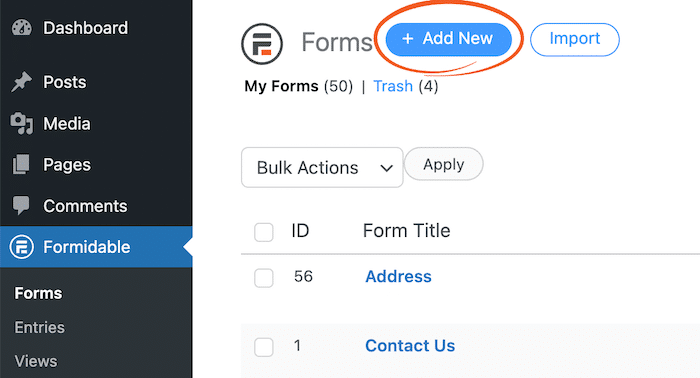
Start with the form you'll use to post a new opening. In your WordPress dashboard, go to Formidable → Forms → Add New, choose Blank Form, give it a name like "Job Listings," and click Create.
With the form open, drag in the fields a listing needs from the field panel on the left: a Single Line Text field for the Job title, a Dropdown for the employment type (Full-time, Part-time) and department, and fields for Salary, Job description, City, and State. Add any others your board calls for.

One tip while you build: make the fields people will filter by, like location and job type, Dropdown fields. That lets the search form match them cleanly in Step 5.
Step 2: Create a View to display the listings
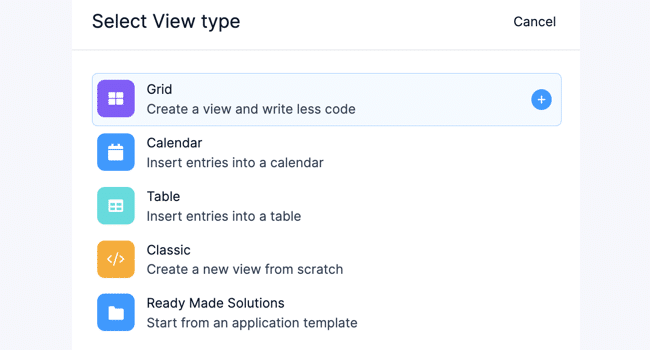
Next, put those submissions on the front end with a Formidable View. Go to Formidable → Views → Add New, select your Job Listings form as the data source, and choose the Grid layout so each opening shows up as a card.
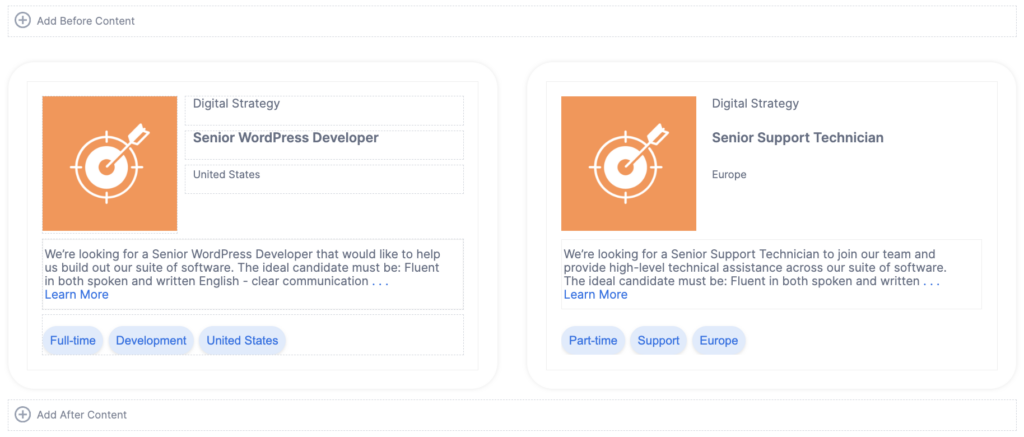
A View has three parts: the Before Content and After Content sections render once per page, while the Content box in the middle repeats for every entry. Add the fields you want each listing to show, like title, location, and salary, into the Content box.
Step 3: Set up the detail page
Open the Detail Page to design the single-job view that opens when someone clicks a listing. Because it shows one job rather than a list, it has no Before or After content, just that entry's full details.
The Layout builder in the top right lets you set up the grid, and from there you can add your content inside each box.
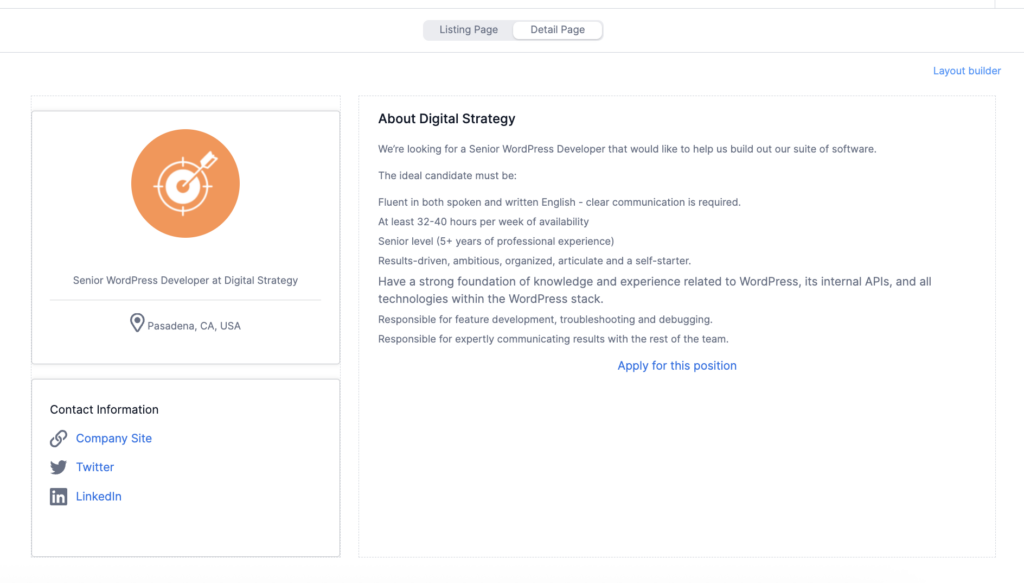
Once this is set up, your board displays new openings automatically the moment a listing form is submitted. For a deeper walkthrough, see our guide to displaying form submissions.
Step 4: Add search functionality
First, add a few sample jobs through your form so you have something to search. Once the View is displaying them correctly, you can make that list searchable.
Formidable has a built-in search shortcode for this:
[frm-search]This adds a search box that looks through the entries shown in your View. The simplest setup is to place it in the before content of your View, so the search bar appears right above your job listings.
One thing to know: this search box searches the text shown in your View entries. It won't search categories, taxonomies, or custom fields, so make sure the fields people search on (like Job Title and Company) are actually displayed in the View.
Add the shortcode, then run a few searches with different terms to confirm the right jobs appear.
For more options, including styling the search bar and the full list of parameters, see Formidable's guide on inserting a search bar.
Step 5: Build the application form
The last thing you need to build is the form people use to apply. You have 2 options.
The quickest is to start from Formidable's Job Application template, which already includes the standard fields applicants expect. Go to Formidable → Forms → Add New, select the Job Application template, and customize it to fit your openings.
Or you can build it from scratch the same way you built the listings form. In Formidable → Forms → Add New, add fields for the applicant's name and email, a File Upload field for the resume, and a Paragraph field for a cover letter.
Then embed the application form's shortcode in the Detail Page content of your View so an Apply button shows up on every individual job.
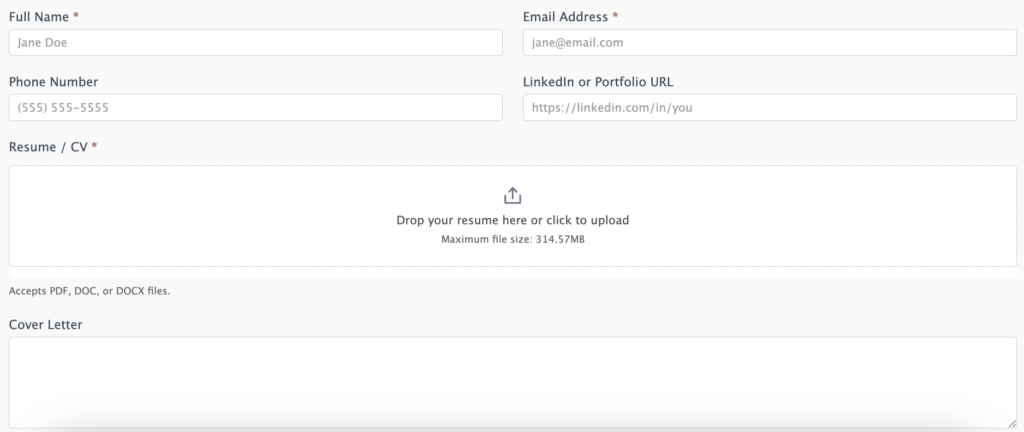
You can also pre-fill the application form with the job title by passing it through the URL with the [get param=...] shortcode, so applicants don't have to retype which role they're applying for.
For more on this, see Formidable's guide on default values and placeholders.
Step 6: Smooth out the experience
One small touch goes a long way. Open the Confirmation action on both the listing form and the application form, edit the success message, and add a link back to the listings page so a submission doesn't dead-end.
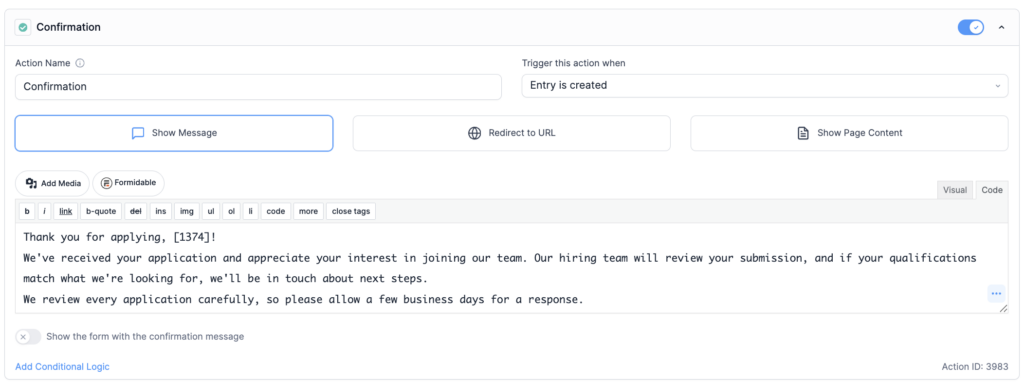
Match the plugin to the hire
A WordPress job application plugin should make your hiring easier, not turn into a second job. Pick based on the actual scope of what you're building, because a single careers page is a different tool than a public job board, and paying for features you don't need is a fast way to regret the choice in 6 months.
Formidable Forms covers more of that spectrum than any other plugin here, from a basic application form to a full filterable job board with Views. Once you've picked your plugin, you can get started with our functional job board template in minutes. Start free, add a paid license when you need it, and never migrate to a different plugin when your needs grow.
What's the difference between a job board plugin and a job application plugin?
A job board plugin focuses on posting and displaying openings, usually with employer accounts and category filters. A job application plugin focuses on collecting and managing applications. Many plugins do both, but they lean one way or the other. If you only need to collect applications for your own company's openings, a form-first plugin like Formidable Forms is enough. If you're hosting other companies' job postings, you want a full job board plugin.
Can I build a job board without a dedicated job board plugin?
Yes. Formidable Forms combines a form builder with Views, which lets you create the job listings, the search, the detail pages, and the application form using a single plugin. That avoids the bloat and theme conflicts that dedicated job board plugins sometimes introduce. You build 2 forms (job postings and applications) and use Views to display them on the front end.
Do these plugins handle resume uploads?
Most of them. File upload is a standard feature in Formidable Forms, WPForms, Gravity Forms, WP Job Manager (with the Resume Manager add-on), Simple Job Board, and others. Check the file size limits and supported file types before committing, especially if you expect large PDFs or portfolios.
Can I charge employers to post jobs?
Yes, with the right plugin. WP Job Manager (with its WooCommerce Paid Listings add-on), WPJobBoard, and WP Job Portal (through its premium credit system) all support paid listings. With Formidable Forms, you can build a paid posting flow using the Stripe or PayPal integrations and conditional logic on the job submission form.
Are there free WordPress job board plugins that actually work?
Yes. WP Job Manager and Simple Job Board both have functional free cores, though you'll likely pay for an add-on or two once you need application collection or premium filtering. Formidable Forms Lite is free on WordPress.org and handles job application forms well, though Views (for displaying listings) is a paid feature.
Will a job board plugin slow down my site?
It can. Job board plugins typically register custom post types, add styling, and queue scripts on every page. That's fine on a dedicated jobs site, but on a general business site, it's overkill for a careers page. A lightweight form-and-views setup with Formidable Forms keeps the footprint small.
This article may contain affiliate links. Once in a while, we earn commissions from those links. But we only recommend products we like, with or without commissions.

