What a pleasure to have support within minutes. Brillant, accurate answer, and solved the question. Thanks to the Formidable Team. Eric


Last updated on November 3, 2026 by Formidable Team
5 Best Tax Calculator Plugins for WordPress
Is tax math turning your checkout or quote form into a headache? Formidable Forms can add sales tax to a total, or run loan and income tax math, right inside your forms. Here are the 5 best tax calculator plugins for WordPress, covering sales tax, VAT, and custom tax calculators, so you can pick the right fit.
Approximate read time: 6 minutes
Upgrade your WordPress site with powerful, flexible forms.
The 5 best tax calculator plugins at a glance
Some of these plugins calculate tax inside your own forms. Others automate tax for a store or handle compliance for you. Ratings, installs, and prices below were verified on WordPress.org, WooCommerce.com, and each vendor's own site in November 2026.
| Plugin | Best for | Rating and installs | Starting price |
|---|---|---|---|
| Formidable Forms | Custom tax math in quotes, loan, and price calculators | 4.8 stars, 300,000+ installs | Free; paid plans (with calculators) from $39.50 the first year |
| WooCommerce Tax | Automatic sales tax at WooCommerce checkout | 2.1 stars, 500,000+ installs | Free |
| Easy Digital Downloads | Selling digital products with tax reports and EU VAT | 4.7 stars, 40,000+ installs | Free; EU VAT on Pro from £99.50 first year |
| Quaderno | Global sales tax, VAT, and invoicing on autopilot | 400+ installs (WooCommerce plugin) | From $24 per month |
| Avalara for WooCommerce | Larger stores with complex compliance needs | 2.4 stars, 60,000+ installs | Avalara account required (see below) |
From Idea to Reality in Minutes. Build Powerful Forms, Dashboards, Apps and More.
Formidable Forms makes advanced site building simple. Launch forms, directories, dashboards, and custom WordPress apps faster than ever before.
Top WordPress tax calculator plugins
1. Formidable Forms

Formidable Forms is a form builder, cost calculator builder, survey plugin, and application creator in one. Full disclosure: we built it to handle exactly this kind of math, from sales tax on a price total to loan and income tax calculators, which is why it's our pick here.
Need a mortgage calculator for a real estate website? Want taxes added to an instant quote for a service business? Or an income tax calculator for a financial services site? Formidable handles all three.
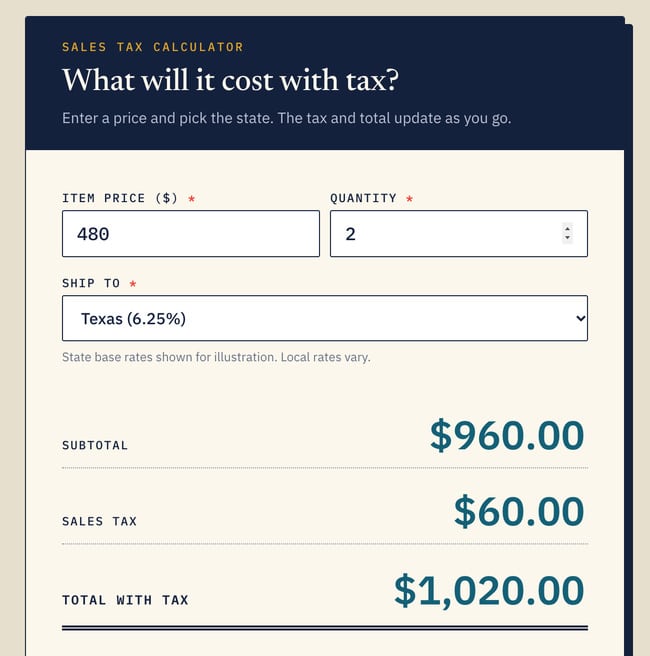
Adding sales tax to a total takes just one extra calculated field. Our guide to creating a price calculator for WordPress walks you through it, and the WordPress calculator plugin page shows everything the builder can do.
You can also describe the calculator you want to an AI assistant and let it build the form for you. Formidable’s MCP connection works with Claude, ChatGPT, and Cursor, so a request like “a quote form that adds 8 percent sales tax to the total” becomes a working form. MCP works on every license, including Lite, but calculations need a paid license.
Key features:
- Drag and drop calculator builder with advanced form calculations
- Conditional logic to show the right tax fields for each customer
- Tons of integrations for payments, email, and more
Formidable Forms has a free version with 300,000+ active installs and a 4.8-star rating from 1,388 reviews. Calculators come with every paid plan, which starts at $39.50 for the first year ($79 on renewal). The ready-made calculator templates come with the Business plan.
Yes, that costs more than the free plugins below. But one license covers every form on your site, your data stays on your own server, and calculators, payments, and registration live in one plugin with no stack of extensions to manage.
If all you need is automatic sales tax at a WooCommerce checkout, a free plugin is fine. If you want tax math inside quotes, loan tools, and order forms, Formidable is the better fit.

2. WooCommerce Tax

WooCommerce Tax was previously called WooCommerce Shipping & Tax, and it still lives at the woocommerce-services address on WordPress.org.
It automatically calculates the sales tax to collect on WooCommerce orders at checkout, so you don't enter tax rates by hand. Shipping label features have since moved to a separate plugin called WooCommerce Shipping, so this one is now focused on tax.
That makes it the simplest way to get accurate tax on a store that already runs WooCommerce, especially if you sell to customers in several states. If you also need shipping math, see our guide to the best WordPress shipping calculator plugins.
Key features:
- Automatic sales tax calculation at checkout
- Tax set up from your store address, with no manual rate tables
- Free, from the WooCommerce team
It's the most installed plugin on this list, at 500,000+ active installs.
The tradeoff is reputation: the rating is 2.1 out of 5 across 106 reviews, and it requires a WordPress.com connection to reach its tax services. It only works inside WooCommerce, so it won't help with quote forms or standalone calculators. If your store is small and your tax needs are simple, it's a sensible free starting point.
3. Easy Digital Downloads

Easy Digital Downloads (EDD) is built for selling digital products with WordPress, such as software, ebooks, and templates. The free plugin includes detailed tax reports for your sales. EU VAT compliance, which covers automatic VAT rate handling and customer VAT number checks, is part of the paid Pro passes, so check which pass you need before you commit. That split matters most if you sell to EU customers, where VAT rules differ by country.
Key features:
- Built for digital product stores
- Tax reports in the free plugin, EU VAT compliance in Pro
- Works with a wide range of payment gateways
EDD has 40,000+ active installs and a 4.7-star rating from 592 reviews. The core plugin is free, and Pro passes start at £99.50 for the first year and renew at £199, per EDD's pricing page.
It's a strong choice for a digital storefront, and a good pick if you want your store and your tax reports in one place. It isn't a calculator builder, though, so it won't add tax math to a quote or loan form.
4. Quaderno

Quaderno is a tax and invoicing service that automates sales tax, VAT, and GST. Its WooCommerce plugin works with WooCommerce's built-in tax calculation, then creates a tax-compliant invoice or credit note in Quaderno for each sale or refund. It also sends alerts when you approach a tax registration threshold.
That makes it a good fit for stores that sell across borders and want the paperwork handled for them. Per Quaderno's integration page, the plugin needs the Classic Checkout instead of the block-based one, so check your setup first.
Key features:
- Sales tax, VAT, and GST handled in one place
- Automatic invoices and credit notes for each sale and refund
- Threshold alerts and tax reports
The WooCommerce plugin is small, at 400+ active installs and 18 ratings, so Quaderno's value is the service behind it. The plugin is free, but you need a paid Quaderno account.
Plans on its pricing page start at $24 per month for 25 transactions a month, with a 7-day free trial and no credit card required.
5. Avalara for WooCommerce

Avalara is an enterprise-grade tax platform, and its WooCommerce extension connects your store to it. It calculates sales tax, VAT, GST, and duties in real time at checkout, and Avalara's platform also covers exemption certificates and return filing.
It's built for stores that have outgrown simple tax rate tables and need compliance across many regions. The tradeoff is setup: you create an Avalara account first, connect it from WooCommerce settings, and then configure tax codes for your products.
Key features:
- Real-time tax calculation at checkout, including cross-border duties
- Exemption certificate management
- Return preparation and filing through the Avalara platform
The WooCommerce.com listing shows 60,000+ active installs and a 2.4-star rating from 64 reviews. The extension requires an Avalara account, which is a separate third-party subscription. Avalara describes its plans as simplified, but the integration listing doesn't show prices, so confirm current plan costs with Avalara directly.
Ready to make a tax calculator in WordPress?
If you just need tax added at WooCommerce checkout, the free WooCommerce Tax plugin does the job, and Quaderno or Avalara take over when compliance gets complicated. But if you want tax math inside your own quotes, loan tools, and price calculators, Formidable Forms is the one built for it.
Start with the free version of Formidable Forms, then upgrade when you're ready for calculators, backed by a 14-day, no-questions-asked money-back guarantee.
This article may contain affiliate links. Once in a while, we earn commissions from those links. But we only recommend products we like, with or without commissions.