
Boosts are standalone add-ons and features for Formidable Forms that you buy separately. Pick only the Boosts your forms need, and pay for those alone.
Upgrade your WordPress site with powerful, flexible forms.
How Boosts differ from regular add-ons
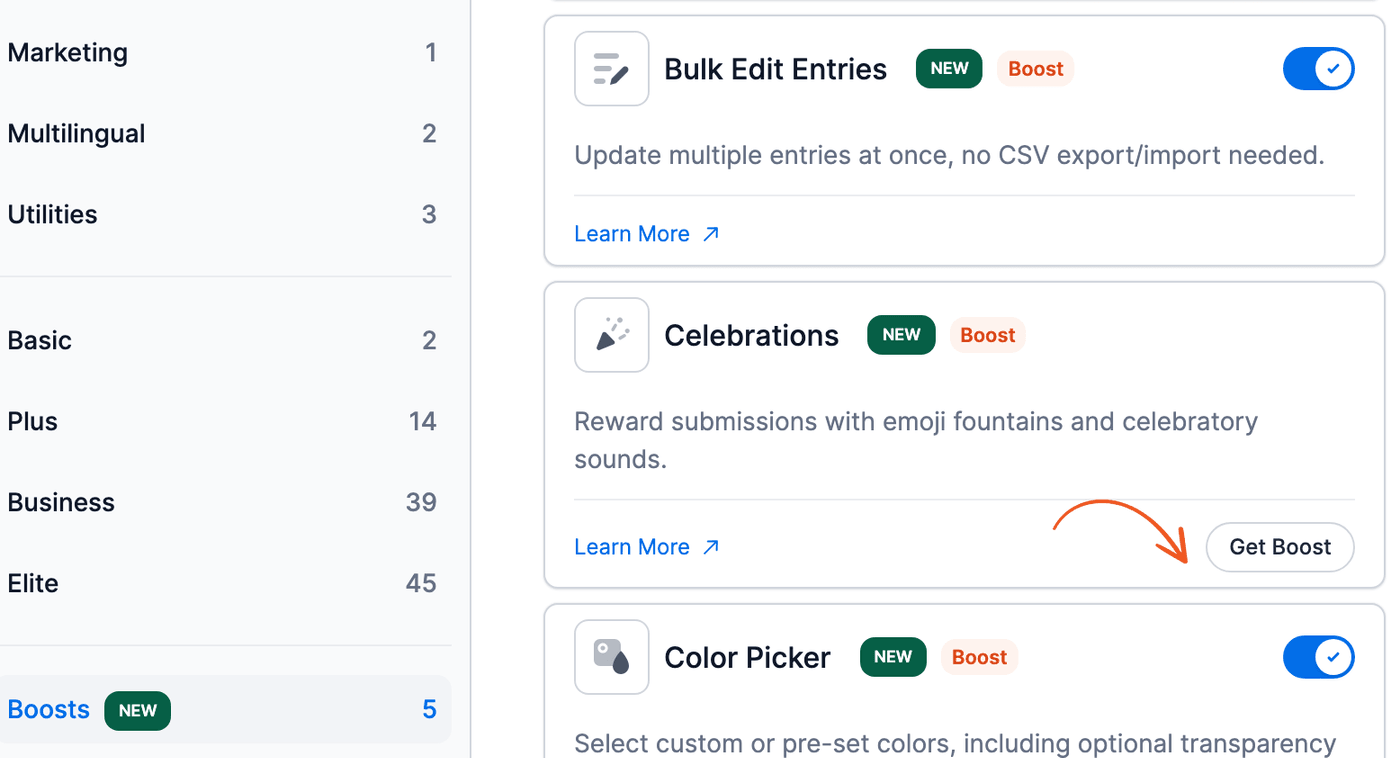
Regular add-ons come with your Formidable Forms plan. Boosts are specialist tools that you buy on their own. You only pay for the ones you use. Both appear on the Formidable → Add-Ons/Boosts page.
| Regular add-on | Boost | |
|---|---|---|
| How you get it | Included in your plan. | Bought separately. Boosts are not included in any plan. |
| Which licenses | The plan tiers that include it: Basic, Plus, Business, or Elite. | Any plan with Formidable Forms Pro: Basic, Plus, Business, or Elite. |
| Where it shows | Formidable → Add-Ons/Boosts, in the plan and topic categories. | Formidable → Add-Ons/Boosts, in the Boosts category. Each card has a Boost label. Hover over the label to read "Boosts are sold separately and are not included in any plan." |
| How you install it | Turn on the toggle on its card. | Click Get Boost to buy it. After you buy it, turn on the toggle on its card. |
Boosts and an expired license
A Boost does not expire. If your license expires, the Boost keeps working.
As with the rest of your license, you miss functionality and security updates for it. You also can't earn or buy new Boosts until you renew.
A Boost stops working when Formidable Forms Pro is not active, or when your license is deactivated or revoked on the site. Each Boost checks that Pro is authorized.
After your license expires and its grace period ends, the form builder treats the Color Picker field like other premium fields. Color Picker is the only Boost that adds a field. You can't add a new Color Picker field. The ones on your forms are locked in the builder.
From Idea to Reality in Minutes. Build Powerful Forms, Dashboards, Apps and More.
Formidable Forms makes advanced site building simple. Launch forms, directories, dashboards, and custom WordPress apps faster than ever before.
Boosts you can get
Formidable Forms has these Boosts today. Each Boost has its own product page with details and the price.
See all Boosts and their prices.
| Boost | What it does |
|---|---|
| Tooltips | Adds help icons to field labels that show extra info on hover or tap. |
| Celebrations | Celebrates form submissions with an emoji burst, a sound, or a custom message. |
| Advanced Modals | Shows forms, text, and images in popups opened by a button, exit intent, or page load. |
| Bulk Edit Entries | Updates many entries at once, without exporting and importing a CSV file. |
| Color Picker | Lets visitors pick custom or preset colors, with optional transparency. |
Product pages: Tooltips, Celebrations, Advanced Modals, Bulk Edit Entries, and Color Picker.
Get and install a Boost
- If you haven't already, install and activate the current version of Formidable Forms Premium on your WordPress site.
- Go to Formidable → Add-Ons/Boosts and click Boosts in the list on the left.
- On the card of the Boost you want, click Get Boost to buy it. The checkout on formidableforms.com opens in a new tab.

- After you buy it, go back to Formidable → Add-Ons/Boosts and click Boosts. Turn on the toggle on the card of the Boost to install and activate it.
If the card still shows Get Boost, click Check now for a recent upgrade or renewal at the top of the page. The page keeps the add-on list for up to 6 hours, and this link loads it again.
Questions about Boosts
What is the difference between a Boost and a regular add-on?
Regular add-ons come with your Formidable Forms plan. Boosts are specialist tools that you buy separately. You only pay for the ones your project uses.
Do I need Formidable Forms Pro to use a Boost?
Yes. You need Formidable Forms Pro with a current Basic, Plus, Business, or Elite license to buy or get a Boost.
Can I use a Boost on more than one site?
Yes. You can use a Boost on any site your license covers.
Do Boosts expire?
No. Once you buy or get a Boost, it is yours to keep. If your license expires, the Boost keeps working. You stop getting updates for it.
See Boosts and an expired license above for what else changes.
Are Boosts included in Elite?
No. Boosts are sold separately from every plan, Elite included. You can buy or earn a Boost. When you renew at full price or upgrade your plan, you earn free Boosts: one of each per year, up to 3.
Can I get a refund for a Boost?
No. We don't offer refunds for Boost purchases.