
What a pleasure to have support within minutes. Brillant, accurate answer, and solved the question. Thanks to the Formidable Team. Eric


Last updated on August 18, 2026 by Formidable Team
How To Use a WordPress PDF Certificate Generator
Find out how to use a WordPress PDF certificate generator to design and download certificates for your users, with simple steps for easy customization.

Approximate read time: 4 minutes
Wondering how you can use a form to instantly fill in a PDF certificate for you? Maybe you’re looking to create something that looks like this:

There are a few different ways to create a PDF certificate like the above:
- ⛔ The hard way: using PHP, CSS, and HTML code.
- ✅ The easy way: using a PDF WordPress certificate plugin!
No matter what kind of PDF certificate you’d like to create, this article will guide you through the why and how of using a WordPress PDF certificate generator to achieve your goals.
Upgrade your WordPress site with powerful, flexible forms.
Why use a WordPress PDF certificate plugin?
You can make a PDF certificate with PHP, but it can be tricky, and you’ll need to do some coding. PHP certificate templates can help, but if you don’t want to or don’t know how to code, you’re better off using a PDF plugin.
A certificate generator WordPress plugin like Formidable Forms makes creating and style downloadable certificates fast and simple.
But all of these WordPress plugins for certificate generators aren’t created equal!
Formidable Forms is the best way to automatically generate custom PDFs from form submissions on a WordPress website.
Thanks to Formidable’s drag-and-drop PDF editor, pre-built PDF templates, and advanced form features, you can create a custom PDF certificate in just a few clicks.
Add a branded header and footer, automatically insert forms data including signatures, change the layout, colors, fonts, and more.
From Idea to Reality in Minutes. Build Powerful Forms, Dashboards, Apps and More.
Formidable Forms makes advanced site building simple. Launch forms, directories, dashboards, and custom WordPress apps faster than ever before.
How to use a WordPress PDF certificate generator
To start creating PDF certificates on your WordPress site, you must download and activate the Formidable Forms plugin. This is the perfect WordPress certificate generator for you.
It's four easy steps:
Step 1: Install the Formidable PDF and Views add-ons
In the left sidebar of your WordPress dashboard, go to Formidable → Add-Ons.
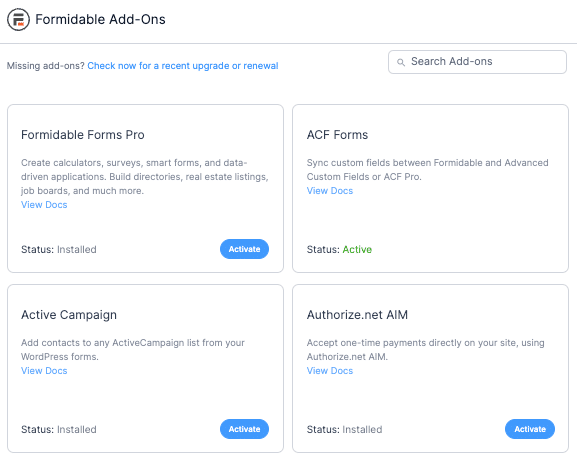
Install and activate both PDFs and Visual Views. These powerful add-ons and loads of other amazing features are part of Formidable Forms Business Plan.
Don’t have Formidable Forms Pro yet?
Step 2: Create a form to fill in your certificate
Next, use our WordPress form builder to create the form that will automatically fill in your PDF certificate. This is the easiest WordPress PDF certificate generator for anyone to use.
From your WordPress dashboard, select Formidable → Forms and click Add New.
Here, you have three options:
- Build a form from scratch
- Use a pre-built form template
- Use the AI form builder
We recommend using our Certificate template to get everything you need to start right away, then you can customize anything else you need from there.
The plugin will take you to its drag and drop form builder where you can start customizing the form to your specific needs.
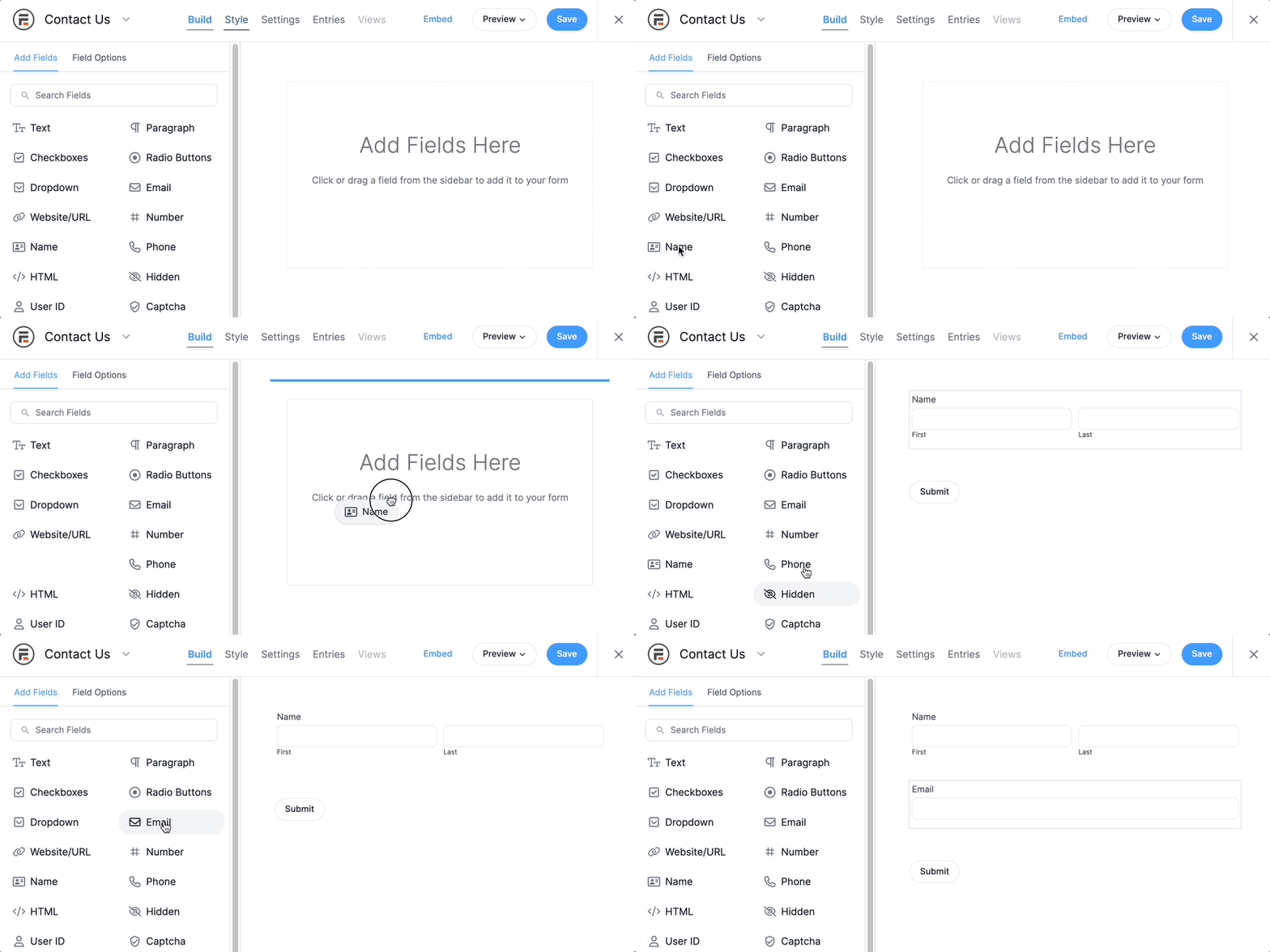
Feel free to add any fields you need and adjust the style using our Visual Form Styler. Once you're finished, click the Save button in the top right to save your progress.
Step 3: Customize your certificate
Once your form is ready, click Views to edit or create your certificate. Add New to generate a custom WordPress PDF or Edit an existing form using our certificate template.
You can then insert or modify the text and content fields to include your logo, business name, and more.
You can also automatically insert data from your form entries by clicking + in the PDF builder, then selecting the appropriate shortcode from the options in the lower right corner of the builder.
Step 4: Publish your PDF certificate
All that’s left is to copy the shortcode and insert it on any WordPress post or page where you’d like the user to download their certificate. You can insert a link to download the certificate or create a PDF button.
You can also send the PDF certificate as an email attachment once a user submits your form.
Just use the the shortcode:
[frm-pdf id=x]wherever you want your downloadable PDF certificate to appear, replace the “x” with the ID number provided in your certificate builder.
You can even copy/paste the certificate shortcode into the actions for your forms to instantly send your PDF file as an email attachment.

Get your certificate generator plugin for WordPress today
Not only can you create a certificate or generate a PDF from a form in WordPress with Formidable Forms, but it also lets you easily make any forms or PDFs. This is the only certificate plugin for WordPress you need
Use a contact form to stay in touch with your customers, a registration form so new users can sign up for your member website, and more.
By the way, we’ve got PDF documentation and plenty more in our Knowledge Base. Our top-notch support team is standing by to assist if you ever hit a snag! And if you feel more comfortable dipping your toe in the water, try our free version to get your feet wet!
Eager to learn how else Formidable Forms can help your business? Try Formidable Pro risk-free for 14 days and discover all the useful features of our WordPress form plugin.
And be sure to follow our Facebook, Twitter, and YouTube for more online form fun!
Read more: PDFs with Formidable!
 Add Charts and Graphs in Emails & PDFs with Formidable Forms!
 How To Add a WordPress PDF Viewer to a Website
 Print to PDF on WordPress (Posts, Form Entries, & More)
This article may contain affiliate links. Once in a while, we earn commissions from those links. But we only recommend products we like, with or without commissions.

