
Formidable API Add-On 2.0 uses /frm/v3 as the current REST namespace. It includes forms, entries, fields, statistics, Views, styles, form actions, style assignment, Applications, and View layouts.
The add-on keeps /frm/v2 as a frozen legacy namespace for existing integrations. Use /frm/v3 for new integrations. Each Formidable REST API endpoint below is part of the API add-on.
Upgrade your WordPress site with powerful, flexible forms.
Requirements
- Formidable Forms Pro and Formidable API Add-On 2.0 installed and activated.
- A Formidable license that includes the API add-on. The API add-on is available on the Business and Elite licenses.
- REST API turned on under Formidable → Global Settings → API.
- A WordPress user whose role has the required Formidable permission.
- Formidable Views for View and View-layout routes. Without Formidable Views active, the /views and /view-layouts routes return a rest_no_route 404 error. The Add/Edit Views permission also doesn't appear under Formidable → Global Settings → Permissions.
- HTTPS and a WordPress Application Password for external user-scoped requests.
From Idea to Reality in Minutes. Build Powerful Forms, Dashboards, Apps and More.
Formidable Forms makes advanced site building simple. Launch forms, directories, dashboards, and custom WordPress apps faster than ever before.
Choose the REST namespace
| Namespace | Use |
|---|---|
| /wp-json/frm/v3 | Current full API surface. Use it for new integrations and new 2.0 resources. |
| /wp-json/frm/v2 | Frozen legacy surface. Keep it for existing integrations that depend on the old routes and response behavior. |
New endpoints and behavior changes are added only to /frm/v3.
Install the API Add-On and enable the REST API
- Install and activate Formidable Forms Pro.
- Go to Formidable → Add-Ons.
- Find Formidable API, then install and activate it.
- Go to Formidable → Global Settings → API.
- Turn on REST API.

- Click Update to save your changes.
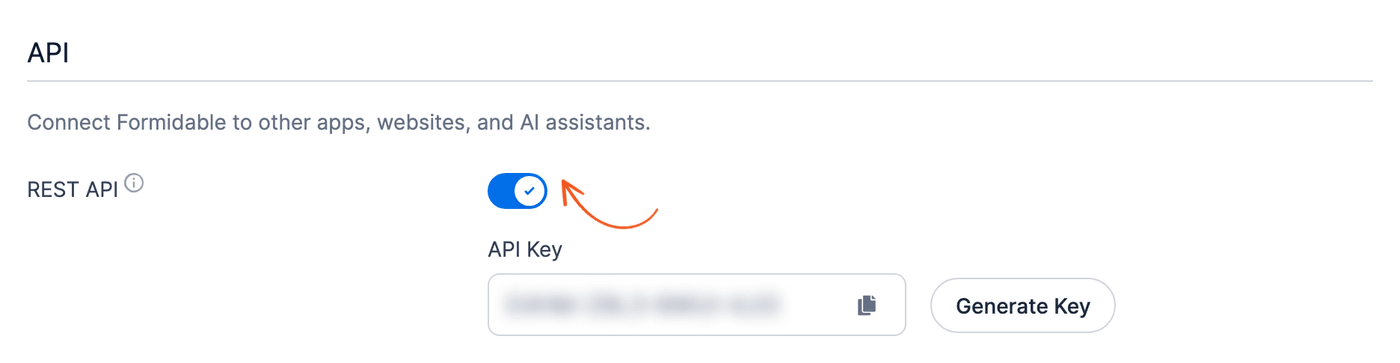
When REST API is off, Formidable does not register the /frm/v2 or /frm/v3 routes. The Formidable MCP server and the Formidable abilities have their own setting, Enable the Formidable MCP server, under Formidable → Global Settings → MCP.
Authenticate a request
Use HTTPS. Send a WordPress username and Application Password with HTTP Basic Authentication. This example lists styles:
curl --silent --show-error \
  --user "YOUR_USERNAME:YOUR_APPLICATION_PASSWORD" \
  "https://example.com/wp-json/frm/v3/styles"
An Application Password runs with the permissions of its WordPress user. Use a dedicated user with only the required Formidable permissions.
Existing integrations can also use the Formidable API Key shown under Formidable → Global Settings → API. The API key and a WordPress Application Password are different credentials. The legacy Formidable API key gives the request administrator access. Use an Application Password for a new version 3 integration. Do not put either credential in a public repository, browser URL, AI conversation, or shared document.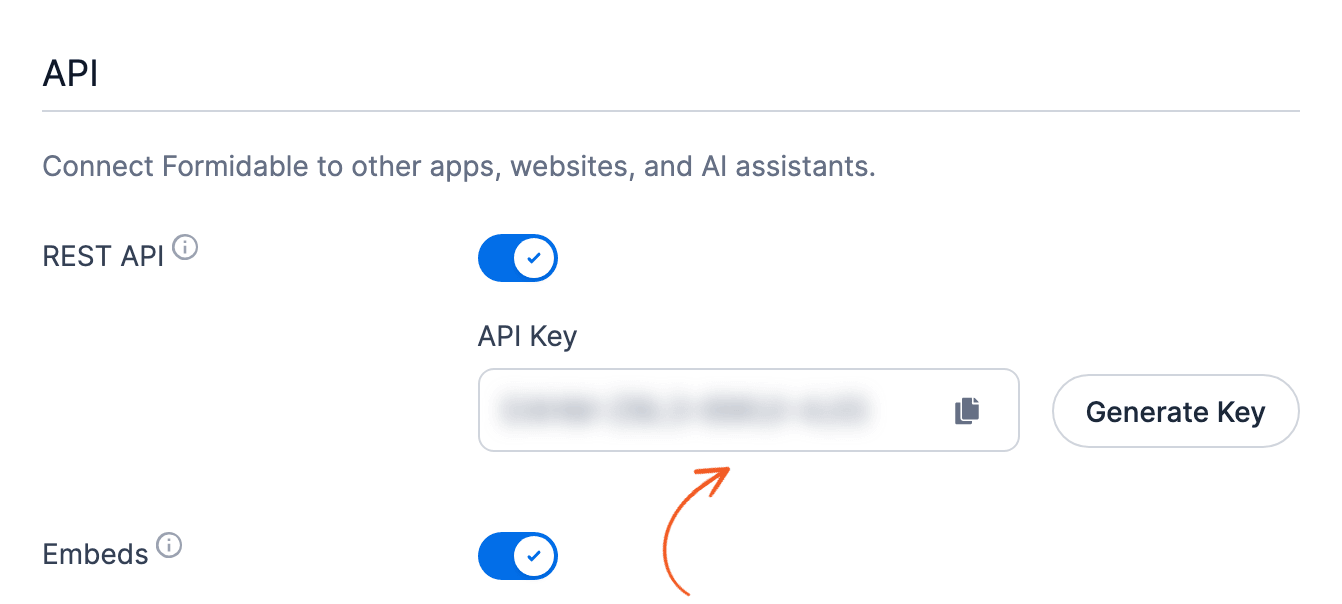
Configure the WordPress user's permissions
Go to Formidable → Global Settings → Permissions. Under each required permission, select the dedicated user's WordPress role, then click Update. Each selection affects all users with that role. If the integration needs a unique permission set, create a custom role with a WordPress role-management plugin or custom code.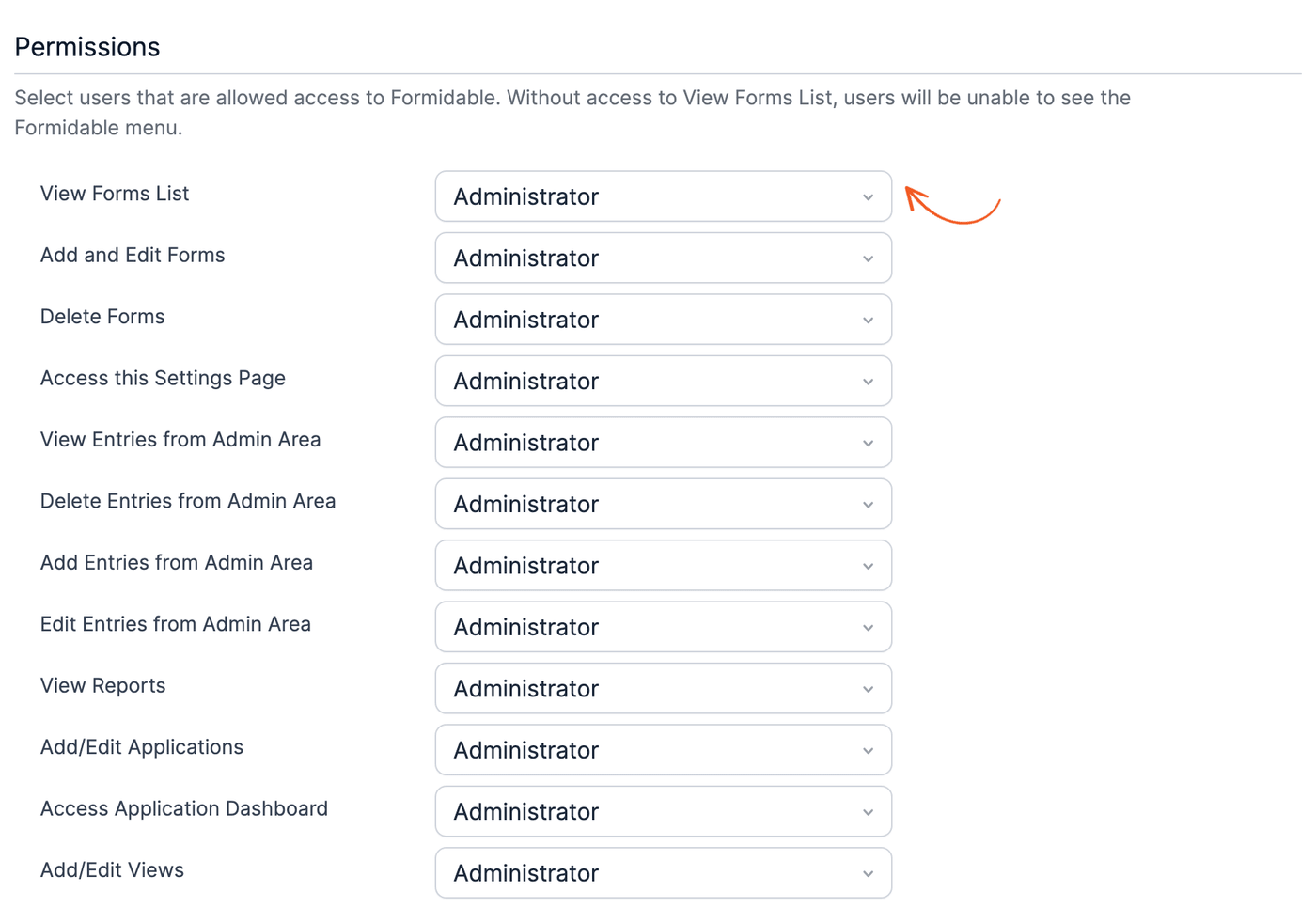
| REST operation | Permission setting |
|---|---|
| View forms and fields | View Forms List |
| Create or update forms and fields | Add and Edit Forms |
| Delete forms and fields | Delete Forms |
| View entries and statistics | View Entries from Admin Area |
| Create entries | Add Entries from Admin Area |
| Update entries | Edit Entries from Admin Area |
| Delete entries | Delete Entries from Admin Area |
| View or change styles | Access this Settings Page |
| View or change form actions | Add and Edit Forms |
| Assign a style to a form | Add and Edit Forms |
| Manage Applications and Application items | Add/Edit Applications |
| List, create, update, or delete Views | Add/Edit Views |
| List or get View layouts | View Forms List |
| Create, update, or delete View layouts | Add/Edit Views |
A Formidable Application is a collection of forms, Views, and pages under Formidable → Applications. It is not a WordPress Application Password. In this article, client means the external software that sends the REST request.
Match REST resources to WordPress
The REST names describe resources in these WordPress admin areas. The locations do not replace the REST permission requirements.
| REST resource | Related WordPress admin area |
|---|---|
| Forms | Formidable → Forms |
| Fields | Open a form in the Form Builder. |
| Entries | Open the form's Entries page. |
| Statistics | Formidable → Reports |
| Styles | Formidable → Styles |
| Form actions | Open a form, then go to Settings → Actions & Notifications. |
| Form style assignment | Use the Style column under Formidable → Forms or open the form's Style page. |
| Applications | Formidable → Applications |
| Views | Formidable → Views |
| View layouts | Open a Grid or Table View and use Layout Builder on the Listing Page or Detail Page. |
The route tables and examples use API identifiers such as form_id, field_id, style_id, and item_type. They are not WordPress admin labels. Use the applicable list or get route to retrieve identifiers before you make a change. The ID and Key columns under Formidable → Forms and Formidable → Views provide the identifiers shown in those lists.
Review the current route families
All paths below are relative to /wp-json/frm/v3.
| Resource | Methods and routes | Main inputs | Product or access note |
|---|---|---|---|
| Forms | GET, POST /forms GET, POST, PUT, PATCH, DELETE /forms/{id} | List: page, page_size, order, order_by, search, return Write: form name, description, status, options, and supported fields | Use View Forms List, Add and Edit Forms, or Delete Forms for the requested method. IDs can be numeric IDs or form keys where the schema permits. |
| Fields | GET, POST, PUT, PATCH /forms/{form_id}/fields GET, PUT, PATCH, DELETE /forms/{form_id}/fields/{id} | Create: a fields array of field objects Each field: type, name (the field label), order, required state, choice options, and field options | Use View Forms List, Add and Edit Forms, or Delete Forms for the requested method. Version 3 normalizes supported field-type aliases. |
| Entries | GET, POST, PUT, PATCH /entries GET, POST, PUT, PATCH /forms/{form_id}/entries GET, PUT, PATCH, DELETE /entries/{id} | List: form_id, date, search, sort, is_draft, and pagination filters Write: form and field values | Use the matching entry permission. The is_draft REST parameter filters saved draft entries. |
| Statistics | GET /stats/{type}/{field_id} | Statistic type: total, count, average, median, deviation, star, minimum, maximum, or unique One field ID, field key, or comma-separated list | Requires View Entries from Admin Area. View Reports is not required. |
| Styles | GET, POST /styles GET, POST, PUT, PATCH, DELETE /styles/{id} | List: page, page_size, order, order_by, search Write: name, post_content | Requires Access this Settings Page. Use default as the ID to retrieve the default style. |
| Form actions | GET, POST /form-actions GET, POST, PUT, PATCH, DELETE /form-actions/{id} | List: form_id, type, post_status Write: form_id, type, post_title, post_status (publish or draft), and post_content | Requires Add and Edit Forms for reads and changes. The payload depends on the action type. |
| Form style assignment | POST /form-styles/{form_id} | style_id | Requires Add and Edit Forms. |
| Applications | GET, POST /applications GET, DELETE /applications/{id} | Create: name | Requires Add/Edit Applications. |
| Application items | GET, POST, DELETE /applications/{id}/items | item_id, item_type | Use form, view, or page for item_type. |
| Views | GET, POST /views GET, POST, PUT, PATCH, DELETE /views/{id} | List: page, page_size, order, order_by, form_id Write: form, name, type, content, status, options, and type-specific fields | Requires Formidable Views. Listing and changes use Add/Edit Views. See the current get-one permission limitation below. Use all for Classic. Other types are grid, table, map, timeline, and calendar. |
| View layouts | GET, POST /view-layouts GET, POST, PUT, PATCH, DELETE /view-layouts/{id} | List: view_id, type Write: view_id, type, data | Requires Formidable Views. Use listing for Listing Page and detail for Detail Page. Use an array of layout rows for data in new integrations. |
List a resource
This example lists the actions attached to form ID 25:
curl --silent --show-error \
  --user "YOUR_USERNAME:YOUR_APPLICATION_PASSWORD" \
  "https://example.com/wp-json/frm/v3/form-actions?form_id=25&post_status="
An empty post_status includes actions that are on and off. post_status is a REST value. In Settings → Actions & Notifications, publish means that the action toggle is on. draft means that the toggle is off.
Create a resource
This example creates a style with Formidable's default style settings:
curl --silent --show-error \
  --request POST \
  --user "YOUR_USERNAME:YOUR_APPLICATION_PASSWORD" \
  --header "Content-Type: application/json" \
  --data '{
    "name": "API example style"
  }' \
  "https://example.com/wp-json/frm/v3/styles"
The Formidable → Styles editor does not display the internal post_content property names. Before you change style settings through REST, get a known style and use its returned post_content object as the starting point. Do not guess internal style property names.
Add a field to a form
The fields route adds fields to an existing form. Send the new fields in a fields array, even for a single field. This example adds a text field labeled Name to form ID 25:
curl --silent --show-error \
  --request POST \
  --user "YOUR_USERNAME:YOUR_APPLICATION_PASSWORD" \
  --header "Content-Type: application/json" \
  --data '{
    "fields": [
      {"type": "text", "name": "Name"}
    ]
  }' \
  "https://example.com/wp-json/frm/v3/forms/25/fields"
The response lists the form's fields. A single field object without the fields array creates nothing, but the request still returns a successful response. Check the response for the new field.
Assign a style to a form
Set the style ID for a form:
curl --silent --show-error \
  --request POST \
  --user "YOUR_USERNAME:YOUR_APPLICATION_PASSWORD" \
  --header "Content-Type: application/json" \
  --data '{"style_id": 12}' \
  "https://example.com/wp-json/frm/v3/form-styles/25"
Replace 12 with the style ID returned by GET /styles. Replace 25 with the form ID or form key. Read the form after assignment to verify its current style.
Create a private View
Provide a form ID and View type. The API value all creates the Classic View type shown in Formidable. New Views are private by default.
curl --silent --show-error \
  --request POST \
  --user "YOUR_USERNAME:YOUR_APPLICATION_PASSWORD" \
  --header "Content-Type: application/json" \
  --data '{
    "form_id": 25,
    "name": "API example View",
    "type": "all",
    "status": "private"
  }' \
  "https://example.com/wp-json/frm/v3/views"
Use private for an unpublished View and publish for a public View. The API accepts draft for compatibility with older data.
Create or replace a View layout
View layouts apply to Grid and Table Views. A Classic View (all) doesn't have Layout Builder, so use a Grid or Table View ID for view_id.
The layout data is an array of rows. The API value listing maps to Listing Page in the View editor. The value detail maps to Detail Page. This example creates a two-column listing layout:
curl --silent --show-error \
  --request POST \
  --user "YOUR_USERNAME:YOUR_APPLICATION_PASSWORD" \
  --header "Content-Type: application/json" \
  --data '{
    "view_id": 42,
    "type": "listing",
    "data": [
      {
        "id": 0,
        "layout": 2,
        "boxes": [
          {"id": 1},
          {"id": 2}
        ]
      }
    ]
  }' \
  "https://example.com/wp-json/frm/v3/view-layouts"
The endpoint replaces the existing layout of the same type for that View.
Each box ID in data must match a box number in the View's content. The View shows only the boxes that its layout references. Read the layout after the request and compare its box IDs with the View's content.
Choose REST, Abilities API, or MCP
| Interface | Use it when |
|---|---|
| /frm/v3 REST | An external integration needs resource-oriented HTTP endpoints and explicit route contracts. |
| WordPress Abilities API | A system needs discoverable operations with schemas and behavior annotations. |
| Formidable MCP server | An AI client needs to discover, inspect, and execute Formidable abilities through MCP. |
| Send API Data form action | A form must send data to an external service after an entry event. |
The Formidable abilities for the WordPress Abilities API and the MCP server are built into Formidable Forms 7.0 and newer, including Formidable Forms Lite. They don't need the API add-on. The /frm/v3 REST routes and the Send API Data action still come from the API add-on.
The interfaces overlap, but they are not interchangeable. Confirm the schema, permission model, and credential for the interface you use.
Keep legacy version 2 integrations stable
Notable version 2 boundaries include:
- No update route for a form item.
- Only the single-View GET route from the older View surface.
- No styles, form actions, form style assignment, Applications, Application items, or View layouts.
- Existing response and validation behavior remains frozen.
Create a version 3 request, compare its response with the version 2 integration, and update one workflow at a time.
Limitations
- The REST API setting disables both /frm/v2 and /frm/v3.
- Product-dependent routes register only when the matching Formidable Pro or Formidable Views classes are available.
- The version 3 get-one View route has a current permission limitation for non-administrators. Neither View Forms List nor Add/Edit Views allows the request by itself because the route checks a separate permission that is not shown on the Formidable Permissions screen.
- Form action content is type-specific. Inspect a known action and verify the saved result before automation.
- View-layout writes accept an array, object, or JSON string. Use an array for new version 3 integrations and verify the normalized response.
- View status draft exists for compatibility. Use private or publish for normal workflows.
- Destructive examples are not included here. Test deletion and recovery on staging before production use.
- A successful HTTP response is not a complete verification. Read the saved object through a separate request.
