
What a pleasure to have support within minutes. Brillant, accurate answer, and solved the question. Thanks to the Formidable Team. Eric


Last updated on August 12, 2026 by Formidable Team
NPS Survey Questions: 15 Examples and How to Write Your Own
You send the "how likely are you to recommend us: 0 to 10" question, the scores come back, and you're left staring at a number with no idea what to do with it. That's the limit of a Net Promoter Score (NPS) on its own, and it's exactly what the right follow-up questions can fix.

Approximate read time: 12 minutes
Below are 15 NPS survey questions worth copying, the rules that separate a question people answer from one they skip, and the fastest way to put the survey live in WordPress with Formidable Forms.
Upgrade your WordPress site with powerful, flexible forms.
What an NPS survey actually measures
A Net Promoter Score survey asks one core question on a 0 to 10 scale:
How likely are you to recommend our product or service to a friend or colleague?
Responses sort customers into 3 buckets:
- Promoters (9 to 10): loyal customers who'll actively recommend you
- Passives (7 to 8): satisfied but indifferent, easily poached by a competitor
- Detractors (0 to 6): unhappy customers who can do real damage by word of mouth
Your NPS is the percentage of Promoters minus the percentage of Detractors. If 80 percent of respondents are Promoters and 10 percent are Detractors, your NPS is 70. Anything above zero means more people love you than hate you, which is a low bar that a surprising number of companies fail to clear.
The score itself isn't the point. The point is the conversation that follows it. A Promoter, a Passive, and a Detractor shouldn't see the same follow-up question, because you want very different information from each of them.
From Idea to Reality in Minutes. Build Powerful Forms, Dashboards, Apps and More.
Formidable Forms makes advanced site building simple. Launch forms, directories, dashboards, and custom WordPress apps faster than ever before.
The 15 NPS questions worth copying
These break down into 2 groups: the primary rating question (you only need one) and follow-ups (pick 2 or 3 based on what you actually want to learn).
The primary question
1. How likely are you to recommend us to a friend or colleague?
The classic. Use it if you want clean, comparable data over time. The wording is standardized for a reason: every NPS benchmark on the internet uses some version of this sentence, so you can compare your score to industry averages without having to translate.

2. How likely are you to recommend us to someone like you?
A variation that works better for niche products. If you sell project management software to architects, "someone like you" returns sharper data than "a friend." Your customer's college roommate has no use for your architect-specific feature set, but another architect does.
3. How likely are you to recommend us after this experience?
Use this for transactional NPS, right after a support interaction, a purchase, or a delivery. It scopes the rating to one moment instead of asking the customer to average out everything they've ever felt about your brand.
Follow-ups for Promoters
When someone gives you a 9 or a 10, you want to know what to keep doing and whether they'll say it in public.
4. What did we do well?
A simple open-ended question that often surfaces strengths you didn't know you had. The thing that makes the difference is rarely the thing you put on the homepage.
5. Would you be willing to leave a review or testimonial?
Nothing builds trust like social proof, and that proof needs to come from real customers, usually your happiest ones.
The best time to ask is right after someone scores you a 9 or 10. Add conditional logic so the request only appears for Promoters, then route them straight to a Google review link or a short testimonial form.
6. Which features do you value most?
This can be open-ended, or you can provide a dropdown. Either way, you learn what your loudest fans actually use, which is rarely the full list you ship. That's useful for both product roadmap decisions and your marketing efforts.
Follow-ups for Passives
Passives are the swing voters. They like you well enough, but a small nudge turns them into Promoters. A competitor can just as easily pull them toward Detractors.
7. What could we do better?
The most honest answers come from this group. Promoters don't want to complain, and Detractors have usually already mentally checked out. Passives will tell you the truth without burning the relationship down.

8. How frequently do you use our product?
A Passive who logs in once a month is a Passive for a different reason than one who logs in every day. The first needs onboarding, and the second needs a missing feature. Same score, different solution.

9. How would you rate us compared to our competitors?
A Passive comparing you to two other tools they evaluated is sitting on information no analyst report can give you. Pair this with a qualifier first: "Have you used other products in this category?" Skip the comparison question if they say no.
Follow-ups for Detractors
Detractors get one shot to feel heard. Make it count.
10. What could we do to improve your experience?
Open-ended. Resist the urge to give multiple choice options. You're not running a poll. You're giving an unhappy customer a clean place to vent. Sometimes that alone keeps them from venting on social media or leaving a bad review.
11. Are there any areas where we didn't meet your expectations?
A sharper version of question 10. "What could we do better?" invites a wishlist. "Where didn't we meet expectations?" invites a specific failure. Both are useful. Pick one based on whether you want ideas or diagnostics.
12. How responsive has our support team been to your questions or concerns?
If you have any reason to think a support interaction is behind the low score, ask. You can fix a support problem faster than you can fix a product problem, and the answer tells you which one you're dealing with.
13. How likely are you to purchase from us again?
Use this for eCommerce or any business that depends on repeat purchases. A Detractor who says they'll buy again is telling you the relationship is salvageable. A Detractor who says they won't is telling you the churn is already decided.
Questions for any segment
14. How well does our product meet your needs?
Multiple choice (Very well, Well, Neutral, Poorly, Very poorly) gives you a clean second metric to track alongside the NPS score itself. Useful when the score is fine but you suspect the product is drifting away from what customers actually want.
15. Anything else you want to tell us?
Always end with this. It costs nothing, most people skip it, and the ones who don't skip it tell you things that no scaffolded question would have ever surfaced. Some of the best product decisions start with a free-text answer to "anything else?"
How to write questions people actually answer
A well-chosen question is wasted if you ask it badly. There are a few rules that hold across every survey, NPS or otherwise.
Keep it short. Two or three questions, max.
Every question past the third one is a tax on your response rate. If you find yourself wanting 6, ask 3 this month and 3 next month. Most NPS programs run on autopilot anyway, so you have time.
You can also turn it into a conversational form so you only ask users 1 question at a time.

Use plain language
"Rate our software" beats "What are your thoughts on the efficacy of our software solution and its role in your daily operational workflow?" Write the question the way you'd ask it if you were sitting across from the customer at a coffee shop. If a sentence has the word "efficacy" in it, it's wrong.
One question per field
"How would you rate our product and our support team?" is two questions pretending to be one. Customers either pick the part they have an opinion on and ignore the other, or they get confused and skip the whole thing. Either way you lose data.
Avoid leading wording
"How much did you love our service?" tells the customer the answer you want. They'll either oblige you with a fake compliment or roll their eyes and bail. "What did you think of your experience?" gets you something real.
Mix up the answer types
Three open-ended questions in a row will kill your completion rate. So will 5 Likert scales in a row. Alternate between rating scales, multiple choice, and a single open-ended at the end. The rhythm matters as much as the content.
Let people skip
Required fields on every question feel like a hostage situation. Add a "prefer not to say" option, or just make the follow-ups optional. A partial response is worth more than no response.
Say thank you
A thank-you screen at the end is the cheapest piece of goodwill you'll ever buy. "Thanks for taking five minutes to help us improve" lands better than redirecting straight to your homepage.
Read it out loud before you send it
If a question feels stilted when you say it, it'll feel worse when someone reads it. This single trick catches more bad survey questions than any best-practices checklist.
A short tour of the question types you have to work with
NPS itself is a rating scale question, but a complete survey usually mixes a few types. Knowing the toolkit helps you pick the right shape for each follow-up.
- Open-ended: Free text. Best for "why" questions. Hard to analyze at scale, easy to mine for quotes.
- Multiple choice: Closed answer set. Fastest to answer, easiest to chart.
- Likert scale: Strongly Agree to Strongly Disagree, usually 5 points. Best for measuring attitudes and opinions.
- Rating scale: The 0 to 10 used in NPS itself. Use for anything you want to track numerically over time.
- Dichotomous: Yes or no, true or false. Use sparingly, for filtering or qualifying questions.
- Ranking: Drag to reorder. Useful when you need to know which of several things matters most.
- Dropdown: Saves space on mobile. Use for long answer lists that would clutter the page.
- Matrix: Several related questions sharing the same answer scale, shown as a grid. Efficient but easy to overuse.
- Image choice: Pick a picture. Good for branding research, visual preference tests, and surveys aimed at younger audiences.
- Slider: Drag a handle along a range. Better than a scale for anything continuous like budget, time, or temperature.
The mistake is using one type for everything. The fix is matching the type to what you actually need to learn, and Formidable Forms gives you a field type for nearly every kind of question.
How to add an NPS survey to your WordPress site
An NPS survey is just a form with a rating field, follow-up questions, and a thank-you screen. You don't need a survey plugin. You need a form builder that does those three things well.
Formidable Forms is the WordPress form plugin built for exactly this, and it has a ready-made NPS survey template so you don't have to start from a blank form. It's earned a 4.8 out of 5 rating across 1,369 reviews and runs on more than 300,000 sites. The survey features come through the Surveys and Polls add-on, which is included with the Business license ($199.50 for the first year, then $399 on renewal) and the Elite license, so you'll want one of those.

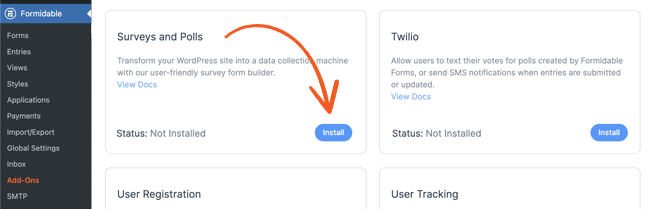
Install and activate Formidable Forms on your WordPress site, then go to Formidable → Add-Ons and click Install and Activate on the Surveys and Polls add-on.
Next, go to Formidable → Forms and click + Add New, then pick the NPS Survey template. The primary 0 to 10 rating field is already in place, so edit the wording to match your brand voice.

Add your follow-up fields, then click Add Conditional Logic to show different questions to Promoters, Passives, and Detractors. With conditional logic, you can route Promoters to the review request, Detractors to the improvement question, and Passives to the comparison question, so each customer only sees the follow-up that fits their score.
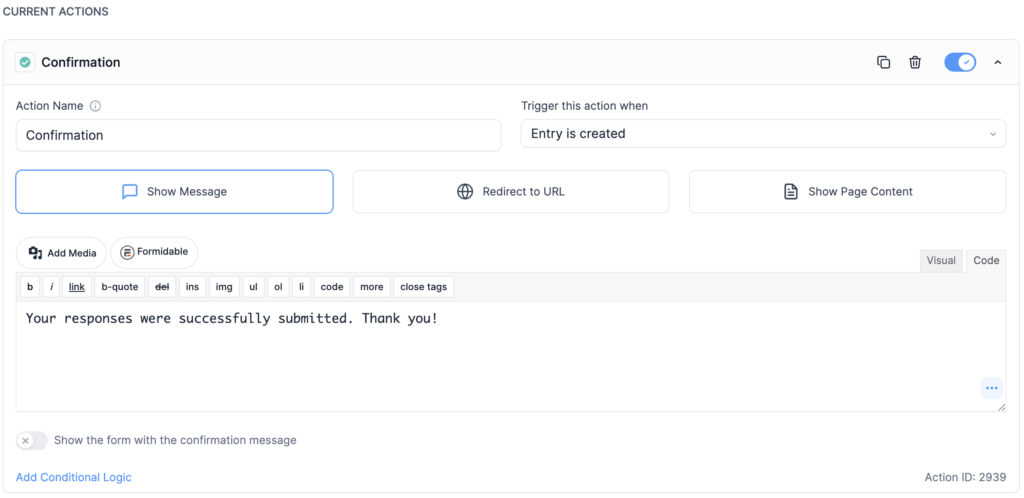
To thank respondents when they finish, open the Confirmation form action and set a confirmation message. Then drop the form on any page with the Formidable Forms block, and your survey goes live as soon as you hit Update or Publish.
Once responses start coming in, you don't have to export them to a spreadsheet to make sense of them. Build a Formidable View to chart your score over time and break it down by Promoters, Passives, and Detractors, so you can watch the number move instead of reading raw entries one by one.
Get Formidable Forms and turn your NPS scores into feedback you can actually act on.
The hardest part is starting
A good NPS survey is two things: one rating question that lets you track a number over time, and one or two follow-ups that tell you what to do with the number. Everything else is unnecessary padding that might actually drive users away.
Pick 3 questions from the list above, enable conditional logic so each customer sees the right follow-up, and put the form somewhere your customers will actually see it. If you want to mix in a balanced rating question along the way, our guide to the Likert scale walks through how those work. The hardest part of running an NPS program is starting one, but Formidable Forms makes it simple.
Ready to start? Try Formidable Forms free and get your first NPS survey live this week.

- What is a good NPS score?
-
It depends on your industry, since a strong score in one field can be average in another. The more useful answer is that the trend in your own score matters more than the absolute number. A score moving from 20 to 35 over 6 months tells you more than a single static reading. Anything above zero means more people would recommend you than would warn others off, which is the first step.
- How often should you send an NPS survey?
-
Two common patterns work well. The first is a relationship survey sent once or twice a year to your entire customer base. The second is a transactional survey triggered after a specific event, like the first purchase or a support ticket closing. Most companies do both.
- How many questions should an NPS survey have?
-
Three is the sweet spot. The rating question, one follow-up that adapts to the score, and an optional "anything else" field. Anything past 5 questions and your completion rate falls off a cliff.
- Should the primary NPS question be on a 0 to 10 scale or a 1 to 5 scale?
-
Use 0 to 10 if you want your score to be comparable to industry benchmarks. Use 1 to 5 if you're running an internal customer satisfaction tracker and don't care about external comparison. Once you decide on one, stick with it, because changing scales mid-program means your old metrics no longer line up with your new ones.
- Can you send an NPS survey by email?
-
Yes. The common approach is to email customers a link to the survey so they click through, answer the rating question, and finish the follow-ups on the page. With Formidable Forms, you can automatically send that link after a triggering event, like when someone completes a payment through one of your forms or you close out a support request, so the survey goes out at exactly the right moment.
This article may contain affiliate links. Once in a while, we earn commissions from those links. But we only recommend products we like, with or without commissions.

