
What a pleasure to have support within minutes. Brillant, accurate answer, and solved the question. Thanks to the Formidable Team. Eric


Last updated on September 27, 2026 by Formidable Team
How To Add AI Product Recommendations to WordPress
Want to add AI product recommendations to WordPress? This guide will show you how to add an AI-personalized recommendation system in a few simple steps.

Approximate read time: 6.5 minutes
By now, we've all done our fair share of online shopping. And you've surely noticed how helpful relevant product recommendations can be for your online store.
In fact, an impressive 35% of Amazon's revenue is generated by its AI product recommendations engine.
You're probably thinking, "But that's Amazon. There's no way I can use personalized recommendations with AI on my website like they do."
But you can!
With Formidable Forms' WordPress AI plugin, adding an AI product recommendation system to your WordPress website is incredibly easy. And we'll show you how to do it step-by-step in this post.
Let's get started!
Upgrade your WordPress site with powerful, flexible forms.
Why use AI product recommendations?
It's simple. Customers love personalization.
In fact, customers will pay more for products simply because of personalized product recommendations.
It's also about offering a personalized customer experience, which improves customer satisfaction. With AI-based recommendations and machine learning, your customers get better suggestions in real time. These aren't just random picks but related products based on customer data, viewed product pages, and purchase history.
And that goes into its recommendation strategies to find the exact products they want to add to their shopping cart.
Which means your average order value increases.
So now that we know the "why," let's take a second to discuss the "how" of Artificial Intelligence.
From Idea to Reality in Minutes. Build Powerful Forms, Dashboards, Apps and More.
Formidable Forms makes advanced site building simple. Launch forms, directories, dashboards, and custom WordPress apps faster than ever before.
How is AI used for product recommendations?
AI product recommendation engines learn as much as they can about your customers. And at lightning speed.
But here's how they specifically help you and your website:
- Data collection: First, AI learns about customers by collecting their data. This includes what they look at and buy online, the reviews they write, and their likes.
- Pattern recognition: Then, AI looks for patterns in what customers do. For example, it might find that customers who buy one item often buy another item too.
- Prediction: Using these patterns, AI guesses what else customers might like and shows them these ideas.
- Continuous learning: AI doesn’t just stop there. It keeps learning from new information. If a customer doesn’t like a suggestion, AI changes its future recommendations.
So, now that you have a better understanding of AI, how it's used, and how it helps you, let's add it to your WordPress site!
How to add AI product recommendations to your site

In this tutorial, we'll guide you through adding AI recommendations to your website using Formidable Forms.
If you don't already have the best WordPress form plugin, click below to get the plugin. The AI feature is included in both the Business and Elite plans.
Once you have your license, we can get started! It's a straightforward, code-free process, so don't worry if you aren't a tech whiz.
Step 1: Install and activate Formidable Forms AI Add On
First things first, you need to install the Formidable Forms AI Add On.
From your WordPress dashboard, head to Formidable → Add-Ons. Find the AI Add-On, click Install, then Activate.
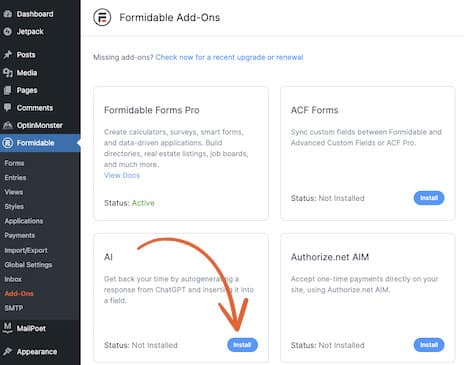
Step 2: Create your AI product recommendations form
In Formidable, go to Forms and click the + Add New button.
Now, you can start from a Blank Form or one of our pre-built AI WordPress Templates.
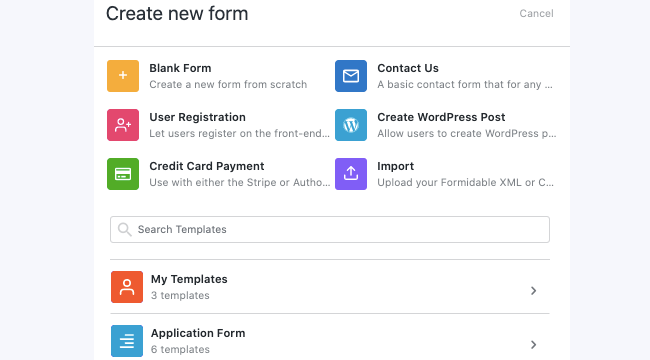
We'll use the Book Buddy template to quickly give visitors personalized book recommendations.
Next, name your form and click Create to open the user-friendly drag-and-drop form builder.
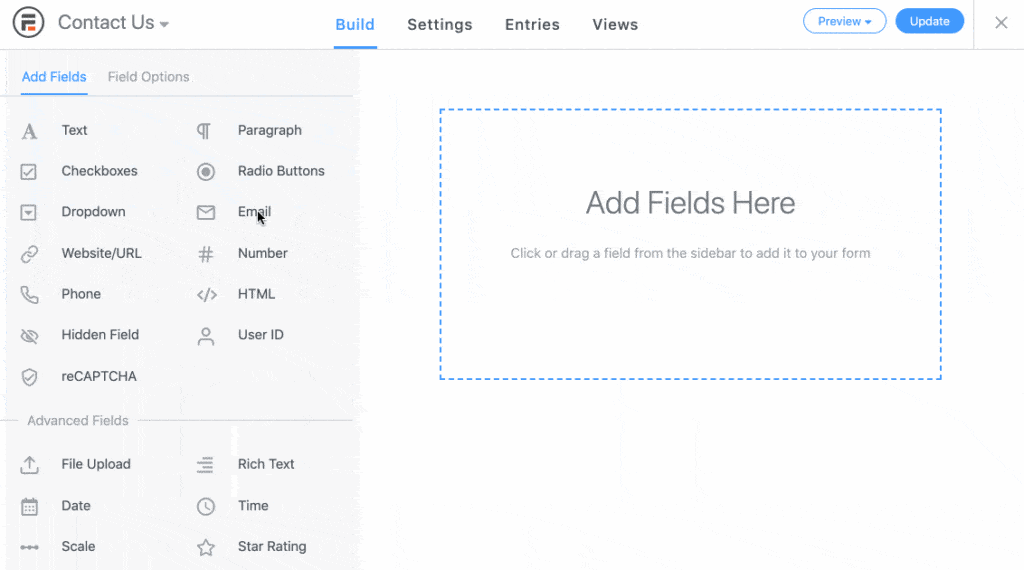
Add the fields you want and configure each one as needed by clicking on them in your form. For your AI field, click to edit the prompt.
Once you're done, click Update to save your form.
Step 3: Publish your form
You're almost there!
Now, open the WordPress post or page where you want to add your product recommendation tool. In the editor, add the Formidable Block and then select your form from the dropdown menu.
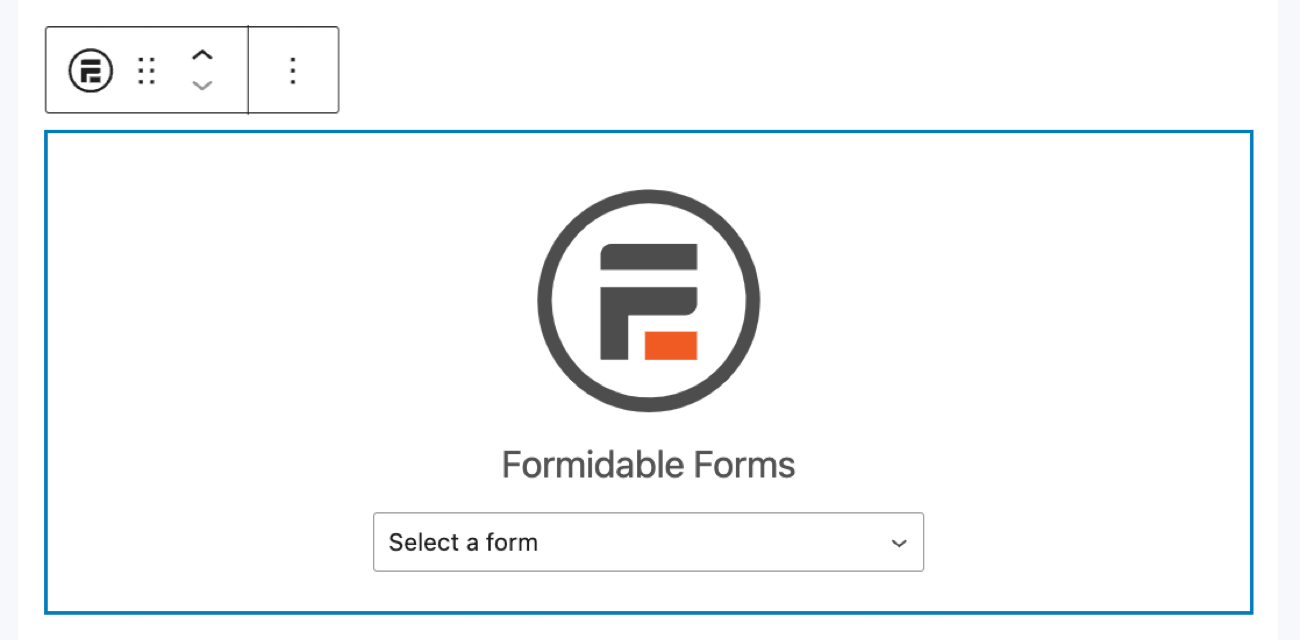
Update or Publish the page/post, and you're done! Your site can now automatically provide AI product recommendations!

Ready to offer AI-based product recommendations on your site?
By adding AI product recommendations to your site, you aren't just adding a flashy feature. You're adding a powerful tool that adjusts based on your customers' needs.
And you learned how to use product recommendation AI to transform your customers' shopping experience and increase your sales.
So how will you use AI product recommendations on your site? Reply below and let us know!
Read more from the Formidable blog
 You Describe the Form, Formidable Builds It in Minutes
 How To Use AI To Create Forms in WordPress [3 Steps!]
 4 Best AI Plugins for WordPress in 2026
This article may contain affiliate links. Once in a while, we earn commissions from those links. But we only recommend products we like, with or without commissions.

